Think back to Chapter 1. You may have opened this book wondering whether programming was something people like you could actually do. Maybe you’d tried before and stopped. Since then, you’ve installed Python, written your first print, and worked your way through variables, decisions, loops, collections, functions, errors, files, modules, and classes. You’ve tidied folders, built spreadsheets, searched text with regular expressions, read PDFs, scheduled scripts, called web APIs, cleaned messy data, hunted bugs, written tests, packaged a command-line tool, built a web app, and trained a machine learning model.
That isn’t a beginner’s list anymore. It’s the foundation every Python programmer stands on. You don’t know everything, and nobody does. But you know enough to keep going on your own, which is the real goal of any book like this one. So let’s talk about where “on your own” might lead.
#Three paths
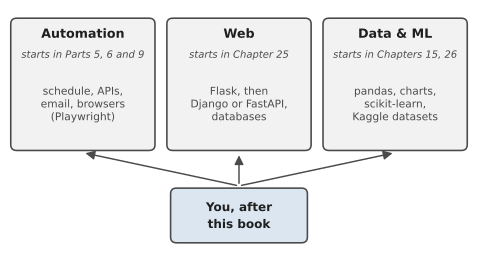
Python is used for so many things that “what next?” can feel overwhelming. It helps to think in terms of a few broad paths. Figure 30.1 shows three that grow directly out of this book. You don’t have to choose one forever, and many people wander between them. But picking one direction for the next few months will help far more than dabbling in everything at once.
#Automation path
If the chapters on files, spreadsheets, documents and scheduling, or the recipes in Part 9, made you think “I could use this at work,” this is your path. It’s also the one with the quickest rewards, because every script you write saves real time, often from the first week.
The best next step isn’t a new library; it’s a real problem. Look at your own week and find the repetitive jobs: the report you copy and paste, the files you rename, the website you check every morning. Automate one of them, properly, with logging and error handling, the way you did in Chapters 13 and 24. Then the next one.
As you go, you’ll find tools that extend what you can reach. You’ve already had a taste of sending email, driving a browser with Playwright and scraping pages with Beautiful Soup in Part 9; each of those goes much deeper than a recipe can show, and their documentation is the natural next stop. pandas, which also appears on the data path, makes working with large spreadsheets far easier than looping over rows yourself. And Typer or Click can make your command-line tools even friendlier than argparse did.
One caution on this path: automation touches real data, real accounts, and other people’s systems. Keep the safety habits from Chapter 14. Dry runs, confirmations, backups, and logs matter more, not less, as your tools grow more capable.
#Web path
If building Pocket Expenses in Chapter 25 was the moment things clicked, the web path may be calling. Flask is a wonderful place to keep going: it’s small enough that you can understand the whole thing, and big enough to run real sites.
The natural next steps are databases, so your app can store data more robustly than a JSON file (Python comes with SQLite built in, which is a great place to start), user accounts, so people can log in and see only their own data, and deployment, putting your app on the internet for others to use. After Flask, many people move on to Django, a larger framework that comes with a database layer, an admin site, and user accounts built in, or to FastAPI, which is especially good for building APIs like the weather service you used in Chapter 19.
You’ll also want a little more of the frontend: enough HTML and CSS to make pages look the way you want, and eventually some JavaScript. You don’t need to master them to build useful things, but a working knowledge goes a long way.
#Data & ML path
If you enjoyed the report generator, the data pipeline, and the machine learning chapter, the data path is a rich one, and Python is the dominant language in it.
Start with pandas, the library for working with tables of data. Nearly everything you did by hand with lists of dictionaries in Chapters 15 and 20, filtering, grouping, totalling, joining, pandas does in a line or two, and much faster. Pair it with a charting library, either matplotlib, which drew the diagrams and charts in this book from Chapter 2 onwards, or seaborn, which builds on it, so you can see your data, not just calculate it. Many data people also work in Jupyter notebooks, which let you mix code, results, charts, and notes in one document, perfect for exploring a dataset.
Then go back to scikit-learn and explore more of it: other algorithms, more careful evaluation, and ways of preparing data so models learn better. Sites like Kaggle offer free real-world datasets and friendly competitions, which are an excellent source of practice problems. Keep the lessons from Chapter 26 close as you go. Test on unseen data. Compare with a baseline. Remember that a model finds patterns, not reasons.
#How to keep practicing
Skills fade without use, and the most important thing now is to keep writing code. Not reading about it. Writing it. Here are some ways to make that easier.
Build things you actually want: The best practice projects solve your own problems, because you’ll care enough to finish them, and you’ll keep improving them as you use them. A tool to track your running, a script that tidies your photo library, a small site for a club you belong to. Motivation is the scarcest resource in learning, and personal projects create their own.
Revisit the projects in this book: Every chapter ended with ideas for extending its project. Go back and do some of them. You’ll be surprised how much easier they feel now, and that feeling is worth noticing.
Read other people’s code: Pick a small, well-known Python project on GitHub and read it. You won’t understand everything, and that’s fine. You’ll pick up habits, patterns, and tricks no book has time to cover. Python’s own documentation, at docs.python.org, is also excellent, and its tutorial and library reference are worth browsing now that you know enough to make sense of them.
Share your work: Put your projects on GitHub, with a short README explaining what they do. It’s a record of how far you’ve come, a portfolio if you’re looking for work, and occasionally someone will find your tool useful, which is a very good feeling.
Learn with other people: Local meetups, online communities, a friend who’s also learning. Explaining something to someone else is one of the fastest ways to understand it properly, the rubber duck from Chapter 21, but with someone who can answer back.
Use AI assistants wisely: Tools that write or explain code can be genuinely helpful, especially for understanding an error message or getting unstuck. But they make mistakes confidently, and if they write all your code, you stop learning. Use them like a knowledgeable friend: ask them to explain, then write the code yourself, and always test what they suggest, exactly as you would code from anywhere else.
#Avoiding tutorial hell
There’s a trap that catches many people at exactly the point you’ve reached. It’s called tutorial hell, and it goes like this. You finish a course or a book. You feel good. But faced with a blank file and your own idea, you freeze, so you start another tutorial. And another. Each one feels productive, because you’re following along and everything works. But following along is a different skill from building on your own, and only the second one makes you a programmer.
The way out is uncomfortable, and simple: build something without step-by-step instructions. Start smaller than you think you need to. Not “a social network,” but “a program that reads my bank’s CSV export and shows me what I spent on food last month.” Break it into pieces, the way we did in Chapters 13 and 24. Write the first piece. Get stuck. Search for the specific thing you’re stuck on, not for a tutorial on the whole project. Get unstuck. Write the next piece.
It will feel slower and messier than following a tutorial, because it is. That messiness is exactly where learning happens. Every time you get stuck and find your own way out, you build the skill that no tutorial can give you: knowing how to figure things out.
When you do use tutorials, use them on purpose: to learn one specific thing you need for something you’re building. Then close the tutorial and go back to your project.
Here’s what that looks like in practice. Joseph worked in a warehouse and learned Python in the evenings, mostly from books and videos. For almost a year he finished tutorial after tutorial and never felt ready. Then his manager mentioned, in passing, that the weekly stock count took two people most of a Friday to reconcile against the system’s export. Joseph asked if he could try something. His first version was clumsy and took him three weekends, and he got stuck a dozen times on things no tutorial had covered. But it worked, and the Friday job shrank to forty minutes. That one small, messy, real project did more for him than the year of tutorials: it went on his CV, it was the story he told in every interview, and eight months later it helped him get his first job as a junior data analyst.
#On the Job
How it shows up at work: This whole book has been preparing you for this section. Every chapter’s “On the Job” pointed at a real skill, a real interview question and a piece of your portfolio. Now it’s time to put them together. Whether you’re aiming for a first developer job, a move into data work, or simply becoming “the person who automates things” in the job you already have, the steps are much the same.
What employers expect from a beginner: Not encyclopaedic knowledge. They expect you to write clear, working Python; to read and fix code you didn’t write; to use Git and GitHub; to test your work; and to explain what you did and why. They also look hard at attitude: curiosity, honesty about what you don’t know, and the habit of finishing things.
Turning this book into a job search:
- Your GitHub profile. Pin your three best projects: the automation suite from Chapter 24, one data project (the report generator, the pipeline or the ML project), and one project of your own. Each should have a README with a description, how to run it, sample output and a “limitations” or “next steps” section.
- Your CV. Describe projects by what they do, with numbers where you have them. “Built a Python tool that turns a monthly sales export into a formatted Excel report in under a second” says far more than “Python, openpyxl, CSV.”
- Your story. Practise answering “Tell me about a project you built” and “Tell me about a bug you fixed” out loud, in under three minutes each. Your bug diary from Chapter 21 is the raw material.
- Your current job. The quickest route into technical work is often sideways. Find one boring, repeated task where you are now, and automate it, as Joseph did. Then you have a real result, a real user, and a real reference.
- Interview practice. Short coding exercises are common. Sites such as Exercism and the easier problems on LeetCode or HackerRank give good practice; time yourself, and always talk through your thinking. Interviewers care about how you approach a problem at least as much as whether you finish it.
Interview questions you might meet:
- “Why Python?” Readable, versatile, a huge standard library, and one language for automation, web and data work. Then say what you used it for.
- “How do you keep learning?” Name a real habit: a project you’re building, documentation you’ve read, a community you’re part of.
- “What would you do if you were stuck on a task for a day?” Make a minimal example, search for the specific error, and then ask a colleague with a clear question that shows what you’ve already tried. Asking well and asking in time are both strengths, not weaknesses.
- “Where do you see yourself in a year?” Pick a path from this chapter, and say what you’re doing about it now.
Professional habit: Ship small things often. A small tool that works and that someone uses is worth more, on a CV and in life, than an ambitious one that’s always nearly finished.
#Exercises
There are no solutions for these, because there’s no single right answer. They’re the bridge from this book to your own work. Do at least the first three. Whatever you build, put it on GitHub and tell someone about it. Finished work that other people can see is what this whole chapter is about.
Warm-up
Exercise 30.1. Write a one-page “skills map.” List every topic in this book’s contents, and mark each one confident, okay or shaky. Go back and redo one exercise from each shaky chapter.
Exercise 30.2. Choose one of the three paths in this chapter. Write down three things you’ll learn next on that path, and one small project that would use all three.
Exercise 30.3. Tidy your GitHub profile: pin three projects, check every README, and write a short profile description saying what you’re learning and what you’ve built.
Practice
Exercise 30.4. Find one repeated, boring task in your work, study or home life. Write down how long it takes each time and how often it happens. Then automate it, even partly, and measure the time again.
Exercise 30.5. Pick a small, well-known Python project on GitHub, clone it, get it running, and read through one module. Write a short summary of what it does and one thing you learned from how it’s written.
Exercise 30.6. Rewrite one of your early projects (Chapter 3 to Chapter 6) using everything you know now: functions, error handling, files, tests. Keep both versions and write a short note comparing them.
Challenge
Exercise 30.7. Build a project of your own from scratch, with no tutorial: something you or someone you know will actually use. Plan it in plain sentences first, as in Chapter 13. Give it a README, tests and a requirements.txt, and put it on GitHub.
Exercise 30.8. Combine two parts of the book in a way it didn’t: for example, put the Chapter 26 model behind the Chapter 25 web app, or have the Chapter 24 suite fetch data from a new API and add it to the morning report.
Exercise 30.9. Teach something. Write a short blog post, a README tutorial or a message to a friend explaining one idea from this book, such as regular expressions or Post/Redirect/Get, in your own words and with your own example. Explaining it is the surest test of whether you understand it.
#Final encouragement
Here’s something worth knowing as you go on. The feeling of not knowing enough never completely goes away. Experienced programmers look things up all day. They read error messages, search for answers, try something, find it doesn’t work, and try something else. The difference between them and a beginner isn’t that they never feel lost. It’s that they’ve learned, through practice, that feeling lost is a normal and temporary part of the work, and they’ve developed ways to find their bearings.
You’ve been developing those ways too, all through this book. You read tracebacks from the bottom up. You test your guesses before you change code. You build things in small pieces and check each one. You plan in plain sentences before you write. You expect things to go wrong and make your programs cope when they do. Those habits will carry you a lot further than any single library or language feature.
So pick something you’d like to exist, something small and real, and start building it. Expect to get stuck. Expect it to take longer than you think. And expect, somewhere along the way, to look at a working program and realise you made it without anyone telling you how.
We said at the very start that you weren’t behind, and that you were starting at exactly the right time. That was true then, and it’s still true now. The only difference is that now, you know how to keep going.
Good luck. Go and build something.