Think about the last ten minutes of your life. You probably made a dozen small decisions without noticing. Is the kettle boiling yet? Do I need a jumper? Is that message worth answering now, or later? None of it felt like “logic,” but every one of those choices followed the same shape: check something, then act depending on what you found.
Up to now, your programs haven’t had that ability. They run every line, top to bottom, no matter what. That’s fine for printing a profile card. It’s useless for almost anything else, because the interesting part of software is that it responds. A login screen lets you in or doesn’t. A thermostat switches the heating on or off. This chapter gives your programs that power. Here’s what’s coming:
- how a program asks a yes-or-no question about the world
- the
if,elif, andelsekeywords, and why indentation suddenly matters - comparing values, and combining conditions with
and,or, andnot - writing conditions that other people (including future you) can actually read
#How programs make decisions
Every decision a program makes comes down to a question with exactly two possible answers. Not “maybe,” not “it depends.” Just true or false. Is the password correct? Is the file bigger than 10 megabytes? Is it after 5pm?
You’ve already met the type that holds these answers. In Chapter 3 we mentioned bool, with its two values True and False. Here’s where they start earning their keep. Try this in the interactive shell:
>>> temperature = 34
>>> temperature > 30
True
>>> temperature < 10
False
The expression temperature > 30 isn’t an instruction. It’s a question, and Python answers it. Once you can ask questions like that, you can tell Python what to do with the answer.
#if, elif, else
Here’s the simplest decision you can write:
1temperature = 34
2
3if temperature > 30:
4    print("It's hot. Drink some water.")
5
6print("Have a good day!")
Read it out loud and it almost sounds like English: if the temperature is greater than 30, print a warning. Run it, and you’ll see both lines. Change temperature to 20 and run it again. This time only “Have a good day!” appears, because the question came back False and Python skipped the indented line.
Two small details carry a lot of weight here. The line with if ends in a colon. And the line underneath is pushed in, or indented, by four spaces. That indentation isn’t decoration. It’s how Python knows which lines belong to the if. Everything indented under it runs only when the condition is true. The moment the indentation stops, you’re back to lines that always run.
Think of it like a recipe with a sub-step: “If the dough is sticky, (indented) add a spoon of flour, (indented) knead for another minute. Put it in the oven.” Anyone reading that knows the flour and the extra kneading only happen in the sticky case, but the oven always happens.
Often you want to do one thing or another, never both. That’s what else is for:
1if temperature > 30:
2    print("It's hot. Drink some water.")
3else:
4    print("Not too hot today.")
And when there are more than two possibilities, you chain extra checks with elif, which is short for “else if”:
1if temperature > 30:
2    print("Hot!")
3elif temperature > 18:
4    print("Nice.")
5else:
6    print("Bring a jacket.")
Python checks the conditions in order, from the top. The first one that comes back True wins, its block runs, and everything else in the chain is skipped. If none of them are true, the else block runs. Figure 23.2 shows the path a value takes through this code. Notice that whatever happens, exactly one message is printed.
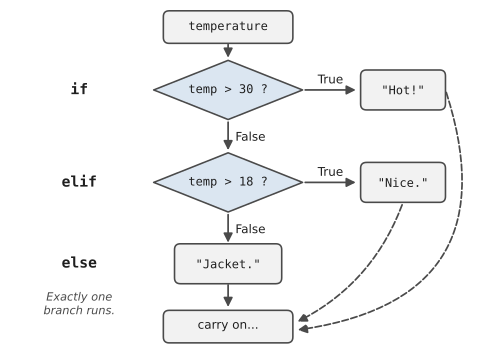
Because the first match wins, order matters. Look what happens if we swap the first two checks:
1if temperature > 18:
2    print("Nice.")
3elif temperature > 30:
4    print("Hot!")      # this line can never run
On a 34-degree day, this version says “Nice.” because 34 is greater than 18, and Python stops looking. The “Hot!” line is now unreachable. It’s a very common bug, and it’s sneaky because nothing crashes. When your conditions overlap, put the most specific one first.
Remember the profile card from Chapter 3, where the age was only “about” right because we didn’t know if the person had had their birthday yet? Now we can fix it:
1current_year = 2026
2birth_year = 1997
3had_birthday = input("Had your birthday this year? (y/n) ")
4
5age = current_year - birth_year
6if had_birthday == "n":
7    age = age - 1
8
9print(f"You are {age}.")
No else needed. If they haven’t had their birthday, we subtract one. Otherwise the age is already right and we simply carry on.
#Comparisons and logic
Python has six ways to compare two values. They all give back True or False:
| Operator | Meaning | Example |
|---|---|---|
== | equal to | age == 18 |
!= | not equal to | answer != "yes" |
< | less than | price < 10 |
> | greater than | score > 50 |
<= | less than or equal to | items <= 3 |
>= | greater than or equal to | age >= 18 |
The one that catches everybody is ==. A single = gives a name to a value. A double == asks whether two values are the same. If you accidentally write if age = 18:, Python stops with a SyntaxError, and honestly that’s a kindness, since in some other languages that mistake runs silently and causes chaos.
Comparisons work on text too, but text is fussy. "Yes" == "yes" is False, because a capital Y is a different character from a small one. When you’re checking what someone typed, it’s kind to tidy their answer first:
1answer = input("Continue? ").strip().lower()
2if answer == "yes":
3    print("Carrying on.")
.strip() removes any accidental spaces from the start and end, and .lower() makes everything lowercase. Now “Yes”, “YES”, and “ yes “ all count. These little dotted add-ons are called methods, and strings have dozens of them. We’ll meet more as we go.
Real decisions often depend on more than one thing. You go to the beach if it’s sunny and you’re free. You bring an umbrella if it’s raining or the forecast looks grim. Python uses those exact words:
1is_sunny = True
2is_free = False
3
4if is_sunny and is_free:
5    print("Beach day!")
6
7if is_sunny or is_free:
8    print("At least something's going right.")
and is strict: both sides must be true. or is relaxed: either side will do. Figure 4.2 shows every combination, and it’s worth a minute of your time, because once this table makes sense, almost any condition you’ll ever write will make sense too.
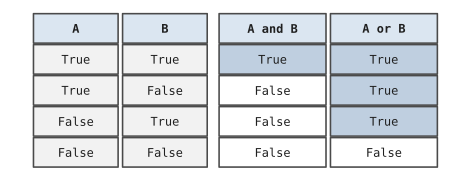
The third word is not, which simply flips a value. not True is False. You’ll see it in conditions like if not is_raining:, which reads quite naturally.
Two more tricks are worth knowing early. First, Python lets you chain comparisons the way you’d write them in maths:
1if 13 <= age <= 19:
2    print("Teenager")
Second, the word in checks whether one thing appears inside another. With text, it asks whether a piece of text appears anywhere in a longer string:
1email = "sara@example.com"
2if "@" not in email:
3    print("That doesn't look like an email address.")
#Writing readable conditions
Conditions are where code most often turns into a puzzle. A line like this works perfectly well:
1if (hour >= 9 and hour < 17) and day != "Sat" and day != "Sun":
2    print("The office is open.")
But you have to stop and decode it. Compare:
1is_working_hours = 9 <= hour < 17
2is_weekday = day not in ("Sat", "Sun")
3
4if is_working_hours and is_weekday:
5    print("The office is open.")
Same logic, but now each piece has a name that explains what it means. That’s the single most useful trick for readable conditions: when a check needs thought, store its result in a well-named variable first. (The brackets with "Sat" and "Sun" are a tuple, a small fixed collection. Chapter 6 will introduce it properly.)
A few other habits help. Don’t write if is_free == True:. Just write if is_free:, because is_free is already true or false. Avoid stacking if inside if inside if when an elif or an and would do. Deeply indented code is like a sentence with five sets of brackets in it. And when you have a chain of ranges, like grades or prices, write them in one direction, high to low or low to high, so the reader’s eye can follow the steps.
Order matters more than it looks. Tomás runs a small bike shop, and he wrote a script to work out discounts at the till: 5% off orders over $50, and 10% off orders over $100. His first version checked if total > 50: first, then elif total > 100:. It ran without a single error for two months. Then a regular customer, buying a $400 wheel set, asked why she’d only been given 5%. Every order over $100 is also over $50, so the first branch always caught it and the second never got a chance. Swapping the two checks fixed it. Python will never warn you about a branch that can’t be reached. You have to read your chain from the top and ask, for each line, “could anything get here?”
#Project: Decision-Based Helper Program
Let’s build a morning helper. It asks four quick questions and then gives advice on what to wear, whether to take an umbrella, and how to get to work. It’s small, but it uses every idea from this chapter. Save it as morning_helper.py:
The most interesting part of the program is the travel advice at the end, where the questions are asked one after another until one of them says yes. Figure 4.3 shows that part as a flowchart. Notice that the program never asks a later question once an earlier one has said yes, which is exactly how an if/elif/else chain behaves.
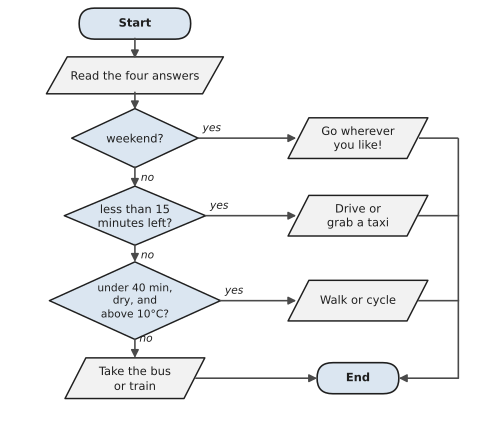
1# morning_helper.py
2# A tiny advisor that makes decisions from your answers.
3
4print("Good morning! Four quick questions.\n")
5
6temp = float(input("Temperature outside (°C)? "))
7raining = input("Is it raining? (y/n) ").strip().lower() == "y"
8day = input("What day is it? (e.g. Mon) ").strip().title()
9minutes = int(input("Minutes until you need to be there? "))
10
11is_weekend = day in ("Sat", "Sun")
12print("\n--- Your morning plan ---")
13
14# 1. Clothes
15if temp >= 28:
16    print("Wear: something light. It's going to be hot.")
17elif temp >= 18:
18    print("Wear: a t-shirt should do.")
19elif temp >= 10:
20    print("Wear: bring a jumper.")
21else:
22    print("Wear: a proper coat. It's cold out there.")
23
24# 2. Umbrella
25if raining:
26    print("Umbrella: yes, definitely.")
27else:
28    print("Umbrella: leave it at home.")
29
30# 3. Getting there
31if is_weekend:
32    print("Travel: it's the weekend. Go wherever you like!")
33elif minutes < 15:
34    print("Travel: you're short on time. Drive or grab a taxi.")
35elif minutes < 40 and not raining and temp > 10:
36    print("Travel: nice enough to walk or cycle.")
37else:
38    print("Travel: take the bus or train.")
39
40# 4. A little extra
41if minutes < 10 and not is_weekend:
42    print("Also: skip the coffee queue today. Sorry.")
There’s one new method in there. .title() capitalises the first letter of a word, so if someone types sat or SAT, it becomes Sat and still matches the weekend check. The line that sets raining is worth a second look, too. It compares the answer to "y" and stores the result, so raining holds True or False directly. That’s what lets the later conditions read so cleanly: not raining instead of answer != "y".
Here’s one run:
Good morning! Four quick questions.

Temperature outside (°C)? 14
Is it raining? (y/n) n
What day is it? (e.g. Mon) wed
Minutes until you need to be there? 35

--- Your morning plan ---
Wear: bring a jumper.
Umbrella: leave it at home.
Travel: nice enough to walk or cycle.
Try a few different answers and predict the advice before you press Enter. When your prediction is wrong, it’s usually because of the order of the conditions, which is exactly the lesson worth learning. Then make it yours:
- Add a question about whether you have a meeting today, and suggest smarter clothes if so.
- Add a warning when the temperature is above 35 or below 0.
- What happens if someone types
maybefor the rain question? Is the program’s behaviour sensible? Why?
Your programs can now look at a situation and choose what to do. That’s a huge step. But they still only do each thing once. Ask them to check a hundred files, or to keep asking a question until they get a sensible answer, and they’d need a hundred copies of the same code. In the next chapter, we fix that with loops.
#On the Job
How it shows up at work: Business rules are conditions. “Free shipping over $80.” “Flag any expense claim above $500 for a manager.” “If the customer is overseas, add the international fee.” When people talk about “the logic” of a system, this is what they mean, and a surprising amount of a junior developer’s work is reading rules like these from a document and turning them into if statements that behave correctly at the edges.
What employers expect: Correct conditions at the boundaries. Is “over $80” written > 80 or >= 80? Ask, don’t guess. Employers also want conditions other people can read: named checks rather than one long line, and elif chains in a sensible order.
Interview questions you might meet:
- “What’s the difference between
=and==?”=gives a name a value.==asks whether two values are equal. - “What does
andreturn if the first part is false?”False, and Python doesn’t even look at the second part. This is called short-circuiting, and it’s whyif items and items[0] == "x":is safe even whenitemsis empty. - “How would you test this discount rule?” Try values just below, exactly on and just above each boundary: 49.99, 50, 50.01, 99.99, 100, 100.01. Testers call these edge cases, and naming them in an interview goes down well.
Portfolio task: Write shipping_calculator.py for an imaginary online shop with at least three rules (weight, destination, order total) and push it to your repository. In its README, write the rules out in plain English above the code. That one habit, rules first and code second, is how professional teams avoid arguments about what the code should do.
Professional habit: Before writing a chain of conditions, list the boundary values on paper and decide what should happen at each. Then write the code, and run it with every value on your list.
#Exercises
Solutions are in solutions/chapter_04 in the book’s GitHub repository.
Warm-up
Exercise 4.1. Predict the value of each expression, then check in the Python shell: 5 > 3 and 2 > 4, 5 > 3 or 2 > 4, not 5 > 3, 3 <= 3, "a" in "banana".
Exercise 4.2. This program has an indentation problem. Fix it so the second message only prints when the number is negative:
1number = int(input("Number: "))
2if number < 0:
3    print("That's negative.")
4print("Negative numbers are below zero.")
Exercise 4.3. Write a program that asks for a number and says whether it is even or odd.
Exercise 4.4. Ask for a password. If it’s shorter than 8 characters, print a warning. Otherwise, print Password accepted.
Practice
Exercise 4.5. Ask for a test score out of 100 and print a grade: A for 85 and above, B for 70 to 84, C for 50 to 69, and F below 50. Also print an error message if the score is below 0 or above 100.
Exercise 4.6. Ask for someone’s age and print the ticket price: free for under 5, $8 for 5 to 15, $15 for 16 to 64, and $10 for 65 and over.
Exercise 4.7. Ask for a year and say whether it’s a leap year. A year is a leap year if it divides by 4, except that years dividing by 100 aren’t, unless they also divide by 400. (So 2024 and 2000 are leap years; 1900 isn’t.)
Exercise 4.8. Ask for three numbers and print the largest one. Don’t use max(); work it out with if statements.
Exercise 4.9. Write the office-hours checker from this chapter as a full program. Ask for the hour (0 to 23) and the day (Mon to Sun), and print whether the office is open.
Exercise 4.10. Ask for an order total and a destination (local or overseas). Local shipping is $8, free over $80. Overseas shipping is $25, or $15 over $150. Print the shipping cost and the final total.
Challenge
Exercise 4.11. Fix Tomás’s discount program. Here’s his buggy version. Correct it, then test it with 49.99, 50, 75, 100, and 400:
1total = float(input("Order total: $"))
2if total > 50:
3    discount = 0.05
4elif total > 100:
5    discount = 0.10
6else:
7    discount = 0
8print(f"Discount: {discount:.0%}")
Exercise 4.12. Write a rock, paper, scissors game against a friend. Ask both players for their choice (assume they don’t peek), then print who wins. Make it handle typing in capitals, so Rock works as well as rock. (Hint: .lower().)
Exercise 4.13. Write a small “should I take the job?” helper. Ask for salary, commute time in minutes, and whether the job is remote-friendly (yes/no). Give a score out of 3, one point for each of: salary at least 60000, commute under 45 minutes, remote-friendly. Print different advice for each score. Use named conditions to keep it readable.