There’s a story, probably made up, about a teacher who wanted to keep a class busy and told them to add up every number from 1 to 100. One boy finished in about a minute. He’d spotted a shortcut. The rest of the class spent the lesson scribbling.
Computers don’t need shortcuts like that, because they don’t get bored. They’ll add a hundred numbers, or a hundred million, without complaint and without a single slip. Repetition is the thing they’re best at, and loops are how you ask for it. Once you have loops, your programs stop being lists of instructions and start being machines: set them going and they work through whatever you give them.
This chapter covers the two kinds of loop, for and while, and when to reach for each. You’ll learn to skip a round with continue and stop early with break. And you’ll meet the infamous infinite loop, which everyone writes eventually, so it helps to know how to get out of one.
#Why loops matter
Imagine you need to print a welcome message for five guests. Without loops, you’d write:
1print("Welcome, guest 1!")
2print("Welcome, guest 2!")
3print("Welcome, guest 3!")
4print("Welcome, guest 4!")
5print("Welcome, guest 5!")
That’s tolerable for five. Now imagine five hundred. Or imagine you don’t know how many guests are coming until the program is already running. Copying and pasting has stopped being an option. Here’s the loop version:
1for number in range(1, 6):
2    print(f"Welcome, guest {number}!")
Two lines, and changing 6 to 501 handles five hundred guests. That’s the whole idea. You describe the work once, and Python repeats it as many times as you need.
There’s a quieter benefit too. When the same code is repeated by hand, a typo in one copy is easy to miss. When it lives in one place inside a loop, either it’s right everywhere or it’s wrong everywhere, and wrong-everywhere is very easy to spot.
#for vs while
Python has two loops, and the difference between them is simple once you see it. A for loop works through a collection of things, one at a time, until it runs out. A while loop keeps going as long as some condition stays true. One is “do this for each of these.” The other is “keep doing this until something changes.”
The for loop
Here’s a for loop going through a shopping list. The square brackets create a list, which is just several values kept together in order. We’ll study lists properly in the next chapter. For now, think of it as a row of items:
1shopping = ["milk", "eggs", "bread", "tea"]
2
3for item in shopping:
4    print(f"Don't forget the {item}.")
Don't forget the milk.
Don't forget the eggs.
Don't forget the bread.
Don't forget the tea.
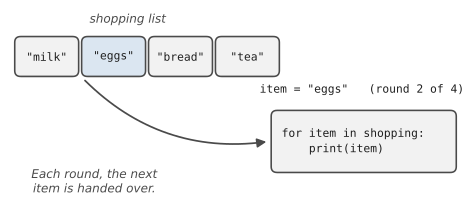
On each round of the loop, Python takes the next item from the list and ties the name item to it. Then it runs the indented block. When there are no items left, the loop ends and the program carries on below it. Figure 5.1 pictures the second round, when item refers to “eggs”.
You can loop over a string, too, and you’ll get one character at a time. And very often you’ll loop over range(), which produces a sequence of numbers. range(5) gives you 0, 1, 2, 3, 4. Yes, it starts at zero and stops before 5, which feels odd at first. range(1, 6) gives 1 to 5, and range(0, 20, 5) counts in steps of five: 0, 5, 10, 15.
Loops become really useful when they build something up. Here’s the classroom puzzle from the start of the chapter, done the patient way:
1total = 0
2for n in range(1, 101):
3    total = total + n
4
5print(total)
The answer is 5050. The pattern here, starting a variable at zero before the loop and adding to it on each round, is one you’ll use a hundred times. Programmers call that variable an accumulator. Python even has a shorter way to write the update line: total += n means exactly the same as total = total + n.
The while loop
Sometimes you don’t have a list to work through. You just want to keep going until something happens. A rocket countdown is a nice example:
1count = 3
2while count > 0:
3    print(count)
4    count = count - 1
5
6print("Lift off!")
3
2
1
Lift off!
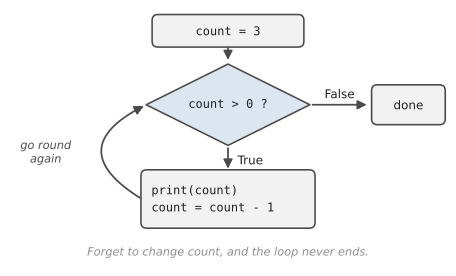
Before each round, Python checks the condition count > 0. If it’s true, the block runs. Then it goes back and checks again. The moment the condition is false, the loop ends. Figure 5.2 shows that cycle.
while really shines when you can’t know in advance how many rounds you’ll need. Asking for input until it makes sense is the classic case:
1answer = ""
2while answer not in ("yes", "no"):
3    answer = input("Please type yes or no: ").strip().lower()
4
5print(f"Thanks, you said {answer}.")
Someone could type nonsense once, or ten times. The loop doesn’t care. It simply keeps asking until it gets an answer it can use.
#Loop control
Sometimes you want to bend a loop’s normal rhythm. Python gives you two keywords for that.
break stops the loop immediately, even if there are items left or the condition is still true. Think of searching a drawer for your keys: once you find them, you stop looking. Here’s that idea in code:
1drawer = ["pen", "receipt", "keys", "battery", "coin"]
2
3for thing in drawer:
4    print(f"Checking: {thing}")
5    if thing == "keys":
6        print("Found them!")
7        break
Checking: pen
Checking: receipt
Checking: keys
Found them!
The battery and the coin never get checked. There was no need.
continue is gentler. It skips the rest of the current round and jumps straight to the next one. Use it when some items should simply be ignored:
1for n in range(1, 11):
2    if n % 2 == 0:
3        continue          # skip even numbers
4    print(n)
This prints 1, 3, 5, 7, 9. Remember % from Chapter 3? n % 2 == 0 is true for even numbers, and for those, continue moves on before print ever runs.
A pattern that combines while and break shows up all the time in real programs. You start a loop that, on its own, would run forever, and then you break out of it when the user asks to stop:
1while True:
2    command = input("Type a word (or 'quit'): ")
3    if command == "quit":
4        break
5    print(f"You typed {len(command)} letters.")
6
7print("Bye!")
while True reads a little alarmingly, since True is always true. But it’s honest about what’s going on. The loop’s exit isn’t at the top; it’s in the middle, at the break. Menus, games, and chat programs very often have this shape. (len(), by the way, tells you the length of something. For a string, that’s the number of characters.)
#Avoiding infinite loops
Every programmer, sooner or later, writes a loop that never stops. It looks like this:
1count = 3
2while count > 0:
3    print(count)
4    # oops: forgot to change count
count is 3 forever, so count > 0 is true forever, and your screen fills with 3s faster than you can read. Nothing is broken, exactly. Python is doing precisely what you asked. You just asked for something that never ends.
First, how to escape. Click into the terminal and press Ctrl+C (on a Mac too, it’s Control, not Command). That interrupts the program, Python prints a KeyboardInterrupt message, and you’re back in control. If you’re running code from VS Code’s Run button, you can also click the bin icon on the terminal panel to close it.
Second, how to avoid it. With every while loop you write, ask yourself one question: what, inside this loop, eventually makes the condition false? There must be a line that moves things towards the exit: a counter going down, an input being read, a value changing. If you can’t point to that line, you’ve probably found your infinite loop before it’s even run.
Infinite loops aren’t only a beginner’s problem. Grace, a data analyst at a council office, once left a script running overnight that was meant to fetch a report, wait, and try again if the report wasn’t ready. She forgot to stop it trying once the report arrived. By morning it had asked the server for the same report forty thousand times, and an IT colleague came to her desk holding a printout of the logs. Nobody was cross; it happens. But from then on, every while loop she wrote got a second exit too: a counter that gives up after a sensible number of tries. It’s a pattern worth remembering when your programs start talking to websites in Chapter 19.
for loops are much safer in this respect, because they run out of items on their own. That’s one more reason to prefer for whenever you’re working through something with a known end.
#Project: Task Repetition Tool
Let’s build a small toolbox of repetitive jobs, wrapped in a menu that keeps running until you choose to leave. It has three tools: a countdown timer, a times-table printer, and a “repeat this reminder” tool. Save it as repeat_tool.py:
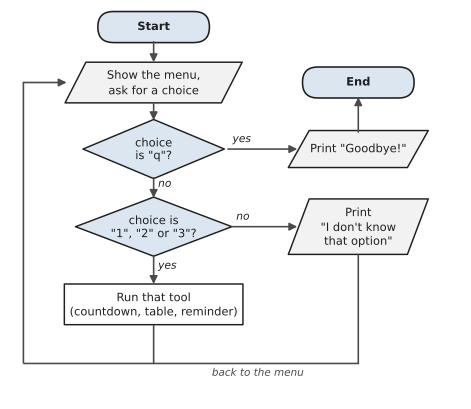
Figure 5.3 shows how the program is put together. The whole thing sits inside a while True loop: show the menu, act on the choice, and go back to the menu, again and again. The only way out is the arrow that leads to End, which is the break when you type q.
1# repeat_tool.py
2# A menu of small tools that do repetitive work for you.
3import time
4
5print("=== Task Repetition Tool ===")
6
7while True:
8    print("\n1. Countdown timer")
9    print("2. Times table")
10    print("3. Repeat a reminder")
11    print("q. Quit")
12    choice = input("Choose an option: ").strip().lower()
13
14    if choice == "q":
15        print("Goodbye!")
16        break
17
18    elif choice == "1":
19        seconds = int(input("Count down from how many seconds? "))
20        while seconds > 0:
21            print(f"{seconds}...")
22            time.sleep(1)          # wait one second
23            seconds -= 1
24        print("Time's up!")
25
26    elif choice == "2":
27        number = int(input("Which times table? "))
28        for i in range(1, 13):
29            print(f"{i:>2} x {number} = {i * number}")
30
31    elif choice == "3":
32        message = input("What should I remind you? ")
33        times = int(input("How many times? "))
34        for i in range(1, times + 1):
35            if i == times:
36                print(f"{i}. {message.upper()}! (last one)")
37            else:
38                print(f"{i}. {message}")
39
40    else:
41        print("I don't know that option. Try again.")
The very first line, import time, is new. It brings in a module, a bundle of extra tools that comes with Python. We only use one thing from it, time.sleep(1), which pauses the program for one second so the countdown happens in real time instead of all at once. Chapter 10 explains imports properly, and Chapter 18 does a lot more with time.
Look at the shape of the whole program. The outer while True loop keeps the menu coming back. Inside it, an if/elif chain picks the tool. And inside each tool there’s another loop doing the repetitive work. Loops inside decisions inside a loop. That might sound complicated, but read it slowly and each piece is something you already know.
Here’s a short session:
=== Task Repetition Tool ===

1. Countdown timer
2. Times table
3. Repeat a reminder
q. Quit
Choose an option: 3
What should I remind you? drink water
How many times? 3
1. drink water
2. drink water
3. DRINK WATER! (last one)

1. Countdown timer
2. Times table
3. Repeat a reminder
q. Quit
Choose an option: q
Goodbye!
Some ideas to extend it:
- Add a fourth tool that adds up all the numbers someone types, stopping when they type a blank line.
- In the times table, let the user choose how far it goes instead of always stopping at 12.
- What happens if you type
tenwhen it asks for seconds? We’ll learn to handle that gracefully in Chapter 8.
You can now make Python repeat itself as many times as you like, and stop exactly when you want. Loops and decisions together are enough to write surprisingly useful programs. What’s missing is a good way to hold lots of data at once. We’ve been sneaking lists in already. In the next chapter, we’ll stop sneaking.
#On the Job
How it shows up at work: Loops are where programs start doing the job of a person. “Go through every row in this spreadsheet.” “Check each file in this folder.” “Keep asking the server until it answers, but give up after five tries.” When a manager says “could we automate that?”, what they’re usually describing is a loop over something boring.
What employers expect: Choose the right loop without hesitating: for when you’re working through a collection or a known number of steps, while when you’re waiting for something to change. Know range() well, including its start, stop and step. And make sure every while loop has an exit you can point to.
Interview questions you might meet:
- “FizzBuzz.” Print the numbers 1 to 100, but print
Fizzfor multiples of 3,Buzzfor multiples of 5, andFizzBuzzfor multiples of both. It’s an old screening question and it still turns up, because it tests loops,%and the order of conditions all at once. It’s Exercise 5.9 below, so you’ll be ready. - “What’s the difference between
breakandcontinue?”breakleaves the loop completely;continueskips to the next round. - “What does
range(10, 0,-2)give you?”10, 8, 6, 4, 2. The stop value is never included.
Portfolio task: Push repeat_tool.py to your repository with one new tool of your own on the menu. Then go back to Leila’s donation counter from Exercise 3.13 and rewrite it with a loop, so it works for any number of donations. Keep both versions in the repository. Showing how your code improved over time is good material for an interview conversation.
Professional habit: Give every loop that waits on something outside your control (a user, a file, a website) a limit. “Try up to five times” is a sentence you’ll write for the rest of your career.
#Exercises
Solutions are in solutions/chapter_05 in the book’s GitHub repository.
Warm-up
Exercise 5.1. Print the numbers from 1 to 10, one per line, using a for loop. Then do the same with a while loop.
Exercise 5.2. Write down what each of these produces, then check: list(range(5)), list(range(2, 8)), list(range(0, 20, 5)), list(range(5, 0, -1)).
Exercise 5.3. Loop over the word "Python" and print each letter on its own line.
Exercise 5.4. This loop never ends. Fix it so it prints 5, 4, 3, 2, 1:
1n = 5
2while n > 0:
3    print(n)
Practice
Exercise 5.5. Add up all the whole numbers from 1 to 100 with a loop, and print the total. (The boy in the story at the start of this chapter got 5050.)
Exercise 5.6. Ask for a number and print its times table from 1 to 12, formatted like 7 x 3 = 21.
Exercise 5.7. Keep asking the user for numbers until they type done. Then print how many numbers they entered, the total, and the average. If they typed no numbers at all, say so instead of crashing.
Exercise 5.8. Count the vowels in a sentence the user types. Treat capitals the same as lower case.
Exercise 5.9. Write FizzBuzz for the numbers 1 to 100, as described in the On the Job section.
Exercise 5.10. Write a guessing game. Pick a secret number between 1 and 20 (just set it in a variable for now; Chapter 10 shows how to pick a random one). Let the user guess, tell them “higher” or “lower” each time, and give them at most five tries.
Challenge
Exercise 5.11. Print a right-angled triangle of stars, where the user chooses the height. A height of 4 should give:
*
**
***
****
Then try printing it the other way up.
Exercise 5.12. Ask for a whole number greater than 1 and say whether it’s prime (divisible only by 1 and itself). Use break to stop checking as soon as you find a divisor.
Exercise 5.13. Savings goal. Ask how much the user can save each month, and what their goal is. Assuming 0.4% interest is added to the balance at the end of each month, print how many months it takes to reach the goal, and the final balance.
Exercise 5.14. Grace’s safer loop. Write a loop that “checks whether a report is ready” by asking the user Is the report ready? (y/n). Stop as soon as they type y, and print Got it after N checks. But give up after five checks and print Giving up. Please check the server.