Think about the last time you fixed something in a program. You changed a line, ran the program, tried it out, and it worked. Good. But did you also check that everything else still worked? All the other menu options, the odd inputs, the edge cases you dealt with weeks ago? Probably not. Nobody has the patience to re-check everything by hand after every change. And that’s exactly how fixes break things.
Testing is the answer, and it’s simpler than it sounds. A test is a small piece of code that runs a piece of your program and checks the result. Write a few of them, and you can re-check everything in a second, as often as you like. It’s like having a tireless assistant who tries every feature of your program every time you save.
Professional programmers can be fierce about testing, and you’ll find books devoted to it. We’re not going to make you a testing expert. This chapter is about getting just enough testing to feel confident changing your code. We’ll look at why tests matter, especially for beginners, then write simple ones and run them with a tool called pytest. You’ll test functions, errors, files and classes, and see how even a handful of good tests changes the way you work.
#Why testing matters
There’s a common belief that testing is something you do once a program is finished, to prove it works. That’s backwards. The real value of tests is that they let you keep changing a program without fear.
Remember the grade report from Chapter 21. Imagine we’d had a test that said “the average of 70, 80, and 90 should be 80.” The off-by-one bug would have been caught the moment we wrote the loop, not later, when someone noticed the class average looked low. Now imagine six months from now you decide to rewrite average() to be more clever. Without a test, you’d have to remember to check it carefully. With a test, you just run it.
Tests catch a particular, sneaky kind of bug called a regression: something that used to work and has stopped working because of an unrelated change. Regressions are hard to notice by hand, because you don’t think to re-check things you believe are fine. Tests check them anyway.
There’s a less obvious benefit too. Writing a test forces you to think about what a function should do, precisely. What should average() return for an empty list? You might never have considered that until you sat down to test it. Code that’s easy to test also tends to be well designed, because it’s made of small functions that take inputs and return outputs, which is exactly the style we’ve been encouraging since Chapter 7.
#Writing simple tests
At its heart, a test needs only one Python keyword: assert. It checks that something is true, and does nothing if it is. If it isn’t, it raises an AssertionError:
>>> assert 2 + 2 == 4
>>> assert 2 + 2 == 5
Traceback (most recent call last):
  ...
AssertionError
You could write tests as plain scripts full of assert lines. But there’s a tool that makes it far more pleasant, called pytest. It finds your tests automatically, runs them all, and gives you a clear report. Install it:
python -m pip install pytest
Then run your tests by typing pytest in the terminal. If the terminal says it doesn’t know the pytest command, type python -m pytest instead (python3 -m pytest on macOS and Linux); it does exactly the same thing.
pytest works by convention. Put your tests in files whose names start with test_, and write each test as a function whose name also starts with test_. That’s it. No classes, no special setup.
Let’s test the grade functions from Chapter 21. First, here are the fixed versions, saved as a module called grades.py. We’ve added one improvement: average() now refuses an empty dictionary with a clear error, instead of crashing with a confusing ZeroDivisionError:
1# grades.py - the fixed grade functions from Chapter 21
2
3
4def load_scores(path):
5    """Read 'name,score' lines, skipping blank ones."""
6    scores = {}
7    with open(path, encoding="utf-8") as file:
8        for line in file:
9            if not line.strip():
10                continue
11            name, score = line.strip().split(",")
12            scores[name] = int(score)
13    return scores
14
15
16def average(scores):
17    if not scores:
18        raise ValueError("can't average an empty set of scores")
19    values = list(scores.values())
20    return sum(values) / len(values)
21
22
23def top_student(scores):
24    return max(scores, key=scores.get)
Now, in the same folder, create test_grades.py. We’ll start with a single test:
1from grades import average
2
3
4def test_average_of_three_scores():
5    scores = {"A": 70, "B": 80, "C": 90}
6    result = average(scores)
7    assert result == 80
This test has a shape you’ll see in almost every test you ever read, shown in Figure 22.1. Arrange: set up the data. Act: call the thing you’re testing. Assert: check the result is what it should be.
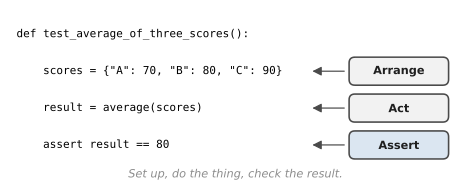
To run it, open a terminal in that folder and type pytest. (If the command isn’t found, python -m pytest does the same thing.) pytest finds every test_ file, runs every test_ function inside it, and reports. A passing test shows as a dot:
collected 1 item

test_grades.py .                                      [100%]

====================== 1 passed in 0.01s ======================
Now let’s see what a failure looks like, because that’s when tests earn their keep. Temporarily put the buggy loop from Chapter 21 back into average() and run pytest again:
    def test_average_of_three_scores():
        scores = {"A": 70, "B": 80, "C": 90}
        result = average(scores)
>       assert result == 80
E       assert 56.666666666666664 == 80

test_grades.py:7: AssertionError
==================== 1 failed in 0.02s ====================
pytest shows you the test, points at the line that failed with >, and, best of all, shows the actual values: we got 56.67 but expected 80. You know immediately that something is wrong with average(), and roughly how wrong. Put the fixed version back, and the test passes again.
#Testing functions and classes
A single test checks a single situation. Good testing means choosing a few situations that cover the important cases. For any function, ask three questions. What’s the normal case? What are the edge cases, like empty inputs, zero, one item, or the largest allowed value? And what should happen with bad input?
Here’s the complete test_grades.py, answering all three:
1# test_grades.py - run with: pytest
2import pytest
3
4from grades import average, load_scores, top_student
5
6
7def test_average_of_three_scores():
8    scores = {"A": 70, "B": 80, "C": 90}
9    result = average(scores)
10    assert result == 80
11
12
13def test_top_student():
14    scores = {"Sara": 85, "Lin": 91, "Tom": 78}
15    assert top_student(scores) == "Lin"
16
17
18def test_average_of_nothing_is_an_error():
19    with pytest.raises(ValueError):
20        average({})
21
22
23def test_load_skips_blank_lines(tmp_path):
24    # regression test for bug one in Chapter 21
25    data = tmp_path / "scores.csv"
26    data.write_text("Sara,85\nOmar,72\n\n", encoding="utf-8")
27    assert load_scores(data) == {"Sara": 85, "Omar": 72}
Two new pytest features appear here, and both are lovely.
pytest.raises(ValueError) is how you test that something fails correctly. The test passes only if the code inside the with block raises a ValueError. If it raises nothing, or a different error, the test fails. Testing failure is just as important as testing success. A function that should refuse bad data but accepts it without complaint is a bug.
tmp_path is a fixture, something pytest provides automatically when you name it as a parameter. It’s a brand-new, empty temporary folder, created just for this test and cleaned up afterwards. That means tests involving files can create whatever files they need, without touching your real data and without leaving clutter behind.
Notice the comment on the last test. It’s a regression test: a test written specifically to stop an old bug from coming back. Every time you fix a bug, it’s worth writing a test that would have caught it. Then that bug can never sneak back in unnoticed.
Testing a class works the same way. You create an object, use it, and check its attributes or the results of its methods. Here’s a trimmed version of the Habit class from Chapter 11, in habit.py:
1# habit.py - the Habit class from Chapter 11 (trimmed)
2
3
4class Habit:
5    def __init__(self, name, weekly_target):
6        if weekly_target <= 0:
7            raise ValueError("weekly_target must be at least 1")
8        self.name = name
9        self.weekly_target = weekly_target
10        self.done_this_week = 0
11
12    def record(self):
13        self.done_this_week += 1
14
15    def progress(self):
16        return min(self.done_this_week / self.weekly_target, 1.0)
17
18    def is_complete(self):
19        return self.done_this_week >= self.weekly_target
And its tests, in test_habit.py:
1# test_habit.py - testing a class
2import pytest
3
4from habit import Habit
5
6
7def test_new_habit_starts_empty():
8    h = Habit("Reading", 5)
9    assert h.done_this_week == 0
10    assert not h.is_complete()
11
12
13def test_progress_never_goes_over_one():
14    h = Habit("Guitar", 2)
15    for _ in range(3):
16        h.record()
17    assert h.is_complete()
18    assert h.progress() == 1.0
19
20
21def test_zero_target_is_rejected():
22    with pytest.raises(ValueError):
23        Habit("Nothing", 0)
Each test creates its own fresh Habit. That’s important: tests should never depend on each other or on the order they run in. If one test changes an object, the next test shouldn’t be affected.
There’s one more kind of code that’s tricky to test: code that depends on something that keeps changing, like today’s date. In Chapter 18, we wrote days_until_birthday() with an optional today parameter, and promised it would pay off. Here’s the payoff. Save the function as birthday.py:
1# birthday.py - from Chapter 18
2from datetime import date
3
4
5def days_until_birthday(birthday, today=None):
6    today = today or date.today()
7    next_one = birthday.replace(year=today.year)
8    if next_one < today:
9        next_one = next_one.replace(year=today.year + 1)
10    return (next_one - today).days
Because we can hand it a fixed “today,” the test gives the same answer whether you run it this week or next year:
1# test_birthday.py - pass in "today" so the answer never changes
2from datetime import date
3
4from birthday import days_until_birthday
5
6
7def test_birthday_later_this_year():
8    today = date(2026, 3, 1)
9    assert days_until_birthday(date(1997, 3, 14), today) == 13
10
11
12def test_birthday_already_passed_this_year():
13    today = date(2026, 11, 5)
14    assert days_until_birthday(date(1997, 3, 14), today) == 129
This idea, letting the caller pass in the things a function depends on instead of the function reaching out for them itself, is the single best trick for making code testable. The same idea let the Report class in Chapter 12 accept a pretend mailer instead of a real one. Whenever a function talks to the clock, the internet, or the user, think about whether that part could be passed in.
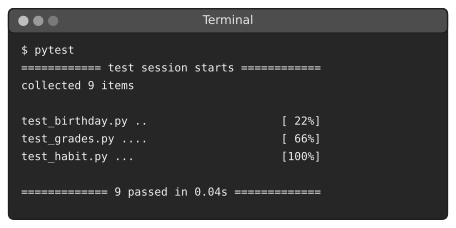
Run pytest in the folder, and all nine tests run in a fraction of a second, as Figure 22.2 shows.
#Building confidence
So how many tests should you write? For the programs in this book, not many. A few tests for each important function, covering the normal case, an edge case or two, and bad input, will catch the large majority of problems. Here’s a sensible routine:
Test the parts that calculate: Functions that take data and return a result, like average(), clean_order() from Chapter 20, or parse() from the safe calculator, are easy to test and often where the subtle bugs live. Code that only prints or asks questions is less valuable to test, and harder.
Write a test for every bug you fix: This is the cheapest, most effective testing habit there is. Each regression test is a small wall that stops one particular mistake from ever happening again.
Lucía found out why. She maintained a small tool at a restaurant group that split each night’s tips between the staff. One week, a waiter noticed the shares added up to a cent more than the actual tips, because of rounding. Lucía fixed it. Two months later, while adding a feature for part-time staff, she rewrote the splitting function and the extra cent came back. Nobody noticed for three weeks. The second time she fixed it, she also wrote a test: split $100.00 between three people and check the shares add up to exactly $100.00. The bug has tried to return twice since, during later changes, and both times the test failed within seconds, before the code ever reached the restaurants.
Run the tests before and after changes: Before, to make sure everything passes and you’re starting from a good place. After, to make sure you haven’t broken anything. If a test fails, you know exactly which change caused it, because you only made one.
Keep tests fast and independent: Tests that take a long time don’t get run. Tests that depend on each other fail in confusing ways. Small, self-contained tests stay useful.
Something subtle happens once you have even a handful of tests. You start making changes more boldly. You tidy up messy code, rename confusing functions, and try simpler approaches, because if anything breaks, you’ll know within seconds. That freedom is the real reason programmers write tests. Not because they enjoy it, but because it lets them keep improving their code without being afraid of it.
Try it yourself. Go back to clean_order() from the Chapter 20 pipeline and write three tests for it: one with a perfect order, one with the quantity written as text, and one with a negative quantity that should raise a ValueError. Then try changing the function and watch the tests guard it.
In the next chapter, we’ll finally untangle something that’s been hovering in the background since Chapter 15: all those pip install commands, and how to keep each project’s packages tidy and separate.
#On the Job
How it shows up at work: On most professional teams, code without tests doesn’t get merged. When you open a pull request (a proposed change), an automated system runs every test in the project, and a single failure blocks the change until it’s fixed. Junior developers are often given “write tests for this module” as a first task, precisely because it’s a safe way to learn a codebase. Being comfortable with pytest is one of the clearest signals that you’re ready for a team.
What employers expect: Write clear tests with pytest: one idea per test, a name that says what’s being checked, the arrange-act-assert shape. Test normal cases, edge cases and errors (pytest.raises). Use tmp_path for files so tests never touch real data. Write a regression test for every bug you fix. You don’t need to know every pytest feature, but @pytest.mark.parametrize, which runs one test with many inputs, is worth knowing; Exercise 22.8 introduces it.
Interview questions you might meet:
- “Why write tests?” So you can change code with confidence, catch bugs early, and document how the code is meant to behave.
- “What’s a regression test?” A test written for a bug you’ve fixed, so the bug can’t quietly come back. Lucía’s story is a perfect example.
- “How would you test a function that’s supposed to raise an error?”
with pytest.raises(ValueError):around the call. - “What makes a good test?” Fast, independent of other tests, testing one thing, with a name that explains what failed when it fails.
- “What’s test-driven development?” Writing the test first, watching it fail, then writing just enough code to make it pass. You don’t have to work that way all the time, but it’s worth trying once, as Exercise 22.12 asks.
Portfolio task: Add a tests folder to one of your earlier projects, perhaps the expense tracker or the data pipeline, with at least five tests. Put a line in the README saying how to run them (pytest). A project with tests looks like the work of someone who has worked on a team, even if you haven’t yet.
Professional habit: When you find a bug, write the failing test before you fix it. Watching it fail proves the test really catches the bug; watching it pass afterwards proves the fix works.
#Exercises
Solutions are in solutions/chapter_22 in the book’s GitHub repository. Each solution file contains the code being tested and its tests together, so it runs on its own: use pytest ex_22_01.py, or run it with Python, which starts pytest for you. (In your own projects, keep code and tests in separate files, as this chapter did.)
Warm-up
Exercise 22.1. Write a function add_vat(price, rate=0.1) and three tests for it: a normal price, a price of zero, and a different rate.
Exercise 22.2. Write is_even(n) and test it with an even number, an odd number, zero and a negative number.
Exercise 22.3. Make one of your tests from Exercise 22.1 fail on purpose by changing the expected value. Read pytest’s report carefully: what does it tell you? Then fix it.
Practice
Exercise 22.4. Write parse_price(text) that turns "$12.50" into 12.5 and raises ValueError for text like "twelve". Write tests for both, using pytest.raises for the second.
Exercise 22.5. Write count_lines(path) that returns the number of non-blank lines in a text file. Test it with tmp_path, using a file with some blank lines in it.
Exercise 22.6. Write tests for the BankAccount class from Exercise 11.5: depositing increases the balance, withdrawing too much leaves the balance unchanged, and the history records each transaction.
Exercise 22.7. Write tests for clean_email() from Exercise 20.6, covering capitals, spaces, a missing @, and two @ signs.
Exercise 22.8. Rewrite your tests for is_even using @pytest.mark.parametrize, so one test function checks many inputs:
1@pytest.mark.parametrize("n, expected", [(2, True), (3, False)])
2def test_is_even(n, expected):
3    assert is_even(n) == expected
Challenge
Exercise 22.9. Lucía’s bug. Write split_tips(total, people) that returns a list of shares, in dollars, rounded to cents, that always add up to exactly the total. (Hint: work in whole cents, and give the leftover cents to the first few people.) Write the regression test that $100.00 split three ways adds up to $100.00, and a few more.
Exercise 22.10. Write tests for the transform() stage of the Chapter 20 pipeline: a good order comes out clean, a negative quantity is rejected with a reason, and the clean and rejected counts add up to the input count.
Exercise 22.11. Write word_counts(text) from Exercise 21.9 and tests that would have caught both of its original bugs. Check that each test fails against the buggy version.
Exercise 22.12. Try test-driven development. Write the tests first for a function initials(full_name) that turns "ada lovelace" into "A.L." and " grace brewster hopper " into "G.B.H.", and returns "" for an empty string. Run them and watch them fail. Then write the function.