Here’s something that might surprise you. Experienced programmers don’t write fewer bugs than beginners nearly as much as you’d think. What they’re much better at is finding them. A beginner meets a bug and starts changing things at random, hoping something sticks. An experienced programmer meets the same bug and gets curious. They treat it like a small mystery, collect clues, narrow down the suspects, and close the case. It’s a skill, not a talent, and it can be learned.
In fact, you’ve been practising pieces of it since Chapter 2, every time you read an error message from the bottom up. This chapter turns those pieces into a method. We’ll go through the steps programmers follow to track down a bug, then practise them on a deliberately broken program. You’ll learn to use print() as a precise investigative tool rather than a scattergun, shrink a problem until the bug has nowhere left to hide, and pause a running program with a debugger to look inside it. And we’ll talk honestly about the hardest part, which is staying calm when nothing makes sense.
#How programmers debug
Debugging is detective work, and like a good detective, you don’t start by accusing the first person you see. You follow a process. Figure 21.1 shows it.
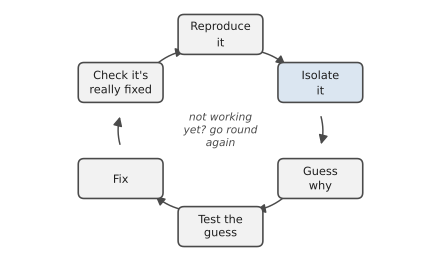
Reproduce it: First, make the bug happen on purpose, reliably. If you can’t make it happen, you can’t tell when you’ve fixed it. Write down exactly what you did: which input, which button, which file. A bug that “sometimes” happens usually turns out to happen every time under a particular condition you haven’t spotted yet.
Isolate it: Narrow down where it happens. Which function? Which line? Which piece of data? This is usually the longest step, and the rest of this chapter is mostly about doing it well.
Guess why: Once you know where, form a specific hypothesis. Not “something’s wrong with the loop” but “I think the loop starts at 1 instead of 0, so it skips the first score.”
Test the guess: Check your hypothesis with evidence before you change any code. Print the value. Try a smaller input. If your guess was wrong, good, you’ve eliminated a suspect. Go back and guess again.
Fix it: Change the code, as little as necessary.
Check it’s really fixed: Run the exact steps that reproduced the bug. Then run a few other things too, because fixes have a habit of breaking something next door. Chapter 22 will make this last step almost automatic.
The most important thing about this loop is what it isn’t: changing code at random until the symptoms go away. Random changes sometimes make a bug disappear without you understanding why, which usually means it’s still there, waiting.
#A buggy program to practise on
Let’s debug something real. Here’s a small program that reads exam scores from a file, works out the class average, and finds the top student. It has three bugs. Save the data as scores.csv, making sure to leave one empty line at the end, the way many text editors do:
Sara,85
Omar,72
Lin,91
Priya,64
Tom,78
And the program, grade_report.py:
1# grade_report.py - a small program with three bugs in it
2from pathlib import Path
3
4
5def load_scores(path):
6    scores = {}
7    with open(path, encoding="utf-8") as file:
8        for line in file:
9            name, score = line.strip().split(",")
10            scores[name] = score
11    return scores
12
13
14def average(scores):
15    values = list(scores.values())
16    total = 0
17    for i in range(1, len(values)):
18        total += values[i]
19    return total / len(values)
20
21
22def top_student(scores):
23    return max(scores, key=scores.get)
24
25
26scores = load_scores(Path(__file__).parent / "scores.csv")
27print(f"Class average: {average(scores):.1f}")
28print(f"Top student: {top_student(scores)}")
Before reading on, look at it for a minute. Can you spot any of the bugs? Don’t worry if you can’t. That’s what the method is for.
Bug one: a crash
Run it, and it crashes straight away:
Traceback (most recent call last):
  File "grade_report.py", line 26, in <module>
    scores = load_scores(Path(__file__).parent / "scores.csv")
  File "grade_report.py", line 9, in load_scores
    name, score = line.strip().split(",")
ValueError: not enough values to unpack (expected 2, got 1)
Bottom line first. “Not enough values to unpack” means we tried to split something into name, score and got only one piece. The line above tells us where: line 9, inside load_scores. So, a guess: some line in the file doesn’t contain a comma. Which line could that be? Every visible line has a comma. Except... the empty one at the end. "".split(",") gives [''], a list with one empty string, and you can’t unpack one thing into two names.
We can test that guess in the interactive shell in five seconds:
>>> "".split(",")
['']
Confirmed. The fix is to skip blank lines, exactly as we did back in Chapter 9:
1        for line in file:
2            if not line.strip():
3                continue
4            name, score = line.strip().split(",")
Bug two: another crash
Run it again, and we get further, then crash somewhere new:
  File "grade_report.py", line 20, in average
    total += values[i]
TypeError: unsupported operand type(s) for +=: 'int' and 'str'
Progress! A new error means the first fix worked. This one says we tried to add a string to a number. total is a number, so values[i] must be a string. Where do the values come from? From load_scores, which stores score straight from the file. And everything read from a file is text. You’ve seen this trap since Chapter 3. The fix:
1 scores[name] = int(score)
Bug three: wrong answer, no error
Run it once more:
Class average: 61.0
Top student: Lin
No crash. Job done? Not quite. Work out the average yourself: 85 + 72 + 91 + 64 + 78 is 390, and 390 divided by 5 is 78.0, not 61.0. This is the most dangerous kind of bug, the kind that produces a confident, wrong answer. If we hadn’t checked, this program would happily report the wrong average to everyone.
There’s no traceback to point the way this time, so we need to isolate the problem ourselves. That’s where print comes in.
#Using print strategically
You’ve used print() to show results since Chapter 2. As a debugging tool, its job is different: to show you what’s going on inside the program at a particular moment, so you can compare what’s actually happening with what you believe is happening.
The trick is to print with purpose. Don’t scatter print("here") everywhere. Decide what you want to know, and print exactly that, clearly labelled. We know the final average is wrong, so let’s look at what goes into it:
1def average(scores):
2    values = list(scores.values())
3    print(f"DEBUG values={values!r}")
4    total = 0
5    for i in range(1, len(values)):
6        total += values[i]
7        print(f"DEBUG i={i} total={total}")
8    return total / len(values)
DEBUG values=[85, 72, 91, 64, 78]
DEBUG i=1 total=72
DEBUG i=2 total=163
DEBUG i=3 total=227
DEBUG i=4 total=305
Two details make these prints useful. Each one starts with DEBUG and names the variable, so you can’t mistake it for real output and you know exactly what you’re looking at. And the !r inside the f-string prints the value’s representation, the way Python would write it in code. That shows strings with their quotes, so '85' and 85 look different. It would have spotted bug two instantly.
Now compare reality with expectations. The values are right. But the very first time through the loop, i is 1, and total is 72, Omar’s score. Sara’s 85 was never added. There’s our guess: the loop starts at the wrong place. range(1, len(values)) starts at index 1, skipping index 0. Remember, lists start counting at zero.
The fix is to start at zero, or better still, to stop using indexes at all, since we only want the values:
1def average(scores):
2    values = list(scores.values())
3    return sum(values) / len(values)
Run it, and the average is 78.0. Then delete the debug prints. Leftover debug prints are a classic way to confuse whoever uses your program next.
There’s a deeper lesson in that last fix. The loop with an index was more complicated than it needed to be, and complexity is where bugs hide. When you fix a bug, ask whether there’s a simpler way to write the code so that bug can’t happen. Often there is.
#Isolating problems
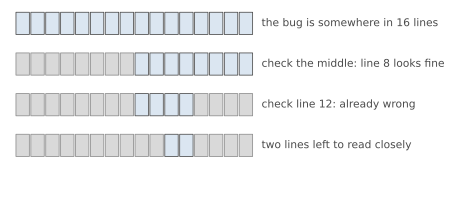
In our example, the program was small enough to read in one go. Real programs aren’t. When you don’t know where a bug lives, you need a way to search efficiently. The best one is called bisection, and it’s the same trick you’d use in a guessing game where someone says “higher” or “lower.”
Pick a point roughly halfway through the code that runs before the problem shows up. Check whether things are still correct there, with a print or a debugger. If they are, the bug is in the second half. If they’re already wrong, it’s in the first half. Then do the same with the half that’s left. Figure 21.2 shows the idea: each check throws away half the suspects. Even in a thousand-line program, ten checks are enough to narrow things down to a single line.
You can bisect data as well as code. If your program fails on a file with ten thousand rows, try the first five thousand. Then the first half of whichever half fails. Very quickly you’ll find the one odd row, the one with a blank cell or a strange character, that causes the trouble.
Siobhan, a researcher at a university, had a script that summarised 40,000 survey responses. It crashed every time with UnicodeDecodeError, somewhere in the file, and the error didn’t say which row. She was about to start scrolling. Instead, she split the file in half and ran the script on each half. The first half worked. She split the second half, and so on. After sixteen runs, which took about ten minutes, she was looking at a single response that someone had pasted in from an old word processor, with a character in an unusual encoding. Opening the file with encoding="utf-8", errors="replace" let the script carry on, and she wrote the odd row’s number down so a human could look at it. Scrolling would have taken her the afternoon, and she might still have missed it.
Another powerful technique is to build a minimal example. Copy the misbehaving piece of code into a new, tiny file and strip away everything that doesn’t affect the bug. Remove functions, simplify the data, hard-code the inputs. Keep removing until removing anything else makes the bug disappear. What’s left is usually only a few lines, and the bug is often obvious once you can see it alone. And if it isn’t obvious, you now have a short, clear example to show someone else or search the internet with.
Speaking of searching: copy the last line of an error message, the bit after the exception name, and paste it into a search engine. You’re very rarely the first person to hit a given error, and someone has usually explained it. Leave out your own file names and variable names, since those won’t match anyone else’s.
#Using a debugger
Print statements are like taking photos at a few chosen moments. A debugger is like pausing a film. It lets you stop a program at any line, look at every variable, then step forward one line at a time and watch the values change.
VS Code has a debugger built in. To try it on grade_report.py:
- Click in the margin just to the left of a line number, say the line
total += values[i]in the buggy version. A red dot appears. That’s a breakpoint, a place where the program will pause. - Open the Run menu and choose Start Debugging (or press F5), then pick Python File if asked.
- The program runs and stops at your breakpoint. A panel on the left shows every variable and its current value.
- Use the small toolbar that appears at the top: Step Over runs the current line and moves to the next; Continue runs until the next breakpoint. Watching
iandtotalchange line by line, the skipped first score is
impossible to miss. Debuggers take a few minutes to get used to, but for tricky bugs, especially inside loops, they’re often faster than adding and removing print statements.
Python also has a simple debugger you can use without any editor at all. Put the line breakpoint() anywhere in your code, and when the program reaches it, it pauses and gives you a (Pdb) prompt in the terminal. Type a variable name to see its value, n to run the next line, c to continue, and q to quit. It’s plain, but it works everywhere, including on a server with no screen.
#Staying calm when code breaks
We’ve saved the most important section for last, because the biggest obstacle in debugging isn’t technical. It’s frustration. When a program has refused to work for an hour, your thinking gets narrower. You start re-reading the same three lines. You make bigger and bigger random changes. Everyone has been there.
A few things genuinely help.
Take a break: This sounds like soft advice, but it’s one of the most reliable debugging techniques there is. Walk away for ten minutes. Make a cup of tea. A surprising number of bugs solve themselves in your head while you’re doing something else, because your brain keeps working on the problem without the tunnel vision.
Explain it out loud: Programmers call this rubber duck debugging, after the idea of explaining your code, line by line, to a rubber duck on your desk. It sounds silly, and it works. When you have to say “and then this line adds up the scores starting from... oh,” the act of explaining forces you to notice the assumption you’d been skipping over. A patient friend, a pet, or a note to yourself works too.
Check your assumptions: When you’re truly stuck, the bug is almost always in something you’re sure is right. The file you think you’re editing is a different copy. The function you think is being called isn’t. The data you think is clean has a blank line at the end. List the things you’re certain of, and test each one.
Keep a record of what you’ve tried: A few notes, “tried X, didn’t help; checked Y, it’s fine,” stop you from going round in circles, and they’re invaluable if you need to ask someone for help.
And remember the shift in perspective from Chapter 1. An error message isn’t the computer telling you you’ve failed. It’s the computer telling you exactly where to look. Every bug you track down makes you better at finding the next one, which is the real reason experienced programmers are faster at this. They’ve simply met more bugs.
All three versions of the grade report, buggy and fixed, are in the chapter_21 folder of the code repository. Try breaking the fixed one in new ways, and practise finding the problems with prints and with the debugger. In the next chapter, we’ll look at how to catch bugs before they happen, by writing tests.
#On the Job
How it shows up at work: Developers spend more time reading and fixing code than writing new code, and much of that time is debugging, often in code someone else wrote years ago. A bug report from a user (“the totals are wrong for some customers”) is a mystery to solve, and the people who solve them methodically are the ones who get trusted with the important systems. On a team, you’ll also debug together: explaining a problem clearly to a colleague is half the skill.
What employers expect: A method, not luck: reproduce the bug, read the error, form a guess, test it, fix it, check the fix. Comfort with tracebacks, targeted prints and a debugger. The ability to make a minimal example. And, frankly, temperament. Employers are looking for people who stay calm and curious when things break.
Interview questions you might meet:
- “Tell me about a difficult bug you fixed.” This is very common, and an honest story from your own practice is perfect. Describe the symptom, how you narrowed it down, what the cause was, and what you learned. Keep a note of good bugs as you work through this book so you have one ready.
- “Your program gives the wrong answer but no error. Where do you start?” Find a small input where you know the right answer, then check values at points along the way until you find where reality and expectation part company.
- “What’s a breakpoint?” A place where a debugger pauses a running program so you can inspect its variables.
- “How would you find which of 40,000 rows breaks a script?” Bisection: halve the data repeatedly. Siobhan’s story is a good example.
Portfolio task: Start a file in your repository called bug_diary.md. Each time you fix a bug that took more than ten minutes, write three lines: what went wrong, how you found it, and how you fixed it. Within a few months it’s a record of your growth, and it’s the best possible preparation for the “tell me about a bug” question.
Professional habit: Change one thing at a time. When you’re debugging, every change should be a small experiment with a prediction attached. Changing three things at once and hoping is how bugs multiply.
#Exercises
Every exercise in this chapter is a small broken program. Find the bug, explain what was wrong in one sentence, and fix it. The fixed versions, each with a comment explaining the bug, are in solutions/chapter_21 in the book’s GitHub repository. Try to find each bug by investigating (reading the error, adding a print, or using the debugger) rather than just by staring.
Warm-up
Exercise 21.1. This should print the average, but crashes:
1scores = [72, 85, 90]
2average = sum(scores) / len(score)
3print(average)
Exercise 21.2. This should print the numbers 1 to 5, but prints 1 to 4:
1for n in range(1, 5):
2    print(n)
Exercise 21.3. This should greet the user, but crashes when they type their age:
1name = input("Name: ")
2age = input("Age: ")
3print("Hi " + name + ", next year you'll be " + age + 1)
Practice
Exercise 21.4. This should count the vowels, but always prints 0:
1def count_vowels(text):
2    count = 0
3    for letter in text:
4        if letter in "aeiou":
5            count + 1
6    return count
7
8print(count_vowels("programming"))
Exercise 21.5. This should find the largest number, but gives the wrong answer for a list of negative numbers. Try [-5, -2, -9]:
1def largest(numbers):
2    biggest = 0
3    for n in numbers:
4        if n > biggest:
5            biggest = n
6    return biggest
Exercise 21.6. This should add an item to a fresh list each time, but the lists keep growing:
1def add_item(item, basket=[]):
2    basket.append(item)
3    return basket
4
5print(add_item("apple"))
6print(add_item("bread"))
Exercise 21.7. This should apply a 10% discount to orders over $100. A customer who spent $99 got the discount anyway, and one who spent $1,000.50 didn’t... or did they? Try both, then use a print to find out what’s really being compared:
1total = input("Order total: ")
2if total > "100":
3    total = float(total) * 0.9
4print(f"You pay ${float(total):.2f}")
Exercise 21.8. This should remove every negative number, but leaves one behind. Try it, then find out why with prints:
1numbers = [3, -1, -4, 5, -2, 8]
2for n in numbers:
3    if n < 0:
4        numbers.remove(n)
5print(numbers)
Challenge
Exercise 21.9. This word counter gives the wrong count for "The cat and the hat". There are two bugs:
1def word_counts(sentence):
2    counts = {}
3    for word in sentence.split(" "):
4        if word in counts:
5            counts[word] = 1
6        else:
7            counts[word] += 1
8    return counts
Exercise 21.10. This should print a report of each student’s best score, but every student shows the same score. Use the debugger with a breakpoint inside the loop:
1students = {"Ana": [70, 88, 91], "Raj": [65, 72, 80]}
2best = 0
3for name, marks in students.items():
4    for mark in marks:
5        if mark > best:
6            best = mark
7    print(name, best)
Exercise 21.11. Siobhan’s problem in miniature. The solutions folder contains responses.txt, 1,000 lines of survey answers. One line makes this function crash. Use bisection (try the first half, then a quarter, and so on) to find it, and print its line number. Then make the function skip bad lines and report them instead of crashing:
1def parse(line):
2    name, score = line.strip().split(",")
3    return name, int(score)