You finish your first proper program. It asks for your age, works out something clever and prints it beautifully. You hand the laptop to a friend. They type “twenty-five” instead of 25, and the whole thing falls over in a wall of red text. Every programmer has had that moment. It’s slightly embarrassing, and it’s also how most of us learned that users never type what you expect.
They really don’t. People make typos and press Enter by accident. Files get renamed by someone in another office. The Wi-Fi drops halfway through a download. None of that is under your control. What is under your control is what your program does next: crash, or say something useful and carry on.
This chapter is about the second option. First, what’s actually going on when a program crashes, and how to read the error report Python gives you (it’s more helpful than it looks). Then catching errors with try and except, checking input before it can cause trouble, and failing safely when something really can’t be fixed.
#Why programs crash
When Python hits a line it can’t carry out, it doesn’t guess or press on regardless. It stops and raises an exception, a special signal that says “something went wrong here, and I don’t know what to do about it.” If nothing in your program deals with that signal, Python ends the program and prints a report. That’s the crash.
Exceptions come in different types, named after what went wrong. You’ve already met several:
| Exception | What it means | Typical cause |
|---|---|---|
NameError | a name hasn’t been defined | a typo, or using a variable too early |
TypeError | wrong type for this operation | adding a string to a number |
ValueError | right type, unusable value | int("hello") |
IndexError | list position doesn’t exist | items[10] on a short list |
KeyError | dictionary key doesn’t exist | phones["Zoe"] |
ZeroDivisionError | dividing by zero | an average of an empty list |
FileNotFoundError | file isn’t where you said | a wrong file name or folder |
It helps to separate two kinds of error. Bugs are mistakes in your code: a misspelled name, the wrong variable, a condition in the wrong order. The fix for a bug is to change the code. Exceptional situations are things outside your control: a user’s typo, a missing file, a network outage. Your code can be perfectly correct and still meet these. The fix isn’t to change the code so they never happen, because you can’t. It’s to handle them.
This chapter is mostly about the second kind. Chapter 21 is all about hunting down the first.
#Reading tracebacks
Here’s a small program with a hidden problem:
1def average(numbers):
2    total = sum(numbers)
3    return total / len(numbers)
4
5
6marks = []
7print(average(marks))
Run it, and Python responds with this report, called a traceback:
Traceback (most recent call last):
  File "average.py", line 7, in <module>
    print(average(marks))
  File "average.py", line 3, in average
    return total / len(numbers)
ZeroDivisionError: division by zero
In Chapter 2 we said to read error messages from the bottom up. Now that you know about functions, you can see why. The last line names the problem: we divided by zero. The lines above trace the route Python took to get there. It started at line 7, the call to average() (<module> just means “the main part of your file”). That call took it into the function, where line 3 tried to divide by len(numbers), which was 0 because the list was empty. Figure 8.1 labels each part.
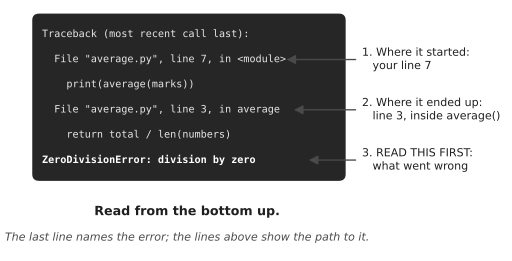
In bigger programs, tracebacks can be long, because one function calls another which calls another. Don’t let the length worry you. The bottom line is still what went wrong. And as you scan upwards, look for the first file name you recognise as your own. That’s usually the line you need to look at, since the files you didn’t write are rarely the ones with the bug.
#try / except
Now for the main event. When you know a line might fail, you can wrap it in a try block and tell Python what to do if it does:
1text = input("How old are you? ")
2
3try:
4    age = int(text)
5    print(f"Next year you'll be {age + 1}.")
6except ValueError:
7    print("That doesn't look like a whole number.")
8
9print("Thanks for playing!")
Python runs the code inside try as normal. If everything works, it skips the except block entirely. But if a ValueError is raised anywhere inside the try, Python immediately jumps to the except block and runs that instead. Either way, the program carries on afterwards. Type thirty and you’ll see the friendly message, then “Thanks for playing!” No crash.
Think of try as a safety net under a trapeze. The performer still attempts the trick. If it goes wrong, the net catches them, and the show goes on.
Always name the exception you’re expecting, like except ValueError:. It’s tempting to write a bare except: that catches everything, but that’s like a net so big it also catches the audience. It’ll hide real bugs, including typos in your own code, and you’ll spend hours wondering why your program silently does nothing.
Kwame learned this the expensive way. He looked after a script at a cleaning company that read the week’s timesheets and worked out everyone’s hours for payroll. Some timesheets had blank rows, which crashed it, so he wrapped the calculation in try: and except: pass, meaning “if anything goes wrong, ignore it and move on.” The crashes stopped. Three weeks later, a new supervisor started typing hours as 7.5h instead of 7.5. Those rows failed too, and the bare except swallowed them without a word. Eleven people were underpaid before anyone noticed. The fix was two changes: catch only ValueError, and print the row that failed instead of passing over it in silence. A program that complains loudly about bad data is annoying for a day. One that hides it can cost real people real money.
You can handle several kinds of error, each in its own way:
1try:
2    total = float(input("Total bill: "))
3    people = int(input("Split between how many? "))
4    print(f"Each pays {total / people:.2f}")
5except ValueError:
6    print("Please type numbers only.")
7except ZeroDivisionError:
8    print("You can't split a bill between zero people.")
If you want to see the message that came with the error, you can catch it with a name using as:
1try:
2    number = int("forty-two")
3except ValueError as error:
4    print(f"Oops: {error}")
Oops: invalid literal for int() with base 10: 'forty-two'
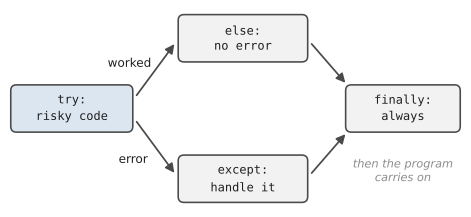
There are two optional extras. An else block runs only if the try block succeeded, which is a tidy place for code that should happen only after the risky part worked. A finally block runs no matter what, error or not, and it’s used for clean-up, like closing a file or printing “done.” Figure 8.2 shows how they fit together.
The most common use of all this, by far, is the “keep asking until it works” loop. In Chapter 7 our ask_number function used a fiddly string check. Here’s the cleaner version, which simply attempts the conversion and catches the failure:
1def ask_number(prompt):
2    """Keep asking until the user types a valid number."""
3    while True:
4        try:
5            return float(input(prompt))
6        except ValueError:
7            print("  That's not a number. Try again.")
Shorter, clearer, and it handles every odd case properly, including things like 1e3 that the old version missed. There’s a saying among Python programmers: it’s easier to ask forgiveness than permission. Rather than checking every possible way something could go wrong before you try it, you try it and handle the failure.
#Input validation
Catching exceptions deals with input that Python can’t process. But some input is perfectly processable and still wrong. int("-5") works fine, but -5 isn’t a sensible age. "sara@" is a valid string, but not a valid email. Python won’t complain about these, so you have to check them yourself. That’s validation.
Validation is just an if statement with good manners:
1def ask_age():
2    while True:
3        try:
4            age = int(input("Your age: "))
5        except ValueError:
6            print("  Please use digits, like 34.")
7            continue
8        if age < 0 or age > 130:
9            print("  That age doesn't seem right.")
10            continue
11        return age
Two layers of protection. The try makes sure the input is a number at all. The if makes sure it’s a sensible number. Only when both are happy does the function return.
A good habit is to validate as early as possible, right where data enters your program. Once an age has made it past ask_age(), the rest of your code can trust it completely. That’s far better than checking it in ten different places later on.
Sometimes you write a function that receives bad data from another part of your program, not directly from a user. In that case the function can’t ask anyone to try again. What it can do is refuse, loudly, by raising an exception of its own:
1def calculate_discount(price, percent):
2    if not 0 <= percent <= 100:
3        raise ValueError(f"percent must be 0-100, got {percent}")
4    return price * percent / 100
raise is how you create the same kind of exception Python raises. Now, if anything calls calculate_discount(50, 150), it gets a clear error explaining exactly what was wrong, instead of a silly negative price slipping through unnoticed. Whoever called the function can catch that ValueError and decide what to do.
#Failing safely
Some problems can’t be fixed by asking again. The settings file is corrupted. The disk is full. In those cases, the goal changes. You can’t succeed, so you aim to fail well. That means three things.
Say what happened, in plain words: “Couldn’t open settings.txt. Check that it’s in the same folder as the program” is a world away from a forty-line traceback. Your user isn’t a programmer.
Don’t make things worse: If your program was halfway through writing a file when something went wrong, it shouldn’t leave behind half a file pretending to be complete. Chapter 9 will show you how to protect files.
Leave a trail for yourself: The friendly message is for the user, but you might need the gory details to fix the problem later. A common pattern is to show a short message and save the full error somewhere, like a log file. Chapter 13 sets that up properly.
There’s one more exception worth knowing about. When a user presses Ctrl+C, Python raises KeyboardInterrupt. You can catch it to say goodbye nicely instead of printing a traceback:
1try:
2    while True:
3        input("Type something (Ctrl+C to quit): ")
4except KeyboardInterrupt:
5    print("\nStopped. See you next time!")
#Project: Crash-Resistant Program
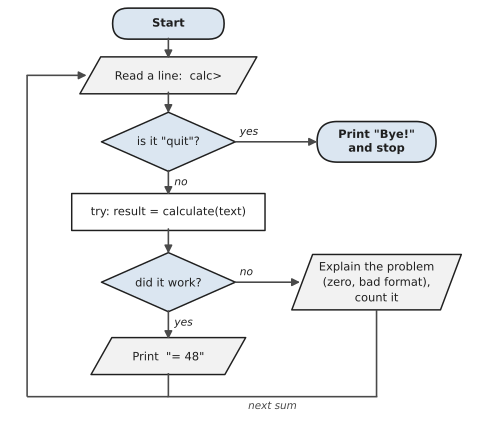
Let’s build a calculator that refuses to crash. It reads a sum like 12 * 4 or 100 / 0, works it out, and handles every kind of bad input you can throw at it. It also keeps a count of how many problems it dealt with, so you can see the safety net at work. Save it as safe_calculator.py:
Figure 8.3 shows the plan. Every line you type goes through the same steps. The important part is the “did it work?” question: whatever goes wrong, the program explains the problem and goes back for another sum, instead of crashing.
1# safe_calculator.py
2# A calculator that handles bad input instead of crashing.
3
4OPERATIONS = {
5    "+": lambda a, b: a + b,
6    "-": lambda a, b: a - b,
7    "*": lambda a, b: a * b,
8    "/": lambda a, b: a / b,
9}
10
11
12def parse(expression):
13    """Split '12 * 4' into (12.0, '*', 4.0). Raise ValueError."""
14    parts = expression.split()
15    if len(parts) != 3:
16        raise ValueError("use the form: number operator number")
17    left, op, right = parts
18    if op not in OPERATIONS:
19        raise ValueError(f"unknown operator '{op}'")
20    return float(left), op, float(right)
21
22
23def calculate(expression):
24    left, op, right = parse(expression)
25    return OPERATIONS[op](left, right)
26
27
28print("Safe Calculator. Type sums like 12 * 4.")
29print("Type 'quit' or press Ctrl+C to stop.\n")
30problems = 0
31
32try:
33    while True:
34        text = input("calc> ").strip()
35        if text.lower() == "quit":
36            break
37        if not text:
38            continue
39        try:
40            result = calculate(text)
41        except ZeroDivisionError:
42            print("  You can't divide by zero.")
43            problems += 1
44        except ValueError as error:
45            print(f"  Can't read that: {error}")
46            problems += 1
47        else:
48            print(f"  = {result:g}")
49except KeyboardInterrupt:
50    print()
51
52print(f"Bye! {problems} problem(s) handled, zero crashes.")
Two new things appear here. The first is lambda, which makes a tiny, nameless function in one line. lambda a, b: a + b is a function that takes a and b and returns their sum. Storing these in a dictionary means we can look up the right operation by its symbol, which is much neater than a long if/elif chain. If lambdas feel strange, you could replace each one with a normal def function and put its name in the dictionary instead. Same result.
The second is the format code :g, which prints a number in its shortest natural form, so 48.0 shows as 48 and 0.5 as 0.5.
Notice how the error handling is layered. parse() raises ValueError when the input is malformed, and also gets one for free when float() meets something like twelve. The main loop catches those errors and turns them into helpful messages. And the whole loop is wrapped in a try that catches Ctrl+C. Each layer has one job.
Here’s a stress test:
Safe Calculator. Type sums like 12 * 4.
Type 'quit' or press Ctrl+C to stop.

calc> 12 * 4
  = 48
calc> 100 / 0
  You can't divide by zero.
calc> twelve + 3
  Can't read that: could not convert string to float: 'twelve'
calc> 5 ^ 2
  Can't read that: unknown operator '^'
calc> 7+3
  Can't read that: use the form: number operator number
calc> 2.5 - 10
  = -7.5
calc> quit
Bye! 4 problem(s) handled, zero crashes.
Try to break it. Seriously. Paste in a paragraph of text, type nothing at all, press Ctrl+C mid-sum. Then improve it:
- Add
**for powers and%for remainders to theOPERATIONSdictionary. - Make it accept
7+3without spaces. (Hint: try looping over the operators and usingsplit(op).) - Keep a history list of successful calculations and print it when the user quits.
You now have one of the most important skills in programming: expecting things to go wrong, and planning for it. Your programs won’t just work on a good day; they’ll behave sensibly on a bad one. And that’s exactly what we need for the next chapter, where we start reading and writing real files, a place where things go wrong all the time.
#On the Job
How it shows up at work: Real data is messy and real users are unpredictable, so a large share of professional code exists to deal with things going wrong: a field left blank, a file that isn’t there, a network that drops out. Reading tracebacks is a daily job too. When a colleague says “it’s throwing an error,” the first thing anyone does is read the last line of the traceback and find the line number. People who do that calmly get a reputation for being good at debugging.
What employers expect: Catch specific exceptions, never everything. Validate input at the edges of your program, where data comes in. Give users plain error messages, and keep the technical details somewhere you can find them. You should also know when not to catch an error: if your code can’t do anything sensible about a problem, letting it crash with a clear message is often the honest choice.
Interview questions you might meet:
- “Why is a bare
except:a bad idea?” It catches everything, including bugs in your own code and even Ctrl+C, so real problems disappear without a trace. Kwame’s story is a good answer to have ready. - “What’s the difference between
elseandfinallyin atryblock?”elseruns only if no error happened.finallyruns whatever happens, and is used for clean-up. - “When would you use
raise?” When your function is given something it can’t work with, like a negative quantity. Raising a clear error is better than returning a wrong answer. - “Walk me through this traceback.” Read from the bottom: the error type and message, then the line where it happened, then the calls that led there.
Portfolio task: Push the crash-resistant calculator to your repository. Then pick one earlier project, perhaps the profile card from Chapter 3, and make it impossible to crash with bad input. Write a short “before and after” note in the README showing what used to happen and what happens now.
Professional habit: When you catch an error, always do something visible: show a message, log it, count it. except ...: pass should make you uneasy every time you type it.
#Exercises
Solutions are in solutions/chapter_08 in the book’s GitHub repository.
Warm-up
Exercise 8.1. Each of these lines raises a different exception. Without running them, name each one, then check: int("ten"), 10 / 0, [1, 2, 3][5], {"a": 1}["b"], "age: " + 30, print(totl).
Exercise 8.2. Here’s a traceback. Which line of the program failed, what kind of error was it, and what’s the most likely fix?
Traceback (most recent call last):
  File "/Users/sara/prices.py", line 4, in <module>
    total = total + price
TypeError: unsupported operand type(s) for +: 'int' and 'str'
Exercise 8.3. Ask the user for their age, and print a friendly message instead of crashing if they type something that isn’t a whole number.
Exercise 8.4. Write a program that divides 100 by a number the user types, handling both a non-number and zero with different messages.
Practice
Exercise 8.5. Write ask_int(prompt, minimum, maximum) that keeps asking until the user types a whole number between the two limits. Use it to ask for a month number (1 to 12).
Exercise 8.6. Given the list prices = ["4.50", "3.20", "free", "7.00", "", "2.75"], add up the valid prices, skip the rest, and print which entries were skipped.
Exercise 8.7. Write safe_get(items, index) that returns the item at that position, or None if the position doesn’t exist. Do it with try and except, not by checking the length.
Exercise 8.8. Write set_volume(level) that raises a ValueError with a clear message if the level isn’t between 0 and 10, and otherwise prints Volume set to N. Call it with a good value and a bad one, catching the error.
Exercise 8.9. Add else and finally blocks to Exercise 8.4 so that it prints the result in else and Calculation finished. in finally. Run it with a good number and a bad one, and notice which lines appear each time.
Exercise 8.10. Write a program that keeps asking for numbers and prints a running total, until the user presses Ctrl+C. Then print the final total and a goodbye message instead of a traceback.
Challenge
Exercise 8.11. Kwame’s payroll, done properly. Given these timesheet rows as (name, hours) pairs, total the hours for each person. Don’t skip bad rows silently: collect them and print a “Please check” list at the end:
1rows = [("Ana", "7.5"), ("Ben", "8"), ("Ana", "7.5h"),
2        ("Cleo", ""), ("Ben", "6.25"), ("Cleo", "8")]
Exercise 8.12. Write a function parse_date(text) that accepts dates written like 2026-11-05 and returns a tuple (2026, 11, 5). Raise a ValueError with a helpful message if the text doesn’t have three parts, if any part isn’t a number, or if the month isn’t between 1 and 12.
Exercise 8.13. Make the guessing game from Exercise 5.10 impossible to crash. It should cope with words, blank input and numbers outside 1 to 20, and none of those should use up one of the five tries.