In the last chapter, data arrived from the internet as JSON, and we saved our weather cache as JSON too. In Chapter 18, the daily digest remembered its last run in a JSON file. JSON has been sneaking into the book for a while. It’s time to look at it directly, because it’s everywhere: web APIs, settings files, app exports, databases, logs. If CSV is the universal format for tables, JSON is the universal format for everything else.
This chapter also introduces an idea that turns scripts into dependable tools: the data pipeline. Real data is messy. It has missing values, typos, numbers stored as text, and records that make no sense. A pipeline is a program that takes messy data in at one end, cleans and checks it step by step, and delivers tidy, trustworthy data at the other end. By the end of the chapter, you’ll have built one. First, though, we’ll look at what JSON looks like and why it’s so popular, how it maps onto Python’s dictionaries and lists, and how to save and load structured data with it. Then we’ll design the pipeline, which cleans data and, just as importantly, keeps track of what it rejected.
#What JSON is
JSON stands for JavaScript Object Notation. The name is a historical accident; it came from the JavaScript language, but today every programming language reads and writes it. Here’s a small piece of JSON describing a book order:
1{
2  "id": 1042,
3  "customer": "Lin Chen",
4  "paid": true,
5  "items": [
6    {"title": "Hands-On Python", "quantity": 1, "price": 39.95},
7    {"title": "Notebook", "quantity": 3, "price": 4.5}
8  ],
9  "coupon": null
10}
If that looks familiar, it should. It’s almost exactly how you’d write the same data as a Python dictionary. Curly braces hold key-value pairs. Square brackets hold lists. Strings are in quotes, numbers aren’t. Values can be nested inside each other as deeply as you like.
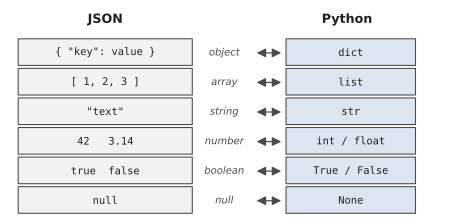
There are only a few small differences from Python, shown in Figure 20.1. JSON writes true, false, and null in lowercase, where Python has True, False, and None. JSON strings must use double quotes, never single ones. Keys must always be strings. And JSON doesn’t allow a trailing comma after the last item, which Python happily accepts.
Why is JSON so popular? Because it hits a sweet spot. It’s plain text, so humans can read it and edit it in any editor. It’s structured, so programs can read it reliably. And it can represent nesting, a customer with a list of orders, each with a list of items, which a flat CSV table can’t do without awkward tricks.
#JSON and Python dictionaries
Python’s built-in json module converts between JSON text and Python objects. There are four functions to know, and they come in two pairs.
json.loads() turns a JSON string into Python objects. json.dumps() does the reverse. (The s at the end stands for “string.”)
1import json
2
3text = '{"name": "Sara", "skills": ["python"], "remote": true}'
4person = json.loads(text)
5print(person["skills"][0])      # python
6print(person["remote"])         # True  (a real Python bool)
7
8person["skills"].append("sql")
9print(json.dumps(person))
python
True
{"name": "Sara", "skills": ["python", "sql"], "remote": true}
Once it’s loaded, it’s just a dictionary. You can read it, change it, loop over it, everything from Chapter 6. And when you turn it back into JSON, True becomes true again automatically.
dumps() puts everything on one line by default, which is compact but hard to read. Add indent=2 and you get neatly laid-out text, like the example at the start of the chapter:
1print(json.dumps(person, indent=2))
#Saving and loading structured data
The other pair, json.load() and json.dump() (no s), work directly with files. They’re the easiest way there is to save a program’s data and get it back exactly as it was:
1import json
2from pathlib import Path
3
4DATA = Path("reading_list.json")
5
6books = [
7    {"title": "The Hobbit", "read": True, "rating": 5},
8    {"title": "Dune", "read": False, "rating": None},
9]
10
11with open(DATA, "w", encoding="utf-8") as file:
12    json.dump(books, file, indent=2)
13
14with open(DATA, encoding="utf-8") as file:
15    loaded = json.load(file)
16
17print(loaded[1]["title"], loaded[1]["rating"])   # Dune None
Compare that with the expense tracker in Chapter 10, where we wrote our own code to turn each expense into a line of text and split it apart again. With JSON, nested data, lists, None, and true/false all survive the round trip without any work from you. For most small programs, a JSON file is all the “database” you’ll ever need.
A few practical details are worth knowing.
Non-English text: By default, dumps() turns characters like é into codes such as é. It’s still correct, but unreadable. Add ensure_ascii=False to keep the real characters: json.dump(data, file, indent=2, ensure_ascii=False).
Not everything fits: JSON only knows about the types in Figure 20.1. Try to save a date, a set, or a Path, and you’ll get TypeError: Object of type date is not JSON serializable. The fix is to convert those values to something JSON understands before saving: dates to strings with .isoformat(), sets to lists with list(). When you load them back, convert again, for example with date.fromisoformat().
Broken files: If a JSON file has been edited by hand and has a typo, a missing comma or a single quote, json.load() raises a json.JSONDecodeError, which tells you the line and column of the problem. It’s a kind of ValueError, so the error handling from Chapter 18’s last_run_time() already covers it.
#Using JSON in automation
You’ve already used JSON in three different roles without making a fuss about it, and they’re worth naming, because they come up again and again.
State: The daily digest stored the time of its last run in a JSON file, so it could remember things between runs. Any automation that needs a memory, which files it has already processed, what it found last time, can keep it in a small JSON file.
Cache: The weather fetcher saved the last response it received, so it had something to show when the network failed.
Data exchange: The weather API sent its answer as JSON. Most web APIs do, and many apps let you export your data as JSON. It’s the common language that lets different programs share information.
There’s a fourth role you’ll see in other people’s projects: configuration. In Chapter 13 we used an INI file for settings, but JSON is just as common, especially when settings are nested. VS Code’s own settings, for example, are stored in a JSON file.
#Data pipelines
Now for the bigger idea. Imagine an online shop exports its orders every night as a JSON file. Before anyone can use that data for reports, someone has to deal with its problems. Some orders have the quantity stored as text, "2" instead of 2. Some have no price. One has a quantity of -1, because somebody made a mistake while testing. Customer emails are typed in a mixture of capitals and lowercase, sometimes with stray spaces.
You could fix these by hand, every night, forever. Or you can write a pipeline.
A pipeline is a series of stages, each one doing a single job and passing its result to the next. The classic shape has three stages, often called ETL: Extract, Transform, Load. Figure 20.2 shows it.
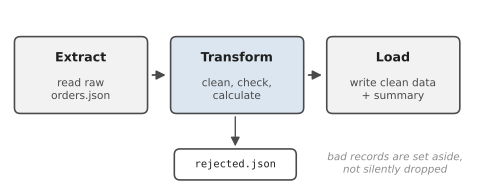
Extract reads the raw data from wherever it lives: a file, an API, a spreadsheet. It doesn’t change anything; its only job is to get the data into Python.
Transform is where the work happens. It cleans each record (fixing types, trimming spaces, standardising capitals), validates it (does it make sense?), and calculates anything extra (like each order’s total).
Load writes the results somewhere useful: a clean file, a summary, a database.
If you remember one rule about pipelines, make it this one: a pipeline never quietly throws data away. If a record is too broken to fix, it goes into a separate “rejected” pile with a note saying what was wrong, so a person can look at it later. A pipeline that silently drops bad records gives you numbers that look right and aren’t. That’s worse than a crash, because a crash at least tells you something is wrong.
Silent extra data is just as dangerous. Elena, an analyst at an online plant shop, built a pipeline a lot like the one you’re about to write, and for months the finance team trusted its revenue figures. Then one quarter came out nine percent higher than the bank statements. It took her two days to find the cause. The shop’s daily export sometimes overlapped by a day, so the last night’s orders in one file showed up again at the start of the next, and her pipeline counted them twice. The fix was a single extra check in the transform stage, “have I seen this order number before?”, with duplicates going to the rejected pile. She’s put a duplicate check in every pipeline since.
#Project: Small Data Pipeline
Let’s build the nightly order pipeline. First, a script that creates a messy file of orders to practise on, with problems deliberately mixed in:
1# make_raw_orders.py - create a messy orders.json to clean up
2import json
3import random
4from pathlib import Path
5
6random.seed(11)
7ITEMS = {"Mug": 14.0, "T-shirt": 29.0, "Sticker pack": 6.5,
8         "Notebook": 9.0, "Tote bag": 19.0}
9NAMES = ["sara ahmed", "LIN CHEN", "Omar Haddad", "priya nair",
10         "  Tom Brooks "]
11
12orders = []
13for order_id in range(1001, 1041):
14    name = random.choice(NAMES)
15    item = random.choice(list(ITEMS))
16    order = {
17        "id": order_id,
18        "customer": name,
19        "email": name.strip().replace(" ", ".").upper()
20                 + "@EXAMPLE.COM ",
21        "item": item,
22        "quantity": random.choice([1, 2, 3, "2", "1"]),
23        "unit_price": ITEMS[item],
24        "date": f"2026-10-{random.randint(1, 31):02d}",
25    }
26    orders.append(order)
27
28# a few deliberately broken records
29orders[5]["unit_price"] = None
30orders[12]["quantity"] = -1
31orders[20]["date"] = "2026-13-40"
32del orders[33]["item"]
33
34path = Path(__file__).parent / "orders.json"
35path.write_text(json.dumps(orders, indent=2), encoding="utf-8")
36print(f"Wrote {len(orders)} messy orders to {path.name}")
Now the pipeline itself. Each stage is a function, and the transform stage is built from small helper functions, so each kind of cleaning has one obvious home:
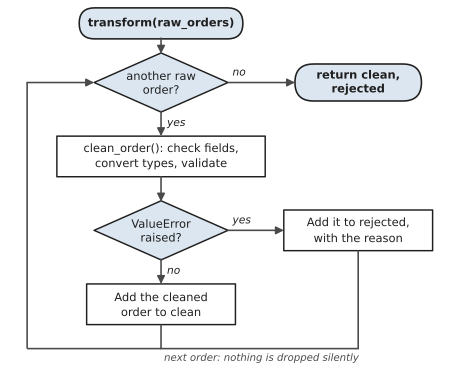
The heart of the pipeline is the transform stage. Figure 20.3 shows what it does with each order. The key detail is the arrow from “ValueError raised?” to the rejected pile: a bad order is set aside with a reason, never thrown away.
1# pipeline.py - clean, check and summarise raw orders
2import json
3import logging
4from collections import defaultdict
5from datetime import date
6from pathlib import Path
7
8HERE = Path(__file__).parent
9RAW_FILE = HERE / "orders.json"
10OUT_DIR = HERE / "output"
11
12logging.basicConfig(level=logging.INFO, format="%(message)s")
13log = logging.getLogger("pipeline")
14
15
16# ---------- Extract ----------
17def extract(path):
18    with open(path, encoding="utf-8") as file:
19        return json.load(file)
20
21
22# ---------- Transform ----------
23def clean_order(raw):
24    """Return a cleaned order, or raise ValueError."""
25    for field in ("id", "customer", "email", "item", "quantity",
26                  "unit_price", "date"):
27        if raw.get(field) in (None, ""):
28            raise ValueError(f"missing {field}")
29    quantity = int(raw["quantity"])          # "2" -> 2
30    if quantity <= 0:
31        raise ValueError(f"bad quantity {quantity}")
32    price = float(raw["unit_price"])
33    order_date = date.fromisoformat(raw["date"])  # checks it
34    return {
35        "id": raw["id"],
36        "customer": raw["customer"].strip().title(),
37        "email": raw["email"].strip().lower(),
38        "item": raw["item"],
39        "quantity": quantity,
40        "unit_price": price,
41        "total": round(quantity * price, 2),
42        "date": order_date.isoformat(),
43    }
44
45
46def transform(raw_orders):
47    clean, rejected = [], []
48    for raw in raw_orders:
49        try:
50            clean.append(clean_order(raw))
51        except (ValueError, TypeError) as error:
52            rejected.append({"order": raw, "reason": str(error)})
53    return clean, rejected
54
55
56def summarise(orders):
57    by_item = defaultdict(lambda: {"quantity": 0, "revenue": 0.0})
58    by_customer = defaultdict(float)
59    for o in orders:
60        by_item[o["item"]]["quantity"] += o["quantity"]
61        by_item[o["item"]]["revenue"] += o["total"]
62        by_customer[o["customer"]] += o["total"]
63    top = max(by_customer, key=by_customer.get)
64    return {
65        "orders": len(orders),
66        "revenue": round(sum(o["total"] for o in orders), 2),
67        "by_item": dict(sorted(by_item.items())),
68        "top_customer": {"name": top,
69                         "spent": round(by_customer[top], 2)},
70    }
71
72
73# ---------- Load ----------
74def save_json(data, path):
75    with open(path, "w", encoding="utf-8") as file:
76        json.dump(data, file, indent=2, ensure_ascii=False)
77
78
79def load(clean, rejected, summary):
80    OUT_DIR.mkdir(exist_ok=True)
81    save_json(clean, OUT_DIR / "orders_clean.json")
82    save_json(rejected, OUT_DIR / "rejected.json")
83    save_json(summary, OUT_DIR / "summary.json")
84
85
86def main():
87    raw = extract(RAW_FILE)
88    log.info("extract:   %d raw orders", len(raw))
89    clean, rejected = transform(raw)
90    log.info("transform: %d clean, %d rejected",
91             len(clean), len(rejected))
92    for r in rejected:
93        log.info("           order %s: %s",
94                 r["order"].get("id"), r["reason"])
95    summary = summarise(clean)
96    load(clean, rejected, summary)
97    log.info("load:      results written to %s/", OUT_DIR.name)
98    log.info("revenue $%.2f, top customer %s",
99             summary["revenue"], summary["top_customer"]["name"])
100
101
102if __name__ == "__main__":
103    main()
Look at how each stage stays in its lane. extract() only reads. clean_order() handles one record and either returns a clean version or raises a ValueError with a clear reason. Notice how much checking it gets almost for free: int("2") fixes text numbers, int(None) would raise a TypeError, and date.fromisoformat("2026-13-40") raises a ValueError because there’s no 13th month. transform() applies the cleaner to every record and sorts the results into two piles, never discarding anything. summarise() does pure calculation. And load() only writes.
Run make_raw_orders.py, then pipeline.py:
extract:   40 raw orders
transform: 36 clean, 4 rejected
           order 1006: missing unit_price
           order 1013: bad quantity -1
           order 1021: month must be in 1..12
           order 1034: missing item
load:      results written to output/
revenue $1079.50, top customer Sara Ahmed
Open output/orders_clean.json and compare it with the raw file. Names are properly capitalised, emails are lowercase without stray spaces, quantities are real numbers, and every order has a total. rejected.json holds the four broken orders, each with its reason, ready for a human to fix. And summary.json holds the figures a report would need.
Here’s the payoff of building it as a pipeline. Tomorrow, when the shop exports a new file, you run it again. When you discover a new kind of mess, say, prices written as "$14.00", you add one line to clean_order(), and every future run handles it. The pipeline grows smarter over time, instead of you getting more tired.
Some ways to extend it:
- Handle prices written as text with a dollar sign, like
"$14.00", using theto_number()idea from Chapter 17. - Add a check that rejects orders dated in the future.
- Make the pipeline read the latest orders from an API instead of a file. Only
extract()needs to change. That’s the whole point of keeping the stages separate.
That’s the end of Part 6. Your programs can now fetch data from the internet, understand JSON, and turn messy data into clean, trustworthy results. In Part 7 we’ll step back from new features and focus on something every programmer needs and most beginners skip: the professional habits of debugging, testing, and managing packages.
#On the Job
How it shows up at work: JSON is the language systems use to talk to each other, so you’ll read and write it constantly: API responses, configuration files, exports from apps, messages between services. And pipelines are an entire career. Data engineers spend their days building and maintaining the extract-transform-load jobs that feed every report and dashboard in a company. Even if that’s not your job title, “clean this data before we use it” is a request every Python user eventually gets.
What employers expect: Move confidently between JSON and Python with json.load, json.dump, json.loads and json.dumps. Navigate nested data with keys and indexes, using .get() where things might be missing. Build pipelines in clear stages, validate every record, and never drop data silently. Know that JSON can’t store dates or sets directly, and convert them yourself.
Interview questions you might meet:
- “What’s the difference between
json.loadandjson.loads?”loadreads from a file;loadsreads from a string (thesis for string). The same goes fordumpanddumps. - “What Python types can JSON hold?” Dictionaries, lists, strings, numbers,
True/FalseandNone. Dates, sets and your own objects have to be converted first, usually to strings or lists. - “What does ETL stand for?” Extract, transform, load. Be ready to describe each stage with an example.
- “How would you make sure a pipeline’s numbers can be trusted?” Validate every record, keep rejected records with reasons, check for duplicates, and compare totals with an independent source. Elena’s story is a good one to tell.
Portfolio task: Push the pipeline with the sample data generator, and add a duplicate check like Elena’s. In the README, show a few lines of rejected.json with their reasons. A pipeline that explains its rejections is exactly the kind of thing data teams want to see.
Professional habit: Count things at every stage. Records in, records cleaned, records rejected, and the two last numbers should add up to the first. If they don’t, something is being lost silently.
#Exercises
Solutions are in solutions/chapter_20 in the book’s GitHub repository.
Warm-up
Exercise 20.1. Turn this dictionary into a JSON string with json.dumps, nicely indented, and print it. Then turn the string back into a dictionary and print the second hobby:
1person = {"name": "Mei", "age": 31,
2          "hobbies": ["climbing", "chess"],
3          "member": True, "nickname": None}
Exercise 20.2. Save a list of three books (each a dictionary with a title, an author and a year) to books.json, then load it again and print the titles.
Exercise 20.3. Here’s some nested JSON. Print the city, the second phone number, and the number of orders:
1{"customer": {"name": "Lin", "address": {"city": "Hobart"},
2              "phones": ["0412 000 111", "03 6200 0000"]},
3 "orders": [{"id": 1, "total": 25.5}, {"id": 2, "total": 12.0}]}
Practice
Exercise 20.4. Try to save a dictionary containing a date object with json.dumps. Read the error, then fix it by converting the date to an ISO string first, and convert it back to a date after loading.
Exercise 20.5. Write a tiny contacts app that stores contacts in contacts.json. It should load existing contacts when it starts (or start with an empty list if there’s no file), let the user add one, and save them all again.
Exercise 20.6. Write clean_email(text) that trims spaces and lowercases an email address, and returns None if what’s left doesn’t contain exactly one @ with something on both sides. Test it on five messy examples.
Exercise 20.7. Given a list of order dictionaries, some with quantities stored as strings and some with missing prices, write a transform stage that returns two lists, clean and rejected, where each rejected record has a reason added.
Exercise 20.8. Summarise the clean orders from Exercise 20.7: the number of orders, total revenue, and revenue per product. Save the summary as summary.json.
Challenge
Exercise 20.9. Elena’s duplicate check. Write a pipeline stage that rejects any order whose id has already been seen, with the reason duplicate of an earlier order. Test it on a list where two orders appear twice.
Exercise 20.10. Write a complete three-stage pipeline in one file: extract() reads raw_orders.json, transform() cleans and validates (including the duplicate check), and load() writes clean.json, rejected.json and summary.json. Print the counts at each stage, and check that clean plus rejected equals the number read in.
Exercise 20.11. Flatten nested JSON for a spreadsheet. Given a list of customers, each with a nested address and a list of orders, write a CSV with one row per order and the columns customer, city, order_id and total.
Exercise 20.12. Write a small state file for a script that processes files in a folder: keep a JSON list of file names already processed, skip those on the next run, and add the new ones. Run it twice and show that the second run processes nothing.