Up to now, every variable has held one thing: a name, an age, a temperature. That stops working the moment you have thirty students to keep track of. You could create student1, student2 and so on up to student30. People do try it. Then they want to print all thirty, or find the oldest, and they realise there’s no way to loop over thirty separate names. Within about an hour, they’ve given up on the idea.
Think about the lists you keep in ordinary life. A shopping list has an order, and you tick things off from the top. Your phone’s contacts aren’t in any useful order; you find people by name. And if you list the countries you’ve visited, it doesn’t matter that you’ve been to France four times, because France only goes on the list once. Three different jobs, three different shapes. Python has a collection for each of them, plus one more, and picking the right one saves you a surprising amount of code.
This chapter introduces Python’s four built-in collections:
- lists, for ordered things that can change
- tuples, for small groups of things that shouldn’t change
- dictionaries, for looking things up by a name or key
- sets, for unique items and fast “is it in here?” checks
And at the end, you’ll use them together to build a small expense tracker.
#Lists
You’ve seen lists already, sneaking into the last chapter. A list is a row of values in square brackets, separated by commas:
1days = ["Mon", "Tue", "Wed", "Thu", "Fri"]
2scores = [72, 88, 95, 61]
3mixed = ["Sara", 29, True]
Lists can hold anything, including a mix of types, though in practice most lists hold one kind of thing. Each item has a position called its index, and here’s the part that confuses every beginner: counting starts at zero. The first item is at index 0, the second at index 1, and so on. For example:
1print(days[0])   # Mon
2print(days[2])   # Wed
3print(days[-1])  # Fri
Negative numbers count from the end, so days[-1] is always the last item, however long the list is. Figure 6.1 shows both ways of counting.
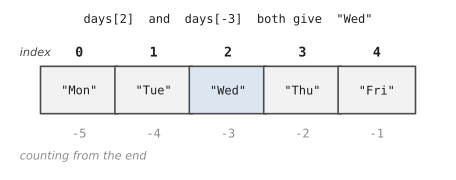
Why zero? The honest answer is history, and that it makes some maths simpler. The useful answer is to think of the index as “how many steps from the start.” The first item is zero steps away. Once you think of it that way, it stops feeling strange.
Ask for an index that doesn’t exist, like days[10], and Python stops with an IndexError: list index out of range. It’s one of the most common errors you’ll meet, and now you know exactly what it means: you asked for a position past the end of the row.
You can also take a slice of a list, a smaller list cut out of the big one:
1print(days[1:3])   # ['Tue', 'Wed']
2print(days[:2])    # ['Mon', 'Tue']
3print(days[3:])    # ['Thu', 'Fri']
The slice [1:3] starts at index 1 and stops before index 3, the same “up to but not including” rule as range(). Leave out the first number and the slice starts at the beginning; leave out the second and it runs to the end.
The real power of lists is that they can change. You can add, remove, and replace items as your program runs:
1todo = ["email Omar", "buy milk"]
2todo.append("call mum")           # add to the end
3todo.insert(0, "coffee")          # add at position 0
4todo.remove("buy milk")           # remove by value
5todo[1] = "email Omar (urgent)"   # replace by position
6print(todo)
7print(len(todo), "things to do")
['coffee', 'email Omar (urgent)', 'call mum']
3 things to do
There’s also sort(), which puts a list in order, sorted(), which gives you a sorted copy and leaves the original alone, and in, which tells you whether something is in the list at all. And of course, lists and for loops were made for each other:
1scores = [72, 88, 95, 61]
2total = 0
3for s in scores:
4    total += s
5print(f"Average: {total / len(scores):.1f}")
6print(f"Best: {max(scores)}, worst: {min(scores)}")
Python has sum() built in as well, so the loop above could be sum(scores) / len(scores). We wrote it out longhand so you can see there’s nothing magical going on.
One more thing about lists surprises nearly everybody, so it’s better to meet it now than in the middle of a bug hunt. Look at this:
1mine = ["tea", "toast"]
2yours = mine
3yours.append("jam")
4print(mine)
['tea', 'toast', 'jam']
We only added jam to yours, so why has mine changed? Remember from Chapter 3 that a variable is a name tag, not a box. yours = mine doesn’t make a second list; it puts a second name tag on the same list. There’s only one breakfast order, with two names on it. When you really want a separate list, ask for a copy:
1yours = mine.copy()
Now the two lists are independent, and changing one leaves the other alone. Dictionaries work the same way and have a .copy() method too. Numbers and strings never cause this surprise, because they can’t be changed in place; anything that looks like changing them actually makes a new value.
#Tuples
A tuple looks like a list wearing round brackets instead of square ones:
1point = (3, 7)
2birthday = (14, "March", 1997)
You get items out of it exactly the same way, with point[0] and so on. The difference is that a tuple can’t be changed once it’s made. No append, no remove, no replacing items. Try point[0] = 5 and Python refuses with a TypeError.
Why would you want something that can’t change? Because sometimes changing would be a mistake. The coordinates of a place, the RGB values of a colour, a date: these are single facts made of a few parts. A tuple says to anyone reading your code, “these values belong together, and they’re fixed.” It’s a small promise, and promises like that prevent bugs.
Tuples also let you do a neat trick called unpacking, where you pull the parts out into separate variables in one line:
1day, month, year = birthday
2print(f"Born in {month} {year}")
You’ll see unpacking a lot when you loop over pairs of things, so it’s worth remembering the shape.
#Dictionaries
Imagine looking up a friend’s phone number in a list. You’d have to go through every entry until you found their name. That’s slow, and it’s not how anyone thinks about a contact book. You think: “Omar’s number.” A name goes in, a number comes out.
That’s a dictionary. It stores key-value pairs, where each key is like the word you look up and each value is what you find there. You write it with curly braces, a colon between each key and its value:
1phones = {
2    "Sara": "0412 555 101",
3    "Omar": "0400 555 202",
4    "Lin": "0433 555 303",
5}
6
7print(phones["Omar"])
0400 555 202
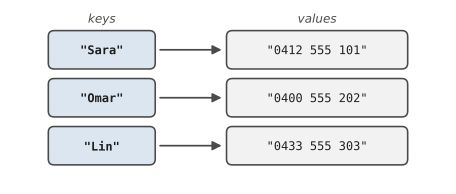
Figure 6.2 shows the idea. Keys on the left, each pointing to its value. To find a value, you don’t need to know a position. You just need its key.
Adding a new pair and changing an existing one look identical:
1phones["Priya"] = "0455 555 404"   # new key: adds it
2phones["Sara"] = "0412 555 999"    # existing key: replaces it
3del phones["Lin"]                  # remove a pair
Ask for a key that isn’t there, like phones["Zoe"], and you’ll get a KeyError. When you’re not sure a key exists, you have two polite options. You can check first with in, or you can use .get(), which returns a fallback instead of crashing:
1if "Zoe" in phones:
2    print(phones["Zoe"])
3
4print(phones.get("Zoe", "no number saved"))
Looping over a dictionary gives you its keys. More often, you want both the key and the value, and .items() hands you each pair as a tuple that you can unpack straight away:
1for name, number in phones.items():
2    print(f"{name:<8}{number}")
Dictionary values can be anything, including lists or other dictionaries. A dictionary describing one person might look like this:
1sara = {
2    "name": "Sara",
3    "age": 29,
4    "languages": ["English", "Bengali"],
5}
6print(sara["languages"][1])   # Bengali
Read that last line left to right: get the value for “languages” (a list), then get item 1 of that list. This kind of nesting is everywhere in real data, from settings files to information downloaded from websites, so it’s worth getting comfortable with it early.
#Sets
A set is a collection where every item appears only once, and order doesn’t matter. You write it with curly braces like a dictionary, but with plain values instead of pairs:
1visited = {"France", "Japan", "Bangladesh"}
2visited.add("Japan")      # already there: nothing happens
3visited.add("Canada")
4print(len(visited))       # 4
Two things make sets useful. First, they remove duplicates automatically. If you have a list with repeats in it, turning it into a set gives you just the unique values:
1tags = ["python", "beginner", "python", "loops", "beginner"]
2unique_tags = set(tags)
3print(unique_tags)
{'loops', 'python', 'beginner'}
Notice the order came out differently. Sets don’t keep order, so never rely on it.
Second, sets can be compared, the same way Venn diagrams compare groups. Which countries have both of us visited? Which ones only I have?
1mine = {"France", "Japan", "Canada"}
2yours = {"Japan", "Kenya", "Canada"}
3
4print(mine & yours)   # both: {'Japan', 'Canada'}
5print(mine | yours)   # either: all five countries
6print(mine - yours)   # only mine: {'France'}
One small trap: {} on its own makes an empty dictionary, not an empty set. For an empty set, write set().
#Choosing the right structure
With four options, how do you choose? Most of the time, a couple of questions settle it. Figure 6.3 lays them out.
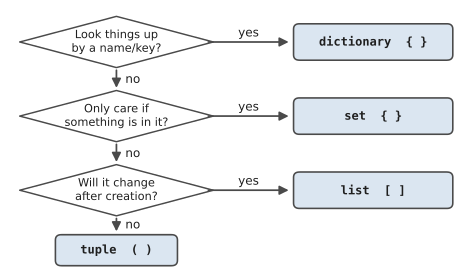
If you’ll look things up by a name, a code, an ID, anything like a label, use a dictionary. If all you care about is whether something is present, and duplicates would be meaningless, use a set. Otherwise you have an ordered collection, and the question is whether it will change. A growing list of tasks is a list. A fixed pair of coordinates is a tuple.
The most common real-world combination, by far, is a list of dictionaries. Each dictionary describes one thing, a person, an order, an expense, and the list holds all of them in order:
1students = [
2    {"name": "Sara", "grade": 88},
3    {"name": "Omar", "grade": 74},
4    {"name": "Lin", "grade": 93},
5]
6
7for s in students:
8    print(f"{s['name']} scored {s['grade']}")
If you remember one pattern from this chapter, make it this one. Spreadsheets, databases, and the data you get from websites all come down to rows of records, and a list of dictionaries is how Python holds rows of records.
The choice can matter a lot once the data gets big. Ahmed works in the office of a furniture warehouse, and every evening he compared the day’s 20,000 orders against a list of the orders that had actually shipped, to find the ones still waiting. His script used if order_id in shipped: with shipped as a list. It worked, but it took nearly ten minutes, because checking a list means looking at every item until you find a match, and he was doing that 20,000 times. A colleague changed one line, shipped = set(shipped), and the same check finished before Ahmed had put his coat on. A set can answer “is it in here?” almost instantly, however many items it holds. The results were identical; only the wait was different.
#Project: Simple Data Tracking System
Let’s build an expense tracker. It lets you add expenses, see them all, and get totals by category. Every expense is a dictionary, the expenses live in a list, the category totals come out as a dictionary, and the list of categories you’ve used is a set. Every structure in the chapter, doing a real job. Save this as expense_tracker.py:
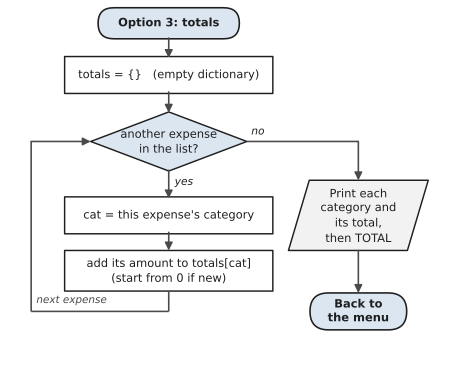
The menu works just like the one in Chapter 5. The new idea is option 3, which builds a dictionary of totals, one category at a time. Figure 6.4 shows that loop. It’s a pattern you’ll use again and again: start with an empty dictionary, go through every item, and add each one’s amount to the right total.
1# expense_tracker.py
2# Track expenses in memory using lists, dicts and sets.
3
4expenses = []          # a list of dictionaries
5
6while True:
7    print("\n1. Add expense   2. Show all")
8    print("3. Totals        4. Categories   q. Quit")
9    choice = input("> ").strip().lower()
10
11    if choice == "1":
12        item = input("What did you buy? ")
13        amount = float(input("How much? $"))
14        category = input("Category (food, transport...): ")
15        expenses.append({
16            "item": item,
17            "amount": amount,
18            "category": category.strip().lower(),
19        })
20        print("Saved.")
21
22    elif choice == "2":
23        if not expenses:
24            print("Nothing recorded yet.")
25        for i, e in enumerate(expenses, start=1):
26            print(f"{i:>2}. {e['item']:<16}"
27                  f"${e['amount']:>8.2f}  ({e['category']})")
28
29    elif choice == "3":
30        totals = {}
31        for e in expenses:
32            cat = e["category"]
33            totals[cat] = totals.get(cat, 0) + e["amount"]
34        for cat, total in sorted(totals.items()):
35            print(f"{cat:<12}${total:>8.2f}")
36        grand = sum(e["amount"] for e in expenses)
37        print(f"{'TOTAL':<12}${grand:>8.2f}")
38
39    elif choice == "4":
40        categories = {e["category"] for e in expenses}
41        print("You've used:", ", ".join(sorted(categories)))
42
43    elif choice == "q":
44        print("Bye! (Your data is gone. Chapter 9 fixes that.)")
45        break
46
47    else:
48        print("Unknown option.")
A few new pieces are hiding in there, so let’s walk through them.
enumerate(expenses, start=1) gives you each item and a counter, so you can number the lines without keeping track yourself. totals.get(cat, 0) + e["amount"] is the classic counting trick for dictionaries: get the running total for this category, or 0 if we haven’t seen it yet, then add this expense. ", ".join(...) glues a list of strings together with a comma between each.
Two lines look a little unusual. sum(e["amount"] for e in expenses) and {e["category"] for e in expenses} are short ways of saying “go through every expense and collect this one value.” The first adds the amounts up, and the second builds a set of categories. They’re called comprehensions, and you can always write them as an ordinary for loop instead, so don’t worry if they feel compressed for now. You’ll get a proper look at them in Chapter 7.
A long print is also split over two lines inside the brackets. Python allows that: as long as a bracket is still open, the line continues. Two f-strings placed side by side are simply joined.
Here’s a session:
1. Add expense   2. Show all
3. Totals        4. Categories   q. Quit
> 1
What did you buy? Flat white
How much? $5.20
Category (food, transport...): food
Saved.
...
> 2
 1. Flat white      $    5.20  (food)
 2. Myki top-up     $   20.00  (transport)
 3. Groceries       $   64.35  (food)
> 3
food        $   69.55
transport   $   20.00
TOTAL       $   89.55
There’s an obvious weakness, which the goodbye message admits: when the program ends, every expense vanishes. Everything lives in the computer’s memory, and memory is wiped when a program stops. In Chapter 9 you’ll save the data to a file so it’s still there tomorrow. For now, try these:
- Add a fifth option that shows the single most expensive purchase.
- Let the user delete an expense by its number. (Hint:
expenses.pop(index)removes and returns the item at a position.) - Add a monthly budget, and warn when the total goes over it.
That’s the end of Part 2. Your programs can now remember things, make decisions, repeat work, and organise data in sensible shapes. Honestly, with just those four abilities you can write a lot of useful software. But as programs grow, they get messy, and you’ll start to notice yourself copying the same few lines from place to place. Part 3 is about writing code that stays clean as it grows, and it starts with functions.
#On the Job
How it shows up at work: Almost all business data is a list of records: customers, orders, invoices, rows of a spreadsheet, results from a website. In Python, that’s a list of dictionaries, and much of a junior developer’s day is spent looping over one, picking out the right records, totting things up, and grouping them. Sets come up whenever someone asks “which of these are missing?” or “how many different customers do we have?”
What employers expect: Pick the right structure and say why. Know the everyday methods by heart: append, pop, sort and slicing for lists, get and items() for dictionaries, and &, | and - for sets. Be able to build a dictionary of totals in a loop, which is the beginner’s version of a pivot table.
Interview questions you might meet:
- “What’s the difference between a list and a tuple?” A list can change; a tuple can’t. Use a tuple for a fixed group of values, like a pair of coordinates.
- “How do you remove duplicates from a list?”
set(items), orlist(dict.fromkeys(items))if you need to keep the original order. - “What happens if you look up a key that doesn’t exist?”
d[key]raises aKeyError.d.get(key)returnsNone, or a default you give it. - “Count how often each word appears in a sentence.” A classic. It’s Exercise 6.10 below.
Portfolio task: Push the expense tracker to your repository, with the monthly budget warning from the end of the project added. In the README, include a short sample of the program’s output. People browsing your work rarely run it, but they’ll read a few lines of output.
Professional habit: When you’re handed a new dataset, print the first two or three records before writing any other code. Most surprises (a missing field, a number stored as text) show up right there.
#Exercises
Solutions are in solutions/chapter_06 in the book’s GitHub repository.
Warm-up
Exercise 6.1. Make a list of five favourite films. Print the first one, the last one, and the middle three using a slice.
Exercise 6.2. Start with numbers = [4, 8, 15, 16, 23, 42]. Add 99 to the end, remove 15, and print the list sorted from largest to smallest.
Exercise 6.3. Make a dictionary of three countries and their capital cities. Print each pair as The capital of Japan is Tokyo.
Exercise 6.4. Predict what this prints, then check:
1a = {1, 2, 3, 4}
2b = {3, 4, 5}
3print(a & b, a | b, a - b)
Practice
Exercise 6.5. Ask the user for five numbers, store them in a list, and print the smallest, the largest, the total, and the average. You can use min(), max() and sum().
Exercise 6.6. Write a shopping-list program. Keep asking for items until the user types done, ignore any item already on the list, then print the list in alphabetical order with a number in front of each item.
Exercise 6.7. Given this list of dictionaries, print only the students who scored 80 or above, and then the class average:
1students = [
2    {"name": "Sara", "grade": 88},
3    {"name": "Omar", "grade": 74},
4    {"name": "Lin", "grade": 93},
5    {"name": "Tom", "grade": 61},
6]
Exercise 6.8. Build a tiny phone book. Store three names and numbers in a dictionary. Ask the user for a name and print the number, or Not found if the name isn’t there. Use .get().
Exercise 6.9. Two friends list the books they’ve read. Using sets, print the books they’ve both read, the books only the first friend has read, and how many different books they’ve read between them.
Exercise 6.10. Ask for a sentence and count how many times each word appears. Ignore capitals, so The and the count as the same word. Print the words with their counts.
Challenge
Exercise 6.11. Here are some expenses as a list of tuples. Build a dictionary of the total spent in each category, then print the categories from the highest total to the lowest:
1expenses = [
2    ("food", 12.50), ("transport", 4.20), ("food", 8.00),
3    ("fun", 25.00), ("transport", 4.20), ("food", 15.30),
4]
Exercise 6.12. Ahmed’s problem in miniature. Given a list of order numbers and a list of shipped order numbers, print the orders that haven’t shipped yet, in order. Then print how many there are:
1orders = [1001, 1002, 1003, 1004, 1005, 1006, 1007]
2shipped = [1002, 1005, 1001, 1007]
Exercise 6.13. Store a small timetable as a dictionary whose keys are days and whose values are lists of classes, such as {"Mon": ["Maths", "Art"], ...}. Print each day with its classes joined by commas, then print the full set of different classes across the week.
Exercise 6.14. Write a program that keeps a list of to-do items. It should repeatedly offer four commands: add, done (remove an item by its number), list, and quit.