Classes have a reputation. Ask people who tried to learn programming where they gave up, and a lot of them will tell you: “Right around classes.” The vocabulary alone sounds like a philosophy lecture. Encapsulation. Instantiation. Polymorphism. It’s enough to make anyone close the book and go and make tea.
Please don’t close the book. This chapter is different from the others, on purpose. We won’t start with code at all. We’ll start with something you’ve held in your hand thousands of times, and we’ll take it apart, slowly, until the idea of a class is sitting in front of you. Only then will we write it in Python. If you get to the end of this chapter, you’re past the place where most self-taught programmers quit, and everything after it gets easier.
Here’s the plan. First, a TV remote: what it knows and what it does. Then the difference between the design of a remote and a remote you can hold. Then we’ll build a Remote class one button at a time, with a picture for each new idea. After that, we’ll make several remotes from the same class and see why that’s useful. Finally, you’ll build a small habit tracker of your own.
#Start with a TV remote
Find a remote. A TV remote, an air-conditioner remote, the little one for a fan, any of them will do. If there isn’t one nearby, look at Figure 11.1.
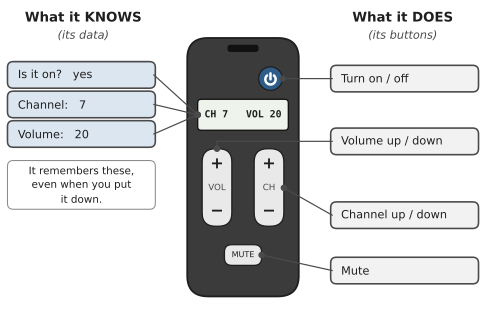
Two kinds of things are going on in that picture.
On the left is what the remote knows. Is the TV on? Which channel is it on? How loud is it? The remote keeps track of these, and it remembers them when you put it down. Pick it up an hour later and it’s still on channel 7.
On the right is what the remote does. It has buttons. Press one and something happens: the volume goes up, the channel changes, the TV switches off.
Now the important part. Those two things belong together. The volume button changes this remote’s volume. It doesn’t change the volume on your neighbour’s TV. The knowing and the doing live in one object, and that’s the whole idea of object-oriented programming, in one sentence:
Python has names for these two parts. What an object knows are its attributes. What it does are its methods. You’ll hear both words a lot, so here’s a way to keep them apart: attributes are nouns (volume, channel), and methods are verbs (turn up, change).
| On a real remote | The Python word | Example |
|---|---|---|
| something it knows | attribute | volume |
| a button you can press | method | volume_up() |
#The design and the thing
Here’s a question that sounds silly but isn’t. How many remotes does a factory design?
One. Somebody draws the design once: where the buttons go, what each one does, what the little screen shows. Then the factory makes thousands of remotes from that one design. Every remote has the same buttons. But each remote has its own settings. Yours is on channel 7. Mine is switched off. Your sister’s is at volume 5.
That’s exactly the difference between a class and an object (Figure 11.2).
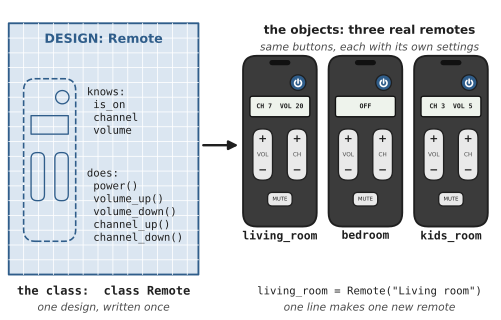
- The class is the design. You write it once. You can’t press its buttons, any more than you can watch TV with a drawing of a remote.
- An object is one real remote made from the design. You can make as many as you like. Another word for an object is an instance, as in “
bedroomis an instance ofRemote.”
If you remember only one line from this chapter, make it this one:
#You’ve already been using objects
You might be surprised to hear that you’ve used objects since Chapter 3. Every string in Python is an object. It knows its text, and it has buttons you press with a dot:
1name = "sara"
2print(name.upper())        # SARA
3print(name.capitalize())   # Sara
Every list is an object too. It knows its items, and it can add to itself and sort itself:
1scores = [72, 95, 61]
2scores.append(88)
3scores.sort()
4print(scores)   # [61, 72, 88, 95]
So upper() and append() are methods: buttons on a string and on a list. str and list are classes that come built into Python. Someone at the Python “factory” designed them, and every string you make is one more object from that design. This chapter is about designing your own.
#Why not just use a dictionary?
Fair question. You already know dictionaries from Chapter 6 and functions from Chapter 7. Couldn’t you describe a remote like this?
1remote = {"is_on": True, "volume": 20, "channel": 7}
2
3def volume_up(r):
4    r["volume"] += 1
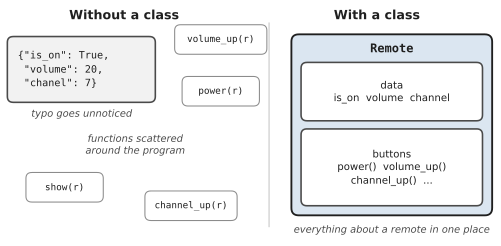
You could, and for a tiny program it works. But watch what happens as the program grows (Figure 11.3).
Nothing stops someone from typing "chanel" instead of "channel". Python won’t notice until much later, when something crashes with a KeyError far away from the typo. Nothing stops someone from setting the volume to 9,000 either, because the rule “never above 100” lives in your head, not in the code. And the functions that work on remotes end up scattered around your program. Six months later, you’re searching three files to find out what a remote can do.
A class fixes all three problems. It puts the data and the buttons in one place, it decides how every new remote starts, and the buttons themselves can enforce the rules. That’s not a philosophy. It’s tidying up.
#Building the Remote class, one button at a time
Let’s write it. We’ll go in five small steps, and you should type each step in and run it before moving on. Create a file called remote.py.
Step 1: An empty design
1class Remote:
2    pass
3
4
5bedroom = Remote()
6print(bedroom)
<__main__.Remote object at 0x10a3b4e50>
class Remote: starts the design. Class names use CapitalisedWords, unlike variables and functions, which is a useful clue when you’re reading code: if a name starts with a capital letter, it’s probably a class. pass means “nothing here yet.”
The line bedroom = Remote() is where a real remote gets made. You call the class like a function, and you get back a brand-new object. Python’s description of it looks odd, but it’s honest: “a Remote object, stored at this address in memory.” (Your number will be different.) We’ll teach it to describe itself properly in Step 5.
Step 2: Factory settings with __init__
A new remote straight out of the box has some starting settings. It’s switched off. The volume is at a sensible level. It’s on channel 1. In Python, those factory settings live in a special method called __init__ (two underscores on each side; people say “dunder init”):
1class Remote:
2    def __init__(self, name):
3        self.name = name
4        self.is_on = False
5        self.volume = 10
6        self.channel = 1
7
8
9bedroom = Remote("Bedroom")
10print(bedroom.name, bedroom.volume, bedroom.channel)
Bedroom 10 1
You never call __init__ yourself. Python calls it for you, automatically, every time a new remote is made. Figure 11.4 shows what happens when that one line bedroom = Remote("Bedroom") runs.
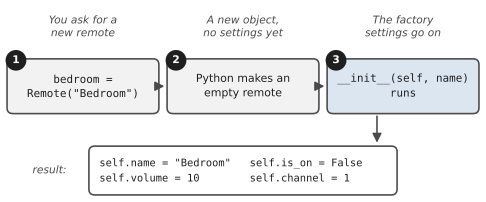
The "Bedroom" you pass in goes to the name parameter of __init__. Every variable that starts with self. becomes an attribute: something this remote knows, and keeps knowing for as long as it exists. You can read any attribute from outside with a dot, as in bedroom.volume.
There’s a bonus here, too. If you forget to give a name and write Remote(), Python stops you straight away with a clear message. Compare that to the dictionary version, where a missing key only causes trouble much later.
Step 3: What is self?
You’ve probably noticed self everywhere, and it’s the word that puzzles everyone. Here’s the plain-English version.
When you write the class, you’re writing the design. You don’t know yet which remote will be used. It could be the bedroom one or the living-room one. So inside the class, you need a word that means “whichever remote this is.” That word is self.
The easiest way to read it is as the word “my”:
self.volume = 10means “set my volume to 10.”self.is_on = Falsemeans “I start switched off.”
Figure 11.5 shows what happens when you press a button on one particular remote.
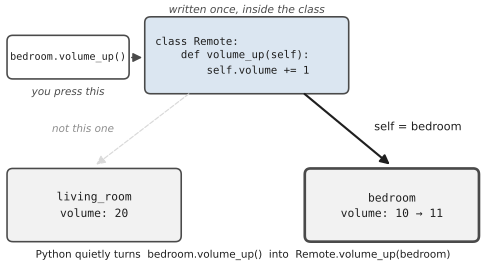
When you write bedroom.volume_up(), Python quietly turns it into Remote.volume_up(bedroom). The object before the dot slides into the self slot. So inside the method, self is bedroom, and self.volume += 1 turns up the bedroom remote. The living-room remote isn’t touched.
That’s why every method has self as its first parameter when you write it, but you never pass it yourself when you call it. Python fills it in.
Step 4: The buttons are methods
Now let’s add buttons. A method is just a function written inside the class, indented under it, with self first:
1class Remote:
2    MAX_VOLUME = 100
3
4    def __init__(self, name):
5        self.name = name
6        self.is_on = False
7        self.volume = 10
8        self.channel = 1
9
10    def power(self):
11        self.is_on = not self.is_on
12
13    def volume_up(self):
14        if self.is_on and self.volume < Remote.MAX_VOLUME:
15            self.volume += 1
16
17    def channel_up(self):
18        if self.is_on:
19            self.channel += 1
Read them out loud, using “my” for self. power says: “if I’m off, turn me on; if I’m on, turn me off.” (not True is False, and not False is True, so one line flips it.) channel_up says: “if I’m on, add one to my channel.”
volume_up is the interesting one, because it has rules. Figure 11.6 is its flowchart.
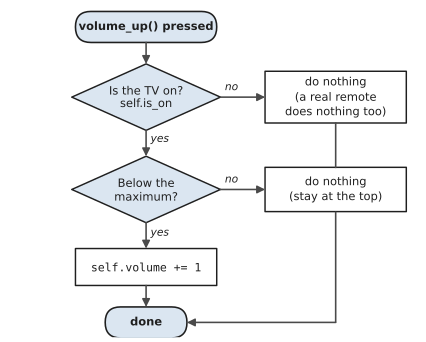
Notice that the rule now lives inside the button. Nobody can push the volume past 100 by accident, because the only way to change the volume is through the button, and the button refuses. And if the TV is off, pressing volume up does nothing at all, exactly like a real remote. Code that behaves like the thing it describes is much easier to think about.
MAX_VOLUME = 100 sits inside the class but outside any method. It’s the same for every remote, so it belongs to the design itself. We’ll come back to that idea later in the chapter.
Try it:
1bedroom = Remote("Bedroom")
2bedroom.volume_up()
3print(bedroom.volume)   # 10: the TV is still off
4bedroom.power()
5bedroom.volume_up()
6print(bedroom.volume)   # 11
Step 5: A little screen with __str__
Real remotes often have a tiny screen that shows what’s going on. Our remote still prints that unhelpful <__main__.Remote object at ...> message. We can give it a screen with another special method, __str__. Whatever it returns is what Python shows when you print the object:
1    def __str__(self):
2        if not self.is_on:
3            return f"[{self.name}] OFF"
4        return f"[{self.name}] CH {self.channel}  VOL {self.volume}"
This goes inside the class, indented like the other methods. Now print(bedroom) shows [Bedroom] CH 1 VOL 11. Python uses __str__ whenever it needs your object as text: in print(), in f-strings, and with str().
#The complete remote
Here’s the whole class, with a few more buttons and a main() function that tries it out. This is the version in Code/chapter_11/remote.py:
1# remote.py
2# A TV remote, written as a Python class.
3
4
5class Remote:
6    MAX_VOLUME = 100     # class variable: the same for every remote
7    made = 0             # class variable: how many remotes exist
8
9    def __init__(self, name):
10        # The factory settings. Every new remote starts like this.
11        self.name = name
12        self.is_on = False
13        self.volume = 10
14        self.channel = 1
15        Remote.made += 1
16
17    def power(self):
18        self.is_on = not self.is_on
19
20    def volume_up(self):
21        if self.is_on and self.volume < Remote.MAX_VOLUME:
22            self.volume += 1
23
24    def volume_down(self):
25        if self.is_on and self.volume > 0:
26            self.volume -= 1
27
28    def channel_up(self):
29        if self.is_on:
30            self.channel += 1
31
32    def channel_down(self):
33        if self.is_on and self.channel > 1:
34            self.channel -= 1
35
36    def go_to(self, number):
37        if self.is_on and number >= 1:
38            self.channel = number
39
40    def __str__(self):
41        if not self.is_on:
42            return f"[{self.name}] OFF"
43        return f"[{self.name}] CH {self.channel}  VOL {self.volume}"
44
45
46def main():
47    living_room = Remote("Living room")
48    bedroom = Remote("Bedroom")
49    kids_room = Remote("Kids' room")
50
51    living_room.power()
52    living_room.go_to(7)
53    for _ in range(10):
54        living_room.volume_up()
55
56    kids_room.power()
57    kids_room.go_to(3)
58    for _ in range(5):
59        kids_room.volume_down()
60
61    bedroom.volume_up()          # the TV is off, so nothing happens
62
63    print(living_room)
64    print(bedroom)
65    print(kids_room)
66    print(f"Remotes made: {Remote.made}")
67
68
69if __name__ == "__main__":
70    main()
[Living room] CH 7  VOL 20
[Bedroom] OFF
[Kids' room] CH 3  VOL 5
Remotes made: 3
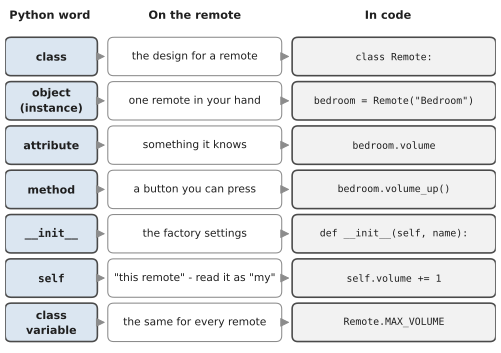
Look back and forth between the code and the remote in Figure 11.7. Every part of the code matches a part you could point at on the real thing. The factory settings are in __init__. The things it knows are the self. attributes. Each button is a method. The screen is __str__.
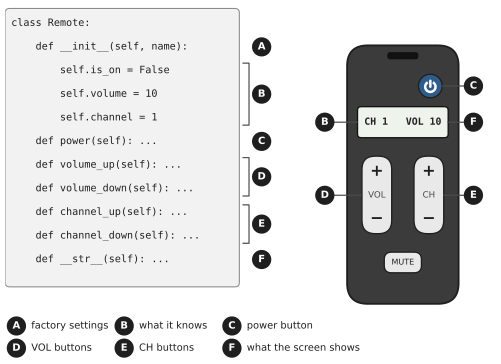
go_to(self, number) shows that a method can take extra information, just like any function. Pressing “go to channel 7” needs to know which channel, so the method has a second parameter. You call it with one argument, living_room.go_to(7), because Python fills in self for you.
for _ in range(10) might look new. The underscore is a perfectly legal variable name, and programmers use it to say “I need a loop that runs ten times, but I don’t care about the counter.”
#One class, many remotes
Look at the output again. Three remotes, all made from one class, and each one is in a completely different state. Turning up the living room didn’t touch the bedroom. That’s the payoff. You wrote the buttons once, and every remote you make gets them for free.
This is how classes show up in real programs. A shop doesn’t have one Customer; it has thousands, all made from one Customer class. A game doesn’t have one Enemy. A school system doesn’t have one Student. Each object keeps its own data, and the class makes sure they all behave the same way.
It also explains why classes make programs easier to change. Suppose you decide the volume should go up in steps of 2. You change one line in volume_up, and every remote in your program, whether there are three or three thousand, gets the new behaviour.
#Instance variables and class variables
Most of the data in our remote belongs to one particular object. The bedroom’s volume is the bedroom’s. These are instance variables, and you create them in __init__ with self..
A few things, though, are the same for every remote. The maximum volume is part of the design. So is the count of how many remotes have been made. These are class variables. You write them inside the class but outside any method, and there’s only ever one copy, shared by everyone (Figure 11.8).
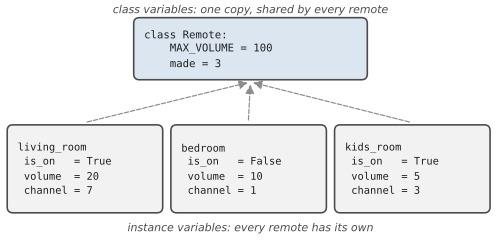
Notice that we update the counter with Remote.made += 1, naming the class, not self.made += 1. That’s deliberate, and it avoids a classic trap. If you write self.made = something, Python doesn’t change the shared value. It quietly creates a brand-new instance variable on that one remote, with the same name, which hides the shared one. It’s like scribbling on your own photocopy of the school timetable and expecting everyone’s timetable to change.
The trap is sneakier with lists. If you write favourites = [] as a class variable and then self.favourites.append(7), every remote ends up sharing one list of favourite channels. Add a favourite on the bedroom remote, and it appears on the kids’ remote too.
Nadia met this one during an internship at a small company that made booking software for gyms. She wrote a Member class with bookings = [] sitting at the top of the class instead of inside __init__. On her laptop, with one test member, everything looked perfect. On the test server, with forty members, one person booking a Tuesday spin class made it appear in everyone’s list. Her manager spotted it in the first five minutes of the demo. “Don’t worry,” he said, “I did exactly the same thing in my first year. Move it into __init__.” It was a one-line fix, and she’s never forgotten it.
#All the class words in one picture
You’ve met a lot of new words in this chapter. Figure 11.9 puts them side by side with the remote. If you only keep one page of this chapter open while you practise, make it this one.
#When classes go wrong
Classes produce a handful of error messages that confuse almost every beginner. They’re all fixable in seconds once you know what they mean:
| What you see | What it means | The fix |
|---|---|---|
volume_up() takes 0 positional arguments but 1 was given | You forgot self in the method definition. Python passed the remote in, and the method had nowhere to put it. | Write def volume_up(self): |
NameError: name 'volume' is not defined | Inside a method, you wrote volume instead of self.volume. | Use self. for anything the object knows. |
Remote.__init__() missing 1 required positional argument: 'name' | You made a remote without the information __init__ asks for. | Remote("Bedroom"), not Remote() |
AttributeError: 'Remote' object has no attribute 'volum' | A typo, or an attribute that was never created in __init__. | Check the spelling against __init__. |
<bound method ...> printed | You named a method without calling it. | Add the brackets: volume_up() |
Remote.volume_up() missing 1 required positional argument: 'self' | You pressed the button on the design instead of on a remote. | bedroom.volume_up(), not Remote.volume_up() |
#Project: Simple Class-Based Program
Remotes were the warm-up. Now it’s your turn to design a class from scratch, and this time the object is something you might actually use every day: a habit. Let’s build a habit tracker. Before writing any code, try the remote questions on it. What does a habit know? Its name, how many times a week you’re aiming for, how many times you’ve done it, and any notes. What can it do? Record a session, work out your progress, draw a progress bar and start a fresh week.
Each habit is an object that knows its name, how many times a week you’re aiming for, and when you’ve done it. It can record a session, work out your progress, and draw a little progress bar. Save this as habit_tracker.py:
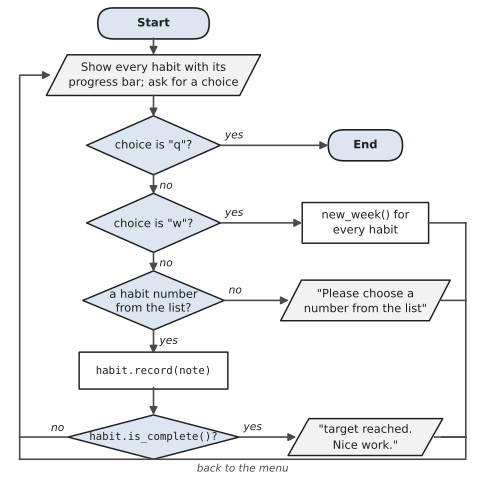
Figure 11.10 shows the main loop, which lives in the main() function. Every path except q leads back to the menu. When you read the code, notice that the flowchart’s steps, such as habit.record(note) and habit.is_complete(), are method calls on a Habit object: the class does the work, and the loop just decides which method to call.
1# habit_tracker.py
2# Track weekly habits, one object per habit.
3
4
5class Habit:
6    BAR_WIDTH = 20      # class variable: same for every habit
7
8    def __init__(self, name, weekly_target):
9        if weekly_target <= 0:
10            raise ValueError("weekly_target must be at least 1")
11        self.name = name
12        self.weekly_target = weekly_target
13        self.done_this_week = 0
14        self.notes = []          # each habit gets its own list
15
16    def record(self, note=""):
17        self.done_this_week += 1
18        if note:
19            self.notes.append(note)
20
21    def progress(self):
22        """Return progress as a fraction from 0.0 up to 1.0."""
23        return min(self.done_this_week / self.weekly_target, 1.0)
24
25    def is_complete(self):
26        return self.done_this_week >= self.weekly_target
27
28    def bar(self):
29        filled = round(self.progress() * Habit.BAR_WIDTH)
30        empty = Habit.BAR_WIDTH - filled
31        return "[" + "#" * filled + "-" * empty + "]"
32
33    def new_week(self):
34        self.done_this_week = 0
35        self.notes.clear()
36
37    def __str__(self):
38        tick = " done!" if self.is_complete() else ""
39        count = f"{self.done_this_week}/{self.weekly_target}"
40        return f"{self.name:<12} {self.bar()} {count}{tick}"
41
42
43def main():
44    habits = [Habit("Exercise", 3), Habit("Reading", 5),
45              Habit("Guitar", 2)]
46
47    while True:
48        print()
49        for i, habit in enumerate(habits, start=1):
50            print(f"{i}. {habit}")
51        print("Type a number to record it, 'w' for a new week,")
52        choice = input("or 'q' to quit: ").strip().lower()
53
54        if choice == "q":
55            break
56        if choice == "w":
57            for habit in habits:
58                habit.new_week()
59            print("Fresh week. Good luck!")
60            continue
61        if choice.isdigit() and 1 <= int(choice) <= len(habits):
62            habit = habits[int(choice) - 1]
63            note = input("Any note? (Enter to skip) ").strip()
64            habit.record(note)
65            if habit.is_complete():
66                print(f"{habit.name}: target reached. Nice work.")
67        else:
68            print("Please choose a number from the list.")
69
70
71if __name__ == "__main__":
72    main()
Look at what the class gives us. All the knowledge about habits lives inside Habit: how to record one, how progress is worked out, how the bar is drawn, how to start a new week. The main() function never touches done_this_week directly. It just asks each habit to do things: habit.record(), habit.is_complete(), print(habit). If you later decide the progress bar should look different, you change one method, and nothing else in the program needs to know.
__init__ also checks its input and raises a ValueError for a target of zero, using what you learned in Chapter 8. A habit can never be created in a broken state. And self.notes is created in __init__, so each habit gets its own list, avoiding the trap we just discussed.
Here’s a short session:
1. Exercise     [--------------------] 0/3
2. Reading      [--------------------] 0/5
3. Guitar       [--------------------] 0/2
Type a number to record it, 'w' for a new week,
or 'q' to quit: 3
Any note? (Enter to skip) Learned a new chord

1. Exercise     [--------------------] 0/3
2. Reading      [--------------------] 0/5
3. Guitar       [##########----------] 1/2
Type a number to record it, 'w' for a new week,
or 'q' to quit: 3
Any note? (Enter to skip)
Guitar: target reached. Nice work.

1. Exercise     [--------------------] 0/3
2. Reading      [--------------------] 0/5
3. Guitar       [####################] 2/2 done!
Some ideas to extend it:
- Add a method
remaining()that returns how many sessions are left this week, and show it in__str__. - Add an option to create a new habit from the menu.
- Use what you learned in Chapter 9 to save each habit’s progress to a file, so it survives between runs.
You’ve written your first real classes, a remote and a habit, and hopefully it felt less like philosophy and more like tidying up. You’re also past the point in the book where most self-taught programmers give up, which is worth a moment of quiet pride. In the next chapter, we’ll look at how classes can be built from other classes, and, just as importantly, when that’s a bad idea.
#On the Job
How it shows up at work: Most large Python codebases are organised around classes: a Customer, an Invoice, a Report, a DatabaseConnection. Even if you rarely write a class from scratch in your first job, you’ll use them constantly, because popular libraries hand you objects to work with. A pandas DataFrame, a Path, a web request: each is an instance of a class, and reading its methods is how you learn what it can do.
What employers expect: Write a small, sensible class: a clear name, an __init__ that sets up every attribute, methods that each do one job, and a __str__ so it prints usefully. Understand self. Know the difference between instance and class variables, and the shared-list trap. Just as importantly, know when not to write a class: if a couple of functions and a dictionary do the job, that’s often better.
Interview questions you might meet:
- “What is
self?” The particular object a method is working on. Python passes it in automatically when you call the method. - “What’s the difference between a class and an instance?” The class is the blueprint; an instance is one object built from it.
- “What’s the difference between
__str__and__repr__?”__str__is the friendly version for users;__repr__is the unambiguous version for developers, ideally looking like the code that would recreate the object. Exercise 11.12 lets you try both. - “Design a class for a bank account.” A classic. Talk through the data (owner, balance) and the actions (deposit, withdraw, refusing to go below zero) before writing code. That’s Exercise 11.5.
Portfolio task: Push the habit tracker, extended so it saves progress to a file. In the README, include a short paragraph explaining why you chose a class here instead of a dictionary. Being able to explain a design decision is something interviewers listen for.
Professional habit: Before writing a class, write down in one sentence what one object of it represents. “A Member is one person with a gym membership.” If the sentence needs an “and,” you might need two classes.
#Exercises
Solutions are in solutions/chapter_11 in the book’s GitHub repository.
Warm-up
Exercise 11.1. Write a Book class with a title, an author and a number of pages. Create two books and print their titles.
Exercise 11.2. Add a __str__ method to Book so that print(book) shows something like Piranesi by Susanna Clarke (272 pages).
Exercise 11.3. This class has a bug. What error does it give, and how do you fix it?
1class Counter:
2    def __init__(self):
3        self.value = 0
4
5    def increase():
6        self.value += 1
Exercise 11.4. Write a Rectangle class with a width and a height, and methods area() and perimeter(). Add an is_square() method that returns True or False.
Practice
Exercise 11.5. Write a BankAccount class with an owner and a balance that starts at 0. Add deposit(amount) and withdraw(amount) methods. Refuse deposits that aren’t positive, and refuse withdrawals that would take the balance below zero, printing a message in each case.
Exercise 11.6. Add a class variable to BankAccount that counts how many accounts have been opened, and a history list on each account that records every successful deposit and withdrawal. Print one account’s history.
Exercise 11.7. Write a Thermostat class with a current temperature and a target. Add raise_target() and lower_target() methods that move the target by 0.5 degrees, never below 10 or above 30, and a status() method that returns heating, cooling or idle.
Exercise 11.8. Write a Playlist class that holds a name and a list of song titles. Add methods to add a song, remove a song, and return the number of songs. Make len(playlist) work by adding a __len__ method.
Exercise 11.9. Write a Student class with a name and a list of marks. Add add_mark(mark), average() and best() methods. Create three students and print which one has the highest average.
Exercise 11.10. Nadia’s bug. Run this code and explain what goes wrong. Then fix it:
1class Member:
2    bookings = []
3
4    def __init__(self, name):
5        self.name = name
6
7    def book(self, session):
8        self.bookings.append(session)
9
10ana = Member("Ana")
11raj = Member("Raj")
12ana.book("Tuesday spin")
13print(raj.bookings)
Challenge
Exercise 11.11. Write a ShoppingCart class. Items are added with a name, a price and a quantity. Include methods for the total, removing an item, and applying a discount code: SAVE10 takes 10% off, and any other code prints Unknown code. Print a neat receipt with a receipt() method.
Exercise 11.12. Give Book from Exercise 11.2 a __repr__ method that returns something like Book('Piranesi', 'Susanna Clarke', 272). Put three books in a list and print the list. Which method does Python use when it prints a list?
Exercise 11.13. Write a Timer class for a simple stopwatch, using time.time() from the time module. It needs start(), stop() and elapsed() methods. Calling stop() before start() should print a sensible message rather than crash. Use it to time how long Python takes to add up the numbers from 1 to a million.
Exercise 11.14. Add a mute() button to the Remote class. Pressing it once should make the volume 0 and remember the old volume; pressing it again should put the old volume back. Make __str__ show MUTED instead of the volume while it’s muted, and make sure volume_up() also unmutes the remote, the way a real one does.