Every time you check the weather on your phone, something interesting happens behind the scenes. The app doesn’t contain the weather. It doesn’t have a tiny meteorologist inside. Instead, it sends a short, precisely worded question over the internet to a computer somewhere that does know: “What’s the forecast for these coordinates?” A fraction of a second later, an answer comes back, not as a pretty web page, but as raw data. The app then turns that data into the cheerful sun icon you see.
That arrangement, one program asking another program for data in an agreed format, is called an API, and it’s how most of the modern internet talks to itself. Currency rates, train times, news headlines, maps, translations, social media posts: there’s an API for nearly everything. And the moment your Python programs can use APIs, they stop being limited to what’s on your computer. They can reach out and use what the world knows.
We’ll start with what an API actually is, in plain terms, then send a request from Python and read the answer. A lot of this chapter is about the many ways a request can go wrong, because on the internet, something always does. The project is a weather tool that keeps working even when the internet doesn’t.
#What APIs are
Think about ordering at a restaurant. You don’t walk into the kitchen and start cooking. You look at the menu, which lists what you can ask for, and you tell the waiter in a fairly fixed format: “the soup, please, no croutons.” The waiter takes that to the kitchen and comes back with exactly what you asked for. You never see how the kitchen works, and you don’t need to.
An API, short for application programming interface, is the menu and the waiter for a computer system. The provider publishes documentation listing what you can ask for and how to phrase it. Your program sends a request in that format. The server does whatever it does in its kitchen and sends back a response. Figure 19.1 shows that exchange.
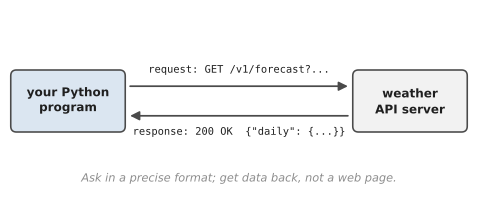
Most web APIs use the same addresses that web pages do: URLs. The difference is what comes back. Visit a normal web page and you get something designed for humans to look at, full of layout and pictures. Ask an API and you get something designed for programs to read, usually in a format called JSON. You’ll meet JSON properly in the next chapter. For now, it’s enough to know that it looks almost exactly like Python dictionaries and lists, so Python can turn it into dictionaries and lists in one step.
An API request is usually just a URL with some extra information attached. Figure 19.2 breaks one into its parts.
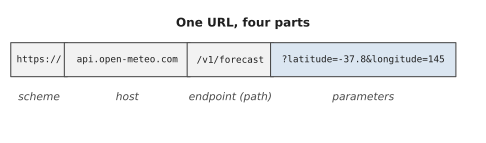
The host is the server you’re talking to. The endpoint, or path, says which service on that server you want, the way a menu has different sections. And the parameters, everything after the ?, are the details of your request, written as name=value pairs joined with &. Here they say which latitude and longitude we want the forecast for.
The API we’ll use in this chapter is Open-Meteo, a free weather service that doesn’t require you to sign up for anything, which makes it perfect for learning. Many other APIs ask you to register and give you an API key, a long secret string that identifies you. We’ll talk about how to handle keys safely later in the chapter.
#Making web requests
Python can fetch URLs using only its standard library, but nearly everybody uses a friendlier library called requests. Install it the usual way:
python -m pip install requests
(Use python3 on macOS and Linux, as before.)
Here’s the simplest possible request, asking the weather API for the current temperature in Melbourne:
1import requests
2
3url = "https://api.open-meteo.com/v1/forecast"
4params = {
5    "latitude": -37.81,
6    "longitude": 144.96,
7    "current": "temperature_2m",
8}
9
10response = requests.get(url, params=params, timeout=10)
11print(response.status_code)
12data = response.json()
13print(data["current"]["temperature_2m"], "°C")
200
18.4 °C
(Your temperature will be different, of course. That’s rather the point.)
Let’s go through it. requests.get() sends a GET request, which is the kind of request that asks for information. Rather than gluing the parameters onto the URL by hand, we give them as a dictionary with params=, and requests builds the URL correctly, handling any special characters for us. timeout=10 says “give up if there’s no answer within ten seconds.” Always include a timeout. Without one, a request to a server that never answers can make your program wait forever.
What comes back is a Response object. Its status_code is a three-digit number saying how things went, and .json() turns the body of the response into Python dictionaries and lists. From there, it’s ordinary dictionary work: data["current"] is a dictionary, and ["temperature_2m"] gets the value inside it.
Status codes are worth learning, because they tell you what happened before you even look at the data. You’ll see a few constantly:
| Code | Meaning | What to do |
|---|---|---|
| 200 | OK | read the data |
| 400 | bad request | check your parameters |
| 401 / 403 | not allowed | check your API key |
| 404 | not found | check the URL |
| 429 | too many requests | slow down and try later |
| 500–599 | server error | not your fault; try later |
The rule of thumb: codes starting with 2 mean success, 4 means you asked for something wrong, and 5 means they have a problem.
If you’re curious what an API actually sent back, print(response.text) shows the raw response as a string. It’s a good habit when you’re exploring a new API. Look at the real data before you write code that assumes its shape.
#Handling responses safely
Here’s the uncomfortable truth about the internet: something is always broken somewhere. Wi-Fi drops. Servers go down for maintenance. APIs change the shape of their data. You hit a limit on how many requests you’re allowed. A program that talks to the internet has to expect all of this, and Chapter 8 gave you the tools.
There are three layers of things that can go wrong, and a sturdy program checks each one.
The request might not get an answer at all: No internet, a server that doesn’t exist, a timeout. In that case requests.get() raises an exception. All of them inherit from one parent, requests.RequestException, so you can catch them together:
1try:
2    response = requests.get(url, params=params, timeout=10)
3except requests.RequestException as error:
4    print(f"Couldn't reach the server: {error}")
The answer might be an error: A 404 or a 500 still counts as an answer, so no exception is raised. You have to check. The tidiest way is response.raise_for_status(), which does nothing for a successful response and raises an exception for any 4xx or 5xx code. That exception is also a kind of RequestException, so one except catches both problems:
1try:
2    response = requests.get(url, params=params, timeout=10)
3    response.raise_for_status()
4    data = response.json()
5except requests.RequestException as error:
6    print(f"Request failed: {error}")
The data might not be what you expected: The API might return an empty result, or a field you rely on might be missing. Use .get() for keys that might not be there, and check before you use things:
1results = data.get("results")
2if not results:
3    print("No matches.")
Beyond errors, being a good citizen of the internet involves a few more habits.
Don’t hammer servers: If you’re making many requests in a loop, pause between them with time.sleep(). Most free APIs have a limit on how many requests you can make per minute or per day, and going over it gets you a 429 and sometimes a temporary ban.
Save what you fetch: If the data won’t change in the next hour, save the response to a file and reuse it instead of asking again. This is called caching. It’s faster, kinder to the server, and as you’ll see in the project, it means your program can still show something useful when the internet is down.
Keep API keys out of your code: If an API gives you a key, never type it directly into a script, and especially never into one you’ll share on GitHub. People run programs that search public code for exactly these keys. Instead, store the key in an environment variable, a setting kept by your operating system, and read it in Python:
1import os
2
3api_key = os.environ.get("NEWS_API_KEY")
4if api_key is None:
5    raise SystemExit("Please set NEWS_API_KEY first.")
On macOS and Linux you set it in the terminal with export NEWS_API_KEY="your-key-here". On Windows Command Prompt it’s set NEWS_API_KEY=your-key-here. Either way, the key lives on your computer, not in your code.
Ibrahim, a student building a news-summary app for a class project, pasted his API key straight into his script “just for now,” and pushed the whole folder to a public GitHub repository that evening. Within the hour, the news service emailed to say his key had been used for thousands of requests from computers he’d never heard of, and it had been suspended. He’d been lucky: some services charge by the request, and leaked keys for those have run up bills in the thousands of dollars before anyone noticed. He made a new key, put it in an environment variable, and added a line to his project’s README telling other people how to set their own. Deleting the key from the code wasn’t enough, by the way. Git remembers every old version of a file, so a leaked key has to be cancelled and replaced, not just removed.
Finally, a note on fairness. Many websites have rules about automated access, written in their terms of service. APIs exist precisely so programs can use them, so using an API as documented is always fine. Scraping ordinary web pages, pulling data out of pages meant for humans, is a greyer area, and it’s worth checking a site’s rules before you try it.
#Project: API-Based Data Fetcher
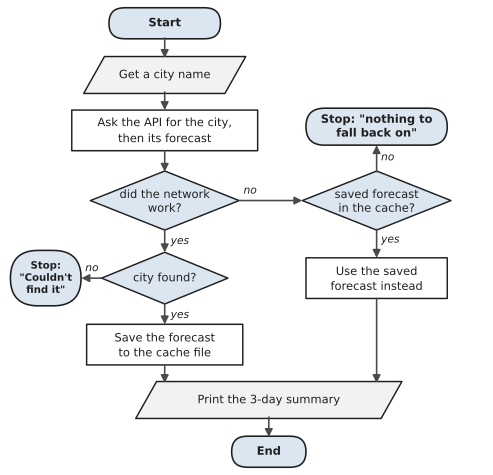
Let’s build a weather tool. You give it a city name. It looks up the city’s coordinates using Open-Meteo’s geocoding API, fetches a three-day forecast, prints a tidy summary, and saves the forecast to a cache file. If the internet is unavailable, it falls back to the last forecast it saved and says so. Save it as weather_fetcher.py:
Figure 19.3 shows the plan, including the part that makes this tool sturdy: when the network fails, it doesn’t give up straight away. It checks whether it saved a forecast last time and shows that instead.
1# weather_fetcher.py - a 3-day forecast from a free weather API
2import json
3import sys
4from pathlib import Path
5
6import requests
7
8HERE = Path(__file__).parent
9CACHE = HERE / "weather_cache.json"
10GEO_URL = "https://geocoding-api.open-meteo.com/v1/search"
11FORECAST_URL = "https://api.open-meteo.com/v1/forecast"
12TIMEOUT = 10        # seconds
13
14
15def find_city(name):
16    """Return (name, country, latitude, longitude), or None."""
17    params = {"name": name, "count": 1}
18    response = requests.get(GEO_URL, params=params,
19                            timeout=TIMEOUT)
20    response.raise_for_status()
21    results = response.json().get("results")
22    if not results:
23        return None
24    place = results[0]
25    return (place["name"], place.get("country", ""),
26            place["latitude"], place["longitude"])
27
28
29def get_forecast(lat, lon):
30    params = {
31        "latitude": lat,
32        "longitude": lon,
33        "daily": "temperature_2m_max,temperature_2m_min,"
34                 "precipitation_probability_max",
35        "timezone": "auto",
36        "forecast_days": 3,
37    }
38    response = requests.get(FORECAST_URL, params=params,
39                            timeout=TIMEOUT)
40    response.raise_for_status()
41    return response.json()
42
43
44def summarise(place, data):
45    daily = data["daily"]
46    rows = zip(daily["time"], daily["temperature_2m_min"],
47               daily["temperature_2m_max"],
48               daily["precipitation_probability_max"])
49    lines = [f"3-day forecast for {place}"]
50    for day, low, high, rain in rows:
51        lines.append(f"  {day}   {low:>3.0f}° to {high:>3.0f}°   "
52                     f"rain chance {rain}%")
53    return "\n".join(lines)
54
55
56def save_cache(place, data):
57    text = json.dumps({"place": place, "data": data}, indent=2)
58    CACHE.write_text(text, encoding="utf-8")
59
60
61def load_cache():
62    try:
63        saved = json.loads(CACHE.read_text(encoding="utf-8"))
64        return saved["place"], saved["data"]
65    except (FileNotFoundError, KeyError, ValueError):
66        return None
67
68
69def main():
70    city = " ".join(sys.argv[1:]) or input("City: ").strip()
71    try:
72        found = find_city(city)
73        if found is None:
74            print(f"Couldn't find a place called '{city}'.")
75            return
76        name, country, lat, lon = found
77        place = f"{name}, {country}"
78        data = get_forecast(lat, lon)
79        save_cache(place, data)
80    except requests.RequestException as error:
81        print(f"Network problem ({type(error).__name__}).")
82        cached = load_cache()
83        if cached is None:
84            print("No saved forecast to fall back on, sorry.")
85            return
86        place, data = cached
87        print("Showing the last forecast I saved instead.\n")
88
89    try:
90        print(summarise(place, data))
91    except (KeyError, TypeError):
92        print("The weather service sent something unexpected.")
93
94
95if __name__ == "__main__":
96    main()
The structure follows the three layers of safety. Every network call has a timeout and a raise_for_status(). main() catches any RequestException, whether it’s a dropped connection or a server error, and falls back to the cache. And summarise() is wrapped in its own try, in case the data comes back in a shape we didn’t expect.
zip() is new. It takes several lists and walks through them side by side, handing you one item from each on every round. The API gives us four separate lists, dates, lows, highs, and rain chances, all in the same order, and zip() lines them up into rows. type(error).__name__ gives the name of the exception’s class, like ConnectionError, which is a friendlier message than the full technical description.
Run it with a city name, either typed when it asks or added on the command line, like python weather_fetcher.py Melbourne:
3-day forecast for Melbourne, Australia
  2026-11-05    11° to  19°   rain chance 35%
  2026-11-06    12° to  24°   rain chance 10%
  2026-11-07    14° to  27°   rain chance 5%
Now switch your Wi-Fi off and run it again:
Network problem (ConnectionError).
Showing the last forecast I saved instead.

3-day forecast for Melbourne, Australia
  2026-11-05    11° to  19°   rain chance 35%
  ...
That’s the difference between a program that works and a program you can rely on. It didn’t crash, it told you honestly what happened, and it still gave you something useful.
Some ways to extend it:
- Add today’s current temperature at the top, using the
currentparameter from the first example. - Accept several cities on the command line and show a forecast for each, with a one-second pause between requests.
- Only use the cache if it’s less than three hours old. (Hint: save the time you fetched it, using
datetime.now().isoformat().)
You’ve now reached out across the internet and brought data home. That data arrived as JSON, and so did our cache. In the next chapter, we’ll look closely at JSON itself and use it to build a small data pipeline.
#On the Job
How it shows up at work: Modern software is stitched together from APIs. Companies pull data from payment providers, shipping companies, CRMs, weather services, mapping services and each other’s internal systems, and moving data between them is a huge part of everyday development work. “Can we get this data out of system X automatically?” is one of the most common questions you’ll be asked, and the answer usually starts with reading that system’s API documentation.
What employers expect: Make requests with requests, always with a timeout. Check status codes, handle failures with RequestException, and never trust the shape of the data blindly. Keep keys out of code. Be polite to servers: cache, slow down, and respect rate limits. Being able to read API documentation and turn an example into working code is a skill employers test directly.
Interview questions you might meet:
- “What’s an API?” An agreed way for one program to ask another for data or actions, usually over the internet, with the answer in a format like JSON.
- “What do 200, 404, 429 and 500 mean?” OK; not found; too many requests; the server had a problem.
- “Why always set a timeout?” Without one, a request to a server that never answers can hang your program forever.
- “How would you store an API key?” In an environment variable (or a secrets manager at bigger companies), never in the code. If a key leaks, cancel it. Ibrahim’s story shows why deleting it isn’t enough.
- “What’s the difference between GET and POST?” GET asks for information. POST sends information to be stored or acted on, like submitting a form.
Portfolio task: Push the weather fetcher, but not its cache file: add a file called .gitignore containing weather_cache.json so Git leaves it out. In the README, explain how the program behaves when the internet is down. Showing you’ve thought about failure is what separates hobby code from professional code.
Professional habit: When you meet a new API, make one request by hand and print the raw response before writing any code that depends on its shape. Then keep a copy of that response as a sample file. It lets you test your code without the internet, and without using up your request limit.
#Exercises
Solutions are in solutions/chapter_19 in the book’s GitHub repository. They use two free APIs that don’t need a key: Open-Meteo for weather and Frankfurter for currency exchange rates. Every solution handles a missing internet connection gracefully, so you can run it offline and see the failure message, which is itself good practice. Free APIs change from time to time, so if one stops responding, check its website for the current address.
Warm-up
Exercise 19.1. Ask Open-Meteo for the current temperature and wind speed (wind_speed_10m) in your own city. Print both, with units.
Exercise 19.2. Make a request to https://api.open-meteo.com/v1/forecast with no parameters at all. Print the status code and the raw text of the response. What does the API tell you?
Exercise 19.3. Use Frankfurter (https://api.frankfurter.dev/v1/latest?from=AUD&to=USD) to print how many US dollars one Australian dollar buys today.
Practice
Exercise 19.4. Write a currency converter. Ask for an amount and two currency codes, like 100, AUD and EUR, and print the converted amount using today’s rate. Handle unknown currency codes with a friendly message.
Exercise 19.5. Ask Open-Meteo for the next seven days of maximum and minimum temperatures (daily=temperature_2m_max,temperature_2m_min, plus timezone=auto) and print a small table with the date, the low and the high.
Exercise 19.6. Write fetch_json(url, params) that makes a request with a timeout, checks the status, and returns the decoded JSON, or None after printing a clear message if anything goes wrong. Use it in Exercises 19.4 and 19.5.
Exercise 19.7. Compare the current temperature in three cities of your choice and print which one is warmest. Pause for one second between requests.
Exercise 19.8. Write a script that reads an API key from an environment variable called MY_API_KEY, prints only the first four characters followed by **** if it’s set, and exits with a helpful message if it isn’t.
Challenge
Exercise 19.9. Add caching to the currency converter: save each day’s rates to rates_cache.json with the date, and only fetch new rates if the cache is from an earlier day. Print whether the answer came from the cache or the internet.
Exercise 19.10. Write fetch_with_retries(url, params, tries=3) that waits 1 second, then 2, then 4 between failed attempts (this is called backoff), and gives up after the last try. Test it with a URL that doesn’t exist.
Exercise 19.11. Use Frankfurter’s history feature (https://api.frankfurter.dev/v1/2026-01-01..2026-01-31?from=AUD&to=USD) to get a month of exchange rates. Print the lowest and highest rate of the month and the dates they happened on.
Exercise 19.12. Write a “should I take an umbrella?” script that checks today’s maximum chance of rain (daily=precipitation_probability_max) for your city and prints advice. If the internet is down, it should say so rather than guessing.