Think about how you make tea. Boil water, put a bag in a cup, pour, wait, remove the bag, add milk if that’s your thing. Now imagine that every time someone in your house wanted tea, you had to write those steps out again on a fresh sheet of paper. Nobody lives like that. Once you’ve learned the steps, they collapse into one idea, “make tea,” and you just do it.
Functions are how you teach Python a new idea like that. You write the steps once, give them a name, and from then on you use the name. It sounds like a small convenience. It’s actually the most important tool you have for keeping programs understandable as they grow. Almost every piece of real software is built out of functions calling other functions.
We’ll start with the pain functions save you from, because once you’ve felt it, the rest makes sense. Then you’ll define and call your own, pass information in with parameters, and get answers back with return. The chapter ends with the habits that keep functions easy to live with, and a small toolbox of functions you’ll reuse for the rest of the book.
#Why functions exist
Look back at the projects from earlier chapters. In several of them, we asked the user for a number with int(input(...)). If the user typed something silly, the program crashed. Suppose we decided to fix that properly, with a loop that keeps asking until it gets a real number. Fine, except that code would need to go in every place we ask for a number. Five places, five copies.
And then, a week later, you decide the error message should be friendlier. Now you have to find and change five copies. Miss one, and your program behaves differently depending on which question it’s asking. This is how real projects slowly become unpleasant to work on. Not through one big mistake, but through hundreds of small copies drifting apart.
Priyanka found this out at a small bookkeeping firm. The firm’s invoicing script worked out a 7% service charge in fourteen different places, each one written as amount * 0.07. When the charge went up to 8%, she searched for 0.07 and changed every one she found. She found thirteen. The fourteenth had been written as amount * 7 / 100 by someone else, years before. For a month, one kind of invoice came out a little cheaper than the rest, and the firm only noticed when a client asked why two bills for the same work didn’t match. Afterwards she wrote a single function, service_charge(amount), and replaced all fourteen copies with calls to it. The next time the rate changed, it was a one-line edit.
A function fixes this by giving the code one home. Every part of the program that needs it calls that one home. Change it there, and it changes everywhere.
There’s a second, less obvious benefit. Functions let you think in bigger pieces. When you read total = calculate_total(cart), you don’t need to know how the total is calculated to understand what the line is doing. You can trust the name, keep reading, and only dive into the details if you need to. That’s how humans handle complexity in every field: we package details away behind good names.
#Defining and calling functions
Here’s the simplest possible function:
1def say_hello():
2    print("Hello!")
3    print("Nice to see you.")
def is short for define. Then comes the name you’ve chosen, a pair of brackets, and a colon. The indented lines underneath are the function’s body, the steps it will carry out.
Run that file and... nothing happens. That surprises everyone the first time. Defining a function is like writing a recipe card and putting it in a drawer. You’ve described how to do something, but you haven’t actually done it. To run it, you call the function by writing its name followed by brackets:
1say_hello()
2say_hello()
Hello!
Nice to see you.
Hello!
Nice to see you.
Each call runs the whole body from top to bottom, then returns to the line after the call and carries on. You can call a function as many times as you like, from anywhere in your program after it has been defined.
That last part matters. Python reads your file top to bottom, so the def must come before the first call. If you try to call say_hello() above its definition, you’ll get a NameError, because at that point Python hasn’t read the recipe card yet.
You’ve actually been calling functions since Chapter 2. print(), input(), len(), int(), and range() are all functions that come built into Python. The brackets are the giveaway. Now you’re writing your own.
#Parameters and return values
A function that does exactly the same thing every time is only mildly useful. The real power comes when you can hand it information to work with. Those pieces of information go in the brackets:
1def describe_person(name, age):
2    print(f"{name} is {age} years old.")
3
4describe_person("Sara", 29)
5describe_person("Omar", 41)
Sara is 29 years old.
Omar is 41 years old.
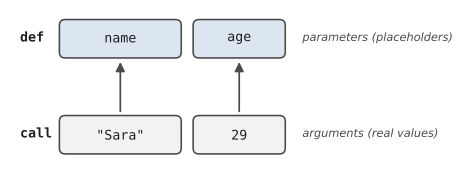
Inside the definition, name and age are parameters. They’re placeholders, like blanks on a form. When you call the function, the values you supply, "Sara" and 29, are called arguments, and they fill in the blanks in order. Figure 7.1 shows the match-up.
You can also pass arguments by name, which helps when a function takes several and you want to be sure which is which: describe_person(age=29, name="Sara") works just as well. And you can give a parameter a default value, so callers can leave it out:
1def greet(name, greeting="Hello"):
2    print(f"{greeting}, {name}!")
3
4greet("Lin")                 # Hello, Lin!
5greet("Lin", "Good morning") # Good morning, Lin!
So far our functions have printed things. But often you don’t want a function to print anything. You want it to work something out and hand you the answer, so you can decide what to do with it. That’s what return is for:
1def calculate_tip(bill, rate):
2    tip = bill * rate
3    return tip
4
5my_tip = calculate_tip(120, 0.15)
6print(f"Leave ${my_tip:.2f}")
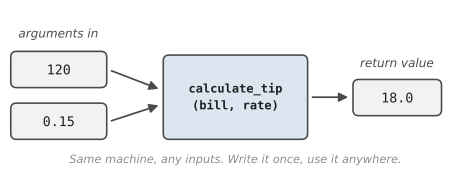
When Python reaches return, the function stops immediately and the value after return is handed back to whoever called it. Here, calculate_tip(120, 0.15) becomes 18.0, which we store in my_tip. Figure 7.2 shows this as a machine: arguments go in, a value comes out.
The difference between print and return trips up almost everyone, so let’s be precise. print shows something on the screen for a human to read. return gives a value back to the program so it can be used. A function that only prints is like a calculator that shows you the answer but won’t let you use it in the next sum. A function that returns is like one that hands you the number to keep working with.
If a function has no return line, or reaches the end without hitting one, it returns a special value called None, which means “nothing.” If you ever see None printed where you expected a number, the usual cause is a function that prints its answer instead of returning it.
A function can return any kind of value, including a list, a dictionary, or a tuple. Returning a tuple is a handy way to send back more than one thing:
1def min_max(numbers):
2    return min(numbers), max(numbers)
3
4low, high = min_max([7, 2, 9, 4])
5print(low, high)   # 2 9
One more idea, and it matters more than it looks. Variables created inside a function only exist inside that function. When the function finishes, they’re gone:
1def calculate_tip(bill, rate):
2    tip = bill * rate
3    return tip
4
5calculate_tip(120, 0.15)
6print(tip)   # NameError: name 'tip' is not defined
This is called scope, and it’s a feature, not a nuisance. It means a function’s internal workings can’t accidentally clash with the rest of your program. You can use a variable called total in ten different functions, and they’ll never interfere with each other. If you need a value from inside a function, return it.
#Writing maintainable functions
Knowing how to write a function is the easy part. Knowing how to write a good one takes longer, but a few principles get you most of the way.
One job each: A function should do one thing, and its name should say what that thing is. If you find yourself naming a function get_input_and_calculate_and_print, it’s three functions pretending to be one. Small, focused functions are easier to test, easier to reuse, and easier to understand.
Name it with a verb: Functions do things, so their names usually start with a verb: calculate_total, load_settings, is_valid_email. That last pattern, starting with is_ or has_, is a lovely convention for functions that return True or False, because the call reads like a question: if is_valid_email(address):.
Take inputs, return outputs: The best functions get everything they need through their parameters and give their result back with return. They don’t secretly read or change variables from elsewhere in the program. A function like that is predictable: same inputs, same output, every time.
Explain it in one line: Python lets you put a short description right at the top of a function, inside triple quotes. This is called a docstring:
1def calculate_tip(bill, rate=0.15):
2    """Return the tip for a bill at the given rate."""
3    return bill * rate
Editors like VS Code show that line when you hover over the function’s name anywhere in your code, so it pays for itself almost immediately.
Keep them short: There’s no strict rule, but if a function no longer fits on your screen, it’s probably doing too much. Look for a chunk inside it that you could give a name to, and pull that chunk out into its own function.
A shortcut you’ll see everywhere: comprehensions
In Chapter 6 we used a compact line to build a set of categories and promised to explain it. Here it is. Very often, you’ll write a loop whose only purpose is to build a new list from an old one:
1prices = [4.5, 12.0, 3.25, 20.0]
2with_tax = []
3for p in prices:
4    with_tax.append(p * 1.1)
Python lets you write that whole pattern in one line, called a list comprehension:
1with_tax = [p * 1.1 for p in prices]
Read it as: “make a list of p * 1.1, for each p in prices.” You can add a condition on the end to keep only some items:
1big = [p for p in prices if p > 10] # [12.0, 20.0]
Swap the square brackets for curly ones and you get a set comprehension, which is what we used in the expense tracker. Comprehensions are optional. Every one of them can be written as an ordinary loop, and if a comprehension starts getting long or clever, the loop is usually kinder to your reader.
#Project: Reusable Utility Functions
Let’s build a small toolbox of functions you’ll actually want to reuse: asking for a number safely, asking a yes/no question, formatting money, and a couple of handy calculations. Then we’ll use them in a short program to show how much tidier code becomes. Save it as utilities.py:
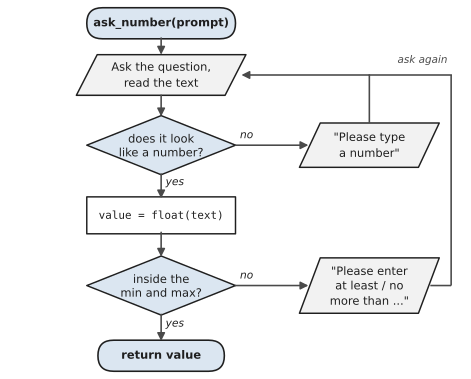
The most useful function in the toolbox is ask_number. Figure 7.3 shows what it does. There are two checks, and if either one fails, the function explains the problem and loops back to ask again. The only way out is a good answer, which is handed back with return.
1# utilities.py
2# A small toolbox of reusable functions, plus a demo.
3
4def ask_number(prompt, minimum=None, maximum=None):
5    """Keep asking until the user types a valid number."""
6    while True:
7        text = input(prompt).strip()
8        if not text.replace(".", "", 1).lstrip("-").isdigit():
9            print("  Please type a number, like 42 or 3.5.")
10            continue
11        value = float(text)
12        if minimum is not None and value < minimum:
13            print(f"  Please enter at least {minimum}.")
14        elif maximum is not None and value > maximum:
15            print(f"  Please enter no more than {maximum}.")
16        else:
17            return value
18
19
20def ask_yes_no(prompt):
21    """Return True for yes and False for no."""
22    while True:
23        answer = input(prompt + " (y/n) ").strip().lower()
24        if answer in ("y", "yes"):
25            return True
26        if answer in ("n", "no"):
27            return False
28        print("  Just y or n, please.")
29
30
31def format_money(amount):
32    """Turn 1234.5 into '$1,234.50'."""
33    return f"${amount:,.2f}"
34
35
36def percent_change(old, new):
37    """Return the change from old to new as a percentage."""
38    if old == 0:
39        return 0.0
40    return (new - old) / old * 100
41
42
43def split_bill(total, people, tip_rate=0.0):
44    """Return what each person pays, tip included."""
45    return total * (1 + tip_rate) / people
46
47
48# ---- A demo program that uses the toolbox ----
49print("=== Bill Splitter ===")
50total = ask_number("Bill total: $", minimum=0)
51people = int(ask_number("Number of people: ",
52                        minimum=1, maximum=50))
53
54tip = 0.0
55if ask_yes_no("Add a tip?"):
56    tip = ask_number("Tip percentage: ",
57                     minimum=0, maximum=100) / 100
58
59each = split_bill(total, people, tip)
60print(f"\nEach person pays {format_money(each)}.")
61
62last_time = ask_number("What did you pay last time? $", minimum=0)
63change = percent_change(last_time, each)
64direction = "more" if change > 0 else "less"
65print(f"That's {abs(change):.0f}% {direction} than last time.")
There’s a lot here, so look at it in two halves. The top half is the toolbox. Every function has one job, a verb-ish name, a docstring, parameters in, and a return value out. The bottom half is the actual program, and notice how readable it is. It reads almost like a description of what it does, because all the fiddly details live in the functions.
ask_number is the star. It loops until the user types something sensible, and it checks the number is in range if you ask it to. The check on the first line inside the loop looks fiddly, so let’s unpack it. isdigit() tells you whether a string is made only of digits. It doesn’t understand a decimal point or a minus sign, so before asking, we remove one dot and any leading minus. It isn’t perfect, but it’s good enough for now, and in Chapter 8 you’ll learn a cleaner way to do this with try and except. The beauty of having it in a function is that when we improve it, every question in every program that uses it improves too.
minimum=None uses a special value we met earlier. None means “nothing given,” so the function only checks the minimum if the caller actually supplied one. And the line direction = "more" if change > 0 else "less" is a compact one-line if, handy when you just need to choose between two values.
Here’s a run, including a couple of deliberate typos:
=== Bill Splitter ===
Bill total: $ninety
  Please type a number, like 42 or 3.5.
Bill total: $186.40
Number of people: 0
  Please enter at least 1.
Number of people: 4
Add a tip? (y/n) maybe
  Just y or n, please.
Add a tip? (y/n) y
Tip percentage: 10

Each person pays $51.26.
What did you pay last time? $45
That's 14% more than last time.
Not a single crash, even with silly input. Try extending the toolbox yourself:
- Write
ask_choice(prompt, options)that only accepts one of the strings in a list. - Write
average(numbers)that returns 0 for an empty list instead of crashing. - Go back to the expense tracker from Chapter 6 and replace its
float(input(...))withask_number. Notice how much sturdier it feels.
Functions are the first big step from “writing code” towards “designing programs.” Next, we’ll deal properly with the thing our ask_number function was working so hard to avoid: errors, and how to handle them gracefully instead of crashing.
#On the Job
How it shows up at work: Professional code is mostly functions. When you open a real project for the first time, you’ll find hundreds of them, each with a name like calculate_invoice_total or send_reminder_email, and your first tasks will usually be “change how this function works” or “add a function that does this.” Being able to read a function’s name, parameters and docstring and understand what it promises, without reading every line inside, is how developers cope with codebases far too big to hold in their heads.
What employers expect: Functions that do one job, have clear verb names and docstrings, and take their inputs as parameters rather than reaching out to global variables. You should know the difference between printing a value and returning it, use default parameter values sensibly, and be comfortable reading a short list comprehension.
Interview questions you might meet:
- “What’s the difference between
printandreturn?”printshows a value on the screen.returnhands it back to the code that called the function, so it can be stored or used. A function that only prints can’t be reused in a calculation. - “What does a function return if it has no
returnstatement?”None. - “Write a function that reverses a string.”
def reverse(text): return text[::-1]. Then expect a follow-up: “now check whether a word is a palindrome.” That’s Exercise 7.8. - “Why shouldn’t you use a list as a default parameter, like
def add(item,items=[])?”The same list is shared between every call, so items pile up from one call to the next. Useitems=Noneand create a new list inside the function.
Portfolio task: Turn the utility functions from this chapter into a file called utils.py with a docstring on every function, and push it. In Chapter 10, you’ll import it from other programs, and you’ll find it’s the most reused file you own.
Professional habit: Write the docstring before the body. If you can’t describe what a function does in one sentence, you’re not ready to write it yet, and the sentence usually tells you what the name should be.
#Exercises
Solutions are in solutions/chapter_07 in the book’s GitHub repository. For the exercises that ask you to write a function, also write two or three lines that call it with different values, so you can see it working.
Warm-up
Exercise 7.1. Write a function greet(name) that prints Hello, Sara! for the name you give it. Call it with three different names.
Exercise 7.2. Write square(n) that returns the square of a number. Use it to print the squares of 1 to 5.
Exercise 7.3. What does this program print? Why?
1def add(a, b):
2    print(a + b)
3
4result = add(2, 3)
5print(result)
Exercise 7.4. Write area_of_rectangle(width, height) and give it a docstring. Then type help(area_of_rectangle) in the shell and see what appears.
Practice
Exercise 7.5. Write celsius_to_fahrenheit(c) and fahrenheit_to_celsius(f). Check that converting 100 one way and then back gives you 100 again.
Exercise 7.6. Write is_even(n) that returns True or False. Use it with a list comprehension to make a list of all the even numbers from 1 to 20.
Exercise 7.7. Write describe_bmi(weight_kg, height_m) that returns a short description: underweight below 18.5, healthy up to 24.9, overweight up to 29.9, and obese above that. Keep the calculation and the description in two separate functions.
Exercise 7.8. Write is_palindrome(word) that returns True if a word reads the same backwards, ignoring capitals. Level and racecar are palindromes; python isn’t.
Exercise 7.9. Write count_letter(text, letter) that returns how many times a letter appears in some text, without using the built-in .count() method.
Exercise 7.10. Write make_username(first, last, year) with a default year=2026 that returns names like sara.khan26. Call it once with a year and once without.
Challenge
Exercise 7.11. Priyanka’s fix. Write service_charge(amount, rate=0.08) and invoice_total(amount), where the total is the amount plus the service charge. Print three invoices of different amounts, nicely formatted, using only those two functions for the arithmetic.
Exercise 7.12. Write stats(numbers) that returns the smallest value, the largest, and the average, all at once, as a tuple. Make it return None for an empty list. Then unpack the result into three variables.
Exercise 7.13. Write password_strength(password) that returns a score from 0 to 4: one point each for being at least 8 characters, containing a digit, containing a capital letter, and containing one of !@#$%. Write a second function that turns the score into a word (weak, okay, strong) and use both in a small program.
Exercise 7.14. Here’s a messy program. Rewrite it using at least three well-named functions so that the main part of the program is only a few lines long:
1prices = [12.5, 8.0, 23.75, 4.2]
2total = 0
3for p in prices:
4    total = total + p
5if total > 40:
6    total = total * 0.9
7print("Total: $" + str(round(total, 2)))
8count = 0
9for p in prices:
10    if p > 10:
11        count = count + 1
12print("Items over $10: " + str(count))