You won’t write any code in this chapter. There are no commands to memorise and nothing to type yet. This chapter is about getting your bearings, so that when the code does arrive in Chapter 2, it lands somewhere that already makes sense.
Think of it as walking into a new building. Before you start using the rooms, you look around: where the doors are, how the corridors connect, where the lifts are. By the end of this chapter you won’t know Python, but you’ll understand the world it lives in, and that changes how everything after it feels. Along the way you’ll find out:
- what Python actually is, and what it isn’t
- how Python sits between you and the computer, acting as a translator
- why a language called C sits underneath Python (and why you don’t need to learn it)
- what happens, step by step, when Python runs your code
- why errors happen, and why they’re nothing to be afraid of
Don’t try to hold on to every detail. If you come away with the general shape of the story, this chapter has done its job.
#You’re Not Behind
Perhaps you’re reading this with a nagging thought: “I should have learned this years ago.” That thought tends to carry some history with it. A tutorial you didn’t finish. Browser tabs you meant to come back to. A video that made perfect sense for five minutes and then lost you. Maybe you tried once or twice, and each time life got in the way. Work got busy, your confidence dipped, and you decided to come back when things were calmer, or when you felt more “ready.”
Picture Daniel, who supervises a warehouse in Melbourne’s west. He first tried to learn programming at twenty-three, from a thick book that spent forty pages on number systems before showing a single useful program. He gave up somewhere around page sixty and decided he “wasn’t a computer person.” Twelve years later, fed up with building the same stock report by hand every week, he tried again with a different approach, and within a month he had a script doing the report for him. Nothing about Daniel had changed except the way he was taught.
Most people who stop learning to program don’t stop because they can’t do it. They stop because the way it was taught didn’t match the way people actually learn. It’s like being handed the car’s service manual when what you needed was someone in the passenger seat saying, “Right, first, start the engine.” So no, you haven’t missed your chance. If anything, you’re starting at the moment you want real understanding rather than another pile of information, which is the best moment to start.
Think about how people learn anything worthwhile. Nobody wakes up and decides to master cooking by reading recipes all day. You learn by standing in a kitchen, burning something, tasting, adjusting, and trying again. Programming is learned the same way, but a lot of programming resources forget to say so. They talk at you instead of walking alongside you.
There’s also an advantage to learning a bit later in life, and it’s a real one. People who come to programming as adults often do better than they expect, because they aren’t trying to prove anything. They have actual problems they want to solve, they’re more patient with confusion, and they ask better questions. They want to know why something works, not just how to copy it. That matters more than raw talent.
You’ll notice this book doesn’t hurry. It doesn’t assume you already know the rules. It explains things the way a friend would: sometimes going round an idea twice, sometimes coming at it from the side, and occasionally stopping to say, “Hang on, this bit matters.” Confidence doesn’t come from speed. It comes from familiarity, from those small moments when something clicks and you think, “Oh, is that all it is?” You’ll have plenty of those.
Nothing here asks you to be brilliant or fearless, either. Curiosity and a bit of patience with yourself are enough, and that applies to the whole book. Now, let’s look at what Python actually is, and why it turns out to be far friendlier than its reputation suggests.
#What Python Is
Python isn’t a machine, and it isn’t a brain. It’s not even particularly clever. Python is a translator. It sits between you and the computer, takes what you mean, and tells the computer exactly what to do. Not roughly. Exactly. That one word, exactly, is behind most of the confusion beginners run into, so it’s worth holding on to. Figure 1.1 shows the idea.
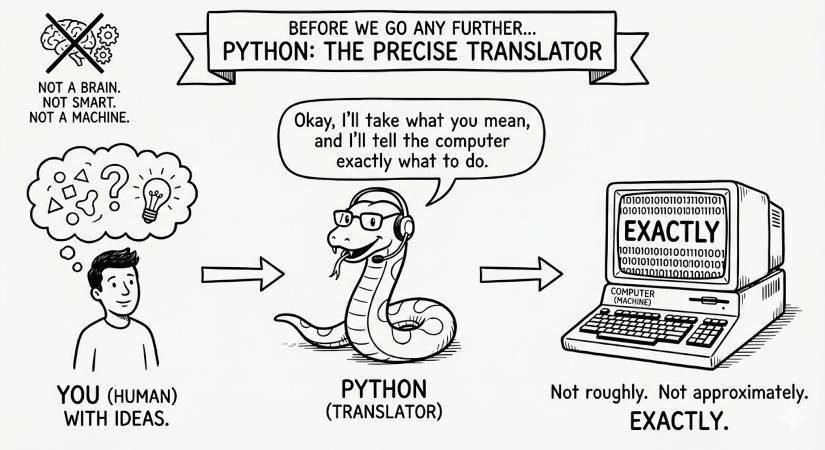
Imagine an assistant who is helpful, polite, and completely literal. If you say, “Please email the report,” they won’t guess which report you mean, who should get it, or whether you wanted it sent now or tomorrow. They’ll stop and say, “I need more details.” In Python, that pause is what we call an error. It isn’t anger and it isn’t failure. It’s a request for a clearer instruction.
That literal-mindedness is also why Python is a good first language. It doesn’t try to be clever, and it doesn’t expect you to think like a machine. It was designed so that code reads almost like plain English. When you come back to your own code a few weeks later, it still makes sense, and when someone else reads it, they don’t need a decoder ring.
It also helps to think of a Python program as a set of written instructions, like a recipe. With a recipe, you don’t throw everything into the pan at once and hope. You preheat the oven, then chop, then cook, then taste. Python works through your instructions the same way, from top to bottom, one line at a time, without skipping ahead or filling in gaps for you. That turns out to be a gift. When something goes wrong, you can follow the steps and point to the exact line where things went off course. That kind of predictability is what lets you trust a program.
You’ll find Python rewards patience. Explain what you want clearly and in order, and it behaves beautifully. Rush, and it gets confused, not because you’re wrong, but because you left a sentence unfinished. If Python ever seems stubborn, it’s usually waiting for you to be more specific.
The good news is that being specific and working step by step are things you already do every day: giving directions, following a recipe, explaining a task to a colleague. You just haven’t done them with a computer yet.
#Python Is the Car, C Is the Engine
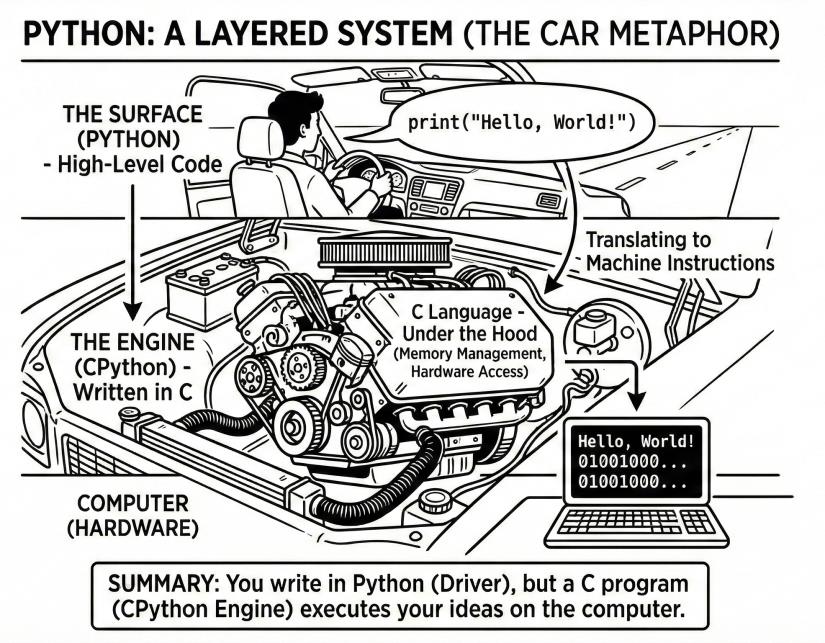
When people say “Python is a programming language,” it’s easy to picture a single thing you install, and that’s that. In reality there are two layers. The first is the one you see: the code you write. The second is the one you don’t: a program that understands that code and actually carries it out. That program is called the Python interpreter, and in most installations it’s a version called CPython, which is written in another language, C. So Python code doesn’t run by itself. It needs something to run it, and that something is a C program.
Why C? Because computers don’t understand Python directly. They understand very low-level machine instructions, and C is much closer to that level than Python is. C is excellent at talking to the operating system, managing memory, handling files, and doing low-level work quickly. Put simply: Python is the language you speak, and CPython, written in C, is the translator and worker that makes your words happen on the machine.
Does that mean you need to learn C to use Python? Not at all. The C layer exists precisely so that you don’t have to deal with the complicated parts.
Think about driving a car. You don’t need to understand fuel injection to drive to the shops. You press the accelerator, and under the bonnet a great deal of precise engineering takes place, so that you can concentrate on the road. Python is the driving. C is under the bonnet.
Here’s what that looks like in practice. When you write print() in Python, CPython reads that instruction, then calls its own internal C code, which asks your operating system to put the text on the screen. You never see the C and you never write it, but it’s doing the heavy lifting. This will come up again later, when you meet libraries that are surprisingly fast: many of the high-performance tools in Python have C (or C++) working away inside them. For now, keep the picture simple:
That one idea will save you a lot of confusion later on. Figure 1.2 shows the layers together.
Next, let’s look at what CPython actually does with your file when you run it.
#How Python Runs Your Code
What actually happens between typing some code and seeing a result? Figure 23.2 shows the whole journey in five steps. It’s worth a slow look, because every program in this book follows exactly this path.
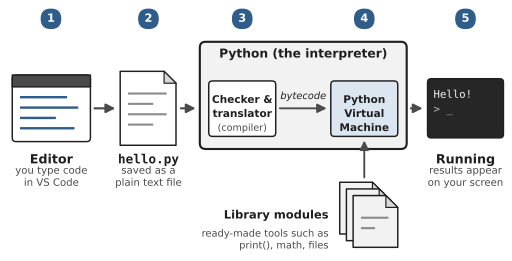
- You write code in an editor: An editor is a program for typing code, a bit like a word processor built for programmers. This book uses one called VS Code, which you’ll install in the next chapter.
- You save it as a
.pyfile: The file is just text, like a note on your phone. It means something to you, but to the computer it’s only a collection of characters. The.pyat the end tells everyone, including your computer, that the text is Python. - Python checks and translates it: When you press Run, Python opens your file and starts at the very first line. First it checks the grammar: are the keywords spelled correctly, is the indentation consistent, does every opening bracket have a closing one? If something’s wrong here, Python stops straight away with a
SyntaxError, and nothing in your program runs. If the grammar is fine, Python translates your code into a simpler in-between form called bytecode. You’ll never write bytecode yourself. Python sometimes saves it in a folder called__pycache__so it doesn’t have to repeat the work next time; when that folder appears one day, you’ll know what it is. - The Python Virtual Machine runs it: This is the part of Python that actually does things. It works through the bytecode one instruction at a time, from top to bottom, storing values, doing calculations, opening files. For many jobs it reaches for library modules, ready-made tools that come with Python. When you write
print(), you don’t have to explain how to put letters on a screen; Python already has a tool for that, and it hands the job over. - You see the result: Output appears on your screen, a file gets written, or a message is sent. The program has run.
Two things in this picture explain a lot of what puzzles beginners. First, Python works strictly in order, top to bottom. If line 3 needs something that only happens on line 7, Python can’t guess what you meant. Second, mistakes can be caught at two different moments: grammar mistakes at step 3, before anything runs, and everything else at step 4, while the program is running. A problem at step 4 is called an exception, and Python prints a report called a traceback that points to the line where things went wrong.
You don’t need to memorise any of this. Just keep the five steps in mind. Whenever something goes wrong later in the book, a good first question is: which step did it go wrong at?
That brings us to errors themselves, and why they deserve far less dread than they usually get.
#Why Errors Happen and Why That’s Okay
Let’s talk about the moment most beginners dread. You run your program, and something appears on the screen. It’s red, or long, or both, and your stomach drops a little. That reaction is incredibly common. Error messages look loud. They feel like the computer pointing at you and announcing, “You got this wrong.”
That isn’t what’s going on, though. An error in Python is a message, and a very literal one. Imagine asking someone for directions and saying, “Turn left at the thing.” If they reply, “Which thing?”, they aren’t telling you off. They’re telling you the instruction wasn’t specific enough to follow. Python behaves the same way. When it meets something it can’t interpret or carry out, it stops and raises an error, because the only other option would be to guess, and Python doesn’t guess.
Most errors have very ordinary causes. A name hasn’t been defined yet. A value isn’t the type Python expected. A line comes before the information it needs. These aren’t deep mistakes; they’re small gaps between what you meant and what Python could understand at that moment.
What Python does next is genuinely helpful, once you know how to read it. It shows you the exception and the traceback, a short account of what it was doing, step by step, until it had to stop. It isn’t random noise. It’s Python pointing at the exact spot where understanding broke down.
There’s something reassuring in that. Python won’t carry on doing the wrong thing and leave you to find out later. It refuses to carry on until the instruction is clear, and that predictability is a big part of what makes programs reliable.
You’ll notice a difference over time, too. Beginners fear errors; experienced programmers expect them. That’s not because anyone enjoys them, but because errors are part of thinking things through. Writing code is a lot like drafting an important email. The first version is rarely right. You read it back, clarify, and try again, and Python is endlessly patient while you do.
So when you see your first error, don’t rush to change things, and definitely don’t apologise to the computer. Read it. Give it a moment. Ask yourself, “What was Python trying to do just before this happened?” That question alone will get you a long way. And remember that seeing errors means you’re running code, which means you’re learning.
Later chapters will show you how to read error messages properly, how to respond to them, and how to write programs that cope with problems gracefully. For now, all you need is a change of perspective. An error isn’t an interruption. It’s the start of a conversation.
#What You’ll Be Doing Very Soon
That’s enough theory for one chapter. In the next one, you’ll install Python and VS Code and run a real program, probably within the hour. It’ll be tiny. It might just print your name. Do it anyway, and pay attention to how it feels when the computer does exactly what you typed. A surprising number of programmers can still remember their first one.
Don’t try to memorise anything in this book. Honestly. You’ll forget most of the details, and that’s fine, because you can look them up (everyone does). What matters is spotting the patterns: oh, this is another loop; this is another file being opened. Those stick by themselves once you’ve seen them a few times.
That one habit matters more than any other advice in this book. Reading code and typing code feel similar, but your fingers notice things your eyes slide past: the colon at the end of the line, the quote marks, the indentation. Copy and paste and you’ll miss all of them.
On to the installation.
#On the Job
How it shows up at work: Search a job site for “Python” and you’ll find far more than programmer jobs. Data analysts use it to clean up spreadsheets and draw charts. Lab researchers process their experiment results with it. Someone in finance has a script that builds the monthly report, and someone in testing has one that clicks through the website every night looking for problems. Web developers and machine learning engineers use it too, of course. The basics are the same in all of those jobs, and they’re what this book teaches.
What employers expect: Nobody expects a beginner to explain the inner workings of the interpreter. They do expect you to talk about Python with the right words: that it’s an interpreted, high-level language, that your code is run by an interpreter (usually CPython), and that errors are reported as exceptions with a traceback. Using vocabulary accurately is a quiet signal that you understand what you’re doing.
Interview questions you might meet:
- “Is Python compiled or interpreted?” The honest answer is “a bit of both,” and saying so impresses people. Python first compiles your code to bytecode, then the Python Virtual Machine runs that bytecode. Most people just say “interpreted,” which is fine for everyday purposes.
- “Why would a team choose Python?” The interviewer wants to hear that you understand the trade-off: Python is quick to write and easy to read, has a huge ecosystem of libraries, and is fast enough for most jobs, with heavy lifting often done by libraries written in C.
Portfolio task: In your GitHub account, create a repository called learning-python with a short README in your own words: why you’re learning, and what you hope to build. A clear, honest README is one of the first things a reviewer reads.
Professional habit: Learn to describe what code does in plain English. In real teams, half the job is explaining your work to people who don’t write code. Start now: when you read an example in this book, say to yourself what it does before you run it.
#Exercises
There’s no code yet, so these are questions to check your understanding. Write your answers down before looking at the suggested answers in solutions/chapter_01/answers.md in the book’s repository.
Warm-up
Exercise 1.1. In one sentence, what does Python do for you, using the translator idea from this chapter?
Exercise 1.2. What’s the name of the program that actually runs your Python code in most installations, and what language is it written in?
Exercise 1.3. In what order does Python read the lines of a program?
Exercise 1.4. What’s the difference between a SyntaxError and an error that happens while the program is running?
Practice
Exercise 1.5. Put these steps in the order they happen when you run a Python file: the Python Virtual Machine runs the instructions; Python checks your grammar; Python turns your code into bytecode; you press Run.
Exercise 1.6. A friend’s program stops with an error on line 12. They say, “Python is broken.” Using what you’ve learned, explain in two or three sentences what’s really going on.
Exercise 1.7. Why might someone who uses Python every day never need to learn C, even though Python’s interpreter is written in C?
Exercise 1.8. Where in a traceback should you look first, and why?
Exercise 1.9. Give two examples of jobs, other than “software developer,” where Python is commonly used, and what it might be used for in each.
Challenge
Exercise 1.10. Write a “recipe” in plain English, as numbered steps, for making a cup of tea, written for someone who is completely literal, like Python. Then read it back and find a step that a literal reader could misunderstand. What would Python do at that step?
Exercise 1.11. Python is often described as “slow” compared with C. Using the car and engine comparison, explain why Python programs can still be fast in practice.
Exercise 1.12. Explain to someone who has never programmed, in about five sentences, why seeing error messages is a good sign when you’re learning.