Once people discover classes, a funny thing often happens. They start building family trees. An Animal class, with a Mammal class under it, with Dog under that, and Puppy under that, and before long there’s a seven-generation dynasty where changing anything at the top breaks something at the bottom, and nobody can remember which class does what.
This chapter is about two ways of building classes out of other classes. One is inheritance, where a class is a more specific version of another. The other is composition, where a class is assembled from other objects, the way a car is assembled from an engine, wheels, and seats. Both are useful. But they’re not equally useful, and experienced programmers reach for one of them far more often than the other. We’ll look at when inheritance genuinely helps, when it causes more trouble than it saves, and how composition works and why it’s usually the safer choice. Then we’ll design a small set of smart-home classes that stays readable as it grows.
#When inheritance helps
Suppose you’re building a smart-home app. There are lights, thermostats, and speakers. They’re different, but they also share a lot. Every device has a name. Every device can be switched on and off. Every device can report its status.
You could write three separate classes, each with its own copy of the on/off code. But you already know from Chapter 7 how copies drift apart. Inheritance lets you write the shared part once, in a parent class, and have each specific device class build on it:
1class Device:
2    def __init__(self, name):
3        self.name = name
4        self.is_on = False
5
6    def turn_on(self):
7        self.is_on = True
8
9    def turn_off(self):
10        self.is_on = False
11
12    def status(self):
13        return "on" if self.is_on else "off"
14
15    def __str__(self):
16        return f"{self.name}: {self.status()}"
Now a light can be a kind of Device:
1class Light(Device):
2    def __init__(self, name, brightness=100):
3        super().__init__(name)
4        self.brightness = brightness
5
6    def dim(self, level):
7        self.brightness = max(0, min(level, 100))
The (Device) after class Light is the important part. It says “a Light is a Device, with extras.” Light is the child class (also called a subclass), and Device is its parent. The child automatically gets every method the parent has. So this works, even though Light never defined turn_on:
1lamp = Light("Desk lamp")
2lamp.turn_on()
3lamp.dim(40)
4print(lamp)            # Desk lamp: on
5print(lamp.brightness) # 40
Look at super().__init__(name) inside Light.__init__. Since Light has its own __init__, Python would normally use that and skip the parent’s entirely, and then the light would never get a name or is_on. super() means “the parent class,” so that line says “do everything the parent’s setup does first, then I’ll add my own bits.” Forgetting it is a classic mistake, and it shows up as an AttributeError complaining that your object has no attribute is_on.
A child can also replace a parent’s method with its own version. This is called overriding. A light’s status should mention its brightness:
1class Light(Device):
2    # ... __init__ and dim as before ...
3
4    def status(self):
5        if not self.is_on:
6            return "off"
7        return f"on at {self.brightness}%"
Now here’s the real payoff. Because every device has a status() method, code that deals with devices doesn’t need to care which kind it’s holding:
1devices = [Light("Lamp", 60), Thermostat("Heater"),
2           Light("Porch")]
3for d in devices:
4    print(d)
Each object answers in its own way, using its own version of status(). The loop doesn’t need any if statements checking types. That idea, different objects responding to the same request in their own way, has a grand name, polymorphism, but you don’t need to remember it. You just need to notice how much simpler the loop is because of it. Figure 12.1 shows the family.
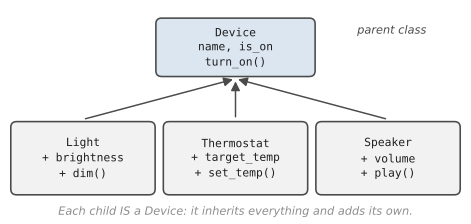
The test for whether inheritance fits is a simple sentence. Can you honestly say “a child is a parent”? A light is a device. A thermostat is a device. If the sentence sounds right, and the child genuinely supports everything the parent can do, inheritance is a reasonable choice.
#When it hurts
Here’s the textbook example of inheritance going wrong. You write a Bird class with a fly() method. Then you add Penguin(Bird). A penguin is a bird, so that seems fine, except now every penguin has a fly() method, and calling it is nonsense. You end up overriding fly() to raise an error, and suddenly code that loops over birds and calls fly() has to worry about penguins. The “is a” test passed in English, but failed in behaviour.
That’s the first problem: a child inherits everything, including things that don’t fit. The parent makes promises on behalf of all its children, and some children can’t keep them.
The second problem is that deep family trees are hard to follow. If Puppy inherits from Dog, which inherits from Mammal, which inherits from Animal, then to understand what a puppy does you have to read four classes, top to bottom, keeping track of which methods were overridden where. It’s like trying to understand a family recipe that says “do what Grandma did, except what Mum changed, except what Auntie changed back.”
The third problem is that parents become fragile. Once ten classes inherit from Device, any change to Device ripples through all ten. A small improvement to the parent can break a child you’d forgotten about, without any warning.
Callum saw this happen at a courier company. Their code had a Vehicle class, and vans, trucks, bikes and, eventually, delivery drones all inherited from it. One afternoon a colleague improved Vehicle.plan_route() so that it avoided toll roads, which saved the vans real money. The next morning, every drone delivery in the city was routed along the roads instead of in a straight line, because the drones had been quietly relying on the old version. Nobody had touched the Drone class at all. The fix took ten minutes; finding the cause took most of a day. Afterwards, the team gave each vehicle a separate route-planner object instead, which is exactly the idea of composition you’re about to meet.
The fourth, and most common in beginners’ code, is inheriting just to borrow a method. Suppose you want a class that sends reports, and you notice an EmailClient class with a handy send() method. Writing class Report(EmailClient) would give you send(), but a report is not an email client. Now your report also has every other email client method and attribute, and anyone reading class Report(EmailClient) will be confused about what a report even is.
#Composition explained simply
The alternative is to build objects out of other objects. A car isn’t a kind of engine. It has an engine. A playlist isn’t a kind of song. It has songs. That’s composition: one object holds others as its attributes and asks them to do things.
Back to the smart home. A room isn’t a kind of device, but it has several devices in it:
1class Room:
2    def __init__(self, name):
3        self.name = name
4        self.devices = []
5
6    def add(self, device):
7        self.devices.append(device)
8
9    def all_off(self):
10        for device in self.devices:
11            device.turn_off()
12
13    def report(self):
14        print(f"--- {self.name} ---")
15        for device in self.devices:
16            print(f"  {device}")
Figure 12.2 shows the relationship. The room holds a list of devices and coordinates them, but it doesn’t inherit anything from them, and they know nothing about the room.
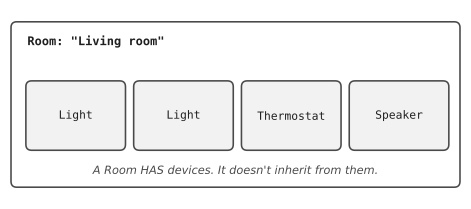
Notice how flexible this is. A room can hold any mix of lights, thermostats, and speakers. You can add or remove devices while the program runs. And Room never has to change when you invent a new kind of device, as long as that device has turn_off() and a sensible __str__.
The report example from earlier gets better this way too. Instead of Report(EmailClient), a report can simply have an email client:
1class Report:
2    def __init__(self, title, mailer):
3        self.title = title
4        self.mailer = mailer      # anything with send()
5
6    def deliver(self, address):
7        self.mailer.send(address, self.title)
Now Report only has the things a report should have. And there’s a lovely bonus: you can hand it a different mailer, say a fake one that just prints instead of sending real emails, which makes testing much easier. You’ll see exactly that trick in Chapter 22.
#Designing readable class systems
So how do you decide what your classes should be? There’s no formula, but these habits will keep you out of trouble.
Start from the nouns: Describe your program in a few plain sentences. “A house has rooms. Each room has devices. A device can be a light, a thermostat, or a speaker.” The important nouns, house, room, device, are your candidate classes. The verbs, turn on, dim, report, are candidate methods.
Keep hierarchies shallow: One level of inheritance, a parent and some children, covers most real needs. If you find yourself going three levels deep, stop and ask whether composition would be simpler.
Give each class one job: The same rule as for functions. If a class’s description needs the word “and” more than once, it’s probably doing too much.
Let objects do their own work: Instead of reaching inside an object and changing its attributes from outside (lamp.brightness = 40), give the object a method that does it (lamp.dim(40)). The method can check the value is sensible, which the outside code would probably forget to do.
Prefer simple data where it’s enough: Not everything needs to be a class. If something is just a bundle of values with no behaviour, a dictionary or tuple is fine. Classes earn their place when data and behaviour belong together.
#Project: Multi-Class Structured Program
Let’s build the smart home properly. It uses inheritance for the device types (a light really is a device) and composition for the rooms and the house (a house really has rooms). Save it as smart_home.py:
1# smart_home.py
2# Inheritance for device types, composition for rooms and houses.
3
4
5class Device:
6    def __init__(self, name):
7        self.name = name
8        self.is_on = False
9
10    def turn_on(self):
11        self.is_on = True
12
13    def turn_off(self):
14        self.is_on = False
15
16    def status(self):
17        return "on" if self.is_on else "off"
18
19    def __str__(self):
20        return f"{self.name:<14}{self.status()}"
21
22
23class Light(Device):
24    def __init__(self, name, brightness=100):
25        super().__init__(name)
26        self.brightness = brightness
27
28    def dim(self, level):
29        self.brightness = max(0, min(level, 100))
30
31    def status(self):
32        if not self.is_on:
33            return "off"
34        return f"on at {self.brightness}%"
35
36
37class Thermostat(Device):
38    def __init__(self, name, target=21):
39        super().__init__(name)
40        self.target = target
41
42    def set_temp(self, degrees):
43        if not 10 <= degrees <= 30:
44            raise ValueError("choose between 10 and 30 degrees")
45        self.target = degrees
46
47    def status(self):
48        if not self.is_on:
49            return "off"
50        return f"heating to {self.target}°C"
51
52
53class Speaker(Device):
54    def __init__(self, name):
55        super().__init__(name)
56        self.song = None
57
58    def play(self, song):
59        self.turn_on()
60        self.song = song
61
62    def turn_off(self):
63        super().turn_off()
64        self.song = None
65
66    def status(self):
67        return f"playing '{self.song}'" if self.song else "off"
68
69
70class Room:
71    def __init__(self, name):
72        self.name = name
73        self.devices = []
74
75    def add(self, device):
76        self.devices.append(device)
77        return device        # handy: lets us keep a reference
78
79    def all_off(self):
80        for device in self.devices:
81            device.turn_off()
82
83    def report(self):
84        print(f"  {self.name}")
85        for device in self.devices:
86            print(f"    {device}")
87
88
89class House:
90    def __init__(self):
91        self.rooms = {}
92
93    def add_room(self, name):
94        self.rooms[name] = Room(name)
95        return self.rooms[name]
96
97    def goodnight(self):
98        for room in self.rooms.values():
99            room.all_off()
100
101    def report(self, title):
102        print(f"\n=== {title} ===")
103        for room in self.rooms.values():
104            room.report()
105
106
107def main():
108    home = House()
109    living = home.add_room("Living room")
110    bedroom = home.add_room("Bedroom")
111
112    lamp = living.add(Light("Floor lamp"))
113    heater = living.add(Thermostat("Heater"))
114    music = living.add(Speaker("Speaker"))
115    reading = bedroom.add(Light("Reading light", brightness=30))
116
117    lamp.turn_on()
118    lamp.dim(60)
119    heater.turn_on()
120    heater.set_temp(23)
121    music.play("Weekend Morning Mix")
122    reading.turn_on()
123    home.report("Evening")
124
125    try:
126        heater.set_temp(45)
127    except ValueError as error:
128        print(f"\nHeater refused: {error}")
129
130    home.goodnight()
131    home.report("After 'goodnight'")
132
133
134if __name__ == "__main__":
135    main()
Notice where each kind of relationship is used. The four device classes form one shallow family: Device and three children, no grandchildren. Each child adds what makes it special and overrides status() to describe itself. Speaker also overrides turn_off() so that switching it off stops the music, and it calls super().turn_off() first so the parent’s version still runs.
Room and House don’t inherit from anything. They’re containers that have other objects and coordinate them. House.goodnight() asks each room to switch everything off, and each room asks each device. Nobody needs to know what kind of device they’re dealing with.
add() returning the device is a small convenience: it lets us write lamp = living.add(Light("Floor lamp")) and keep a name for the lamp in one line. The run looks like this:
=== Evening ===
  Living room
    Floor lamp    on at 60%
    Heater        heating to 23°C
    Speaker       playing 'Weekend Morning Mix'
  Bedroom
    Reading light on at 30%

Heater refused: choose between 10 and 30 degrees

=== After 'goodnight' ===
  Living room
    Floor lamp    off
    Heater        off
    Speaker       off
  Bedroom
    Reading light off
Try extending it in ways that test the design:
- Add a
Blindsdevice withopen()andclose(). How many existing classes do you need to change? (If the design is good, the answer is none.) - Add a
Room.count_on()method that returns how many devices are currently on. - Add a “movie mode” to
Housethat dims every light to 10% and turns the speakers off.
You now know both ways of building classes from other classes, and, more importantly, when to use which. In the next chapter, you’ll put everything from Parts 3 and 4 together in your first major project: a personal automation toolkit with real logging and configuration.
#On the Job
How it shows up at work: You’ll meet inheritance constantly as a user of other people’s code. Web frameworks ask you to inherit from their classes to make a page or a database table, and testing tools ask you to inherit from a test class. Writing your own deep inheritance trees is much rarer, and many teams actively avoid it. Composition is everywhere: an Order has a Customer and a list of Items; a Report has a data source and a formatter.
What employers expect: Use super().__init__() correctly, override a method cleanly, and explain the “is a” versus “has a” test. Above all, they want judgement: knowing that a small, flat design is a strength, not a sign that you haven’t learned the advanced stuff.
Interview questions you might meet:
- “What’s the difference between inheritance and composition?” Inheritance means a class is a more specific kind of another class. Composition means a class has other objects as parts. Prefer composition unless the “is a” relationship is genuine and the child can keep every promise the parent makes.
- “What does
super()do?” It gives you the parent class’s version of a method, most often so a child’s__init__can run the parent’s set-up before adding its own. - “What’s polymorphism?” A long word for a simple idea: different classes having methods with the same name, so one loop can call
device.describe()on lights, speakers and thermostats without caring which is which. - “Here’s a class hierarchy. What would you change?” Look for children that switch off inherited behaviour (the penguin problem), very deep chains, and classes inheriting only to borrow a method.
Portfolio task: Push the smart-home project with movie mode added. Draw the design as a simple diagram (boxes and arrows on paper is fine; photograph it) and put it in the README. A picture of how classes fit together is something reviewers love and few beginners provide.
Professional habit: When you’re tempted to inherit, say the sentence aloud: “a ___ is a ___.” Then ask whether every method of the parent makes sense on the child. Two yeses, and inheritance is fine.
#Exercises
Solutions are in solutions/chapter_12 in the book’s GitHub repository.
Warm-up
Exercise 12.1. For each pair, decide whether inheritance (“is a”) or composition (“has a”) fits better: Car and Engine; Manager and Employee; Library and Book; Square and Shape; Playlist and Song.
Exercise 12.2. Write an Animal class with a name and a speak() method that returns "...". Write Cat and Cow classes that inherit from it and override speak(). Loop over a list of animals and print what each one says.
Exercise 12.3. Write an Employee class with a name and a salary. Write a Manager class that inherits from it, uses super().__init__(), and adds a list of team members.
Exercise 12.4. What does this code print, and why?
1class Parent:
2    def greet(self):
3        return "Hello from Parent"
4
5class Child(Parent):
6    pass
7
8print(Child().greet())
Practice
Exercise 12.5. Write a Shape class with an area() method that raises NotImplementedError. Write Circle, Rectangle and Triangle subclasses with their own area(). Put several shapes in a list and print the total area.
Exercise 12.6. Use composition to build a Car that has an Engine. The engine has a horsepower and start() and stop() methods. The car’s drive() method should refuse to drive unless its engine is running.
Exercise 12.7. Write a Library class that holds Book objects (with a title and an on_loan flag). Add methods to add a book, lend a book by title, return a book, and list the books that are available.
Exercise 12.8. Extend Exercise 12.3 so that both classes have a describe() method. The manager’s version should call the employee version with super().describe() and add a line listing the team.
Exercise 12.9. Build an Order that has a Customer (name and email) and a list of Items (name and price). Give Order a total() method and a summary() method that mentions the customer’s name.
Challenge
Exercise 12.10. The penguin problem, solved. Instead of Penguin(Bird) with a broken fly(), give each bird a movement object: Flying, Swimming or Walking, each with a move(name) method. Create a sparrow, a penguin and an emu, and make each one move.
Exercise 12.11. Callum’s fix. Write a RoutePlanner class with a plan(start, end) method, and two versions of it: RoadPlanner, which says it’s avoiding toll roads, and StraightLinePlanner. Write a Vehicle class that’s given a planner when it’s created. Make a van and a drone that use different planners, and show that changing RoadPlanner can’t affect the drone.
Exercise 12.12. Write a small notification system. Notifier objects each have a send(message) method: EmailNotifier prints Email to ..., SMSNotifier prints Text to .... A Reminder class has a message and a list of notifiers, and its fire() method sends the message through all of them. Add a third kind of notifier without changing Reminder at all.