Rafi does the accounts for a printing shop. Every Monday his manager forwards him a long email thread from customers, and somewhere in the middle of all the “thanks!” and “see attached” there are invoice numbers and payment amounts. Rafi copies each one into a spreadsheet by hand. It takes most of Monday morning, and he’s never completely sure he hasn’t missed one.
Could you automate that with find() and split()? Partly. They’re fine when you know exactly what you’re looking for, like the word Total:. But Rafi doesn’t know the invoice numbers in advance. He knows what they look like: the letters INV, a dash and some digits. Phone numbers have a recognisable look too, and so do email addresses, dates and prices. What he needs is a way to describe that look and say “find everything like this.”
That’s what regular expressions are. They’re a small language for describing patterns in text, and Python understands them through its built-in re module. They have a reputation for looking like a cat walked across the keyboard, and, to be fair, they can. But you only need a handful of pieces to do genuinely useful work, and by the end of this chapter you’ll have built a tool that does Rafi’s Monday morning in under a second.
#Your first pattern
Let’s start with something you could almost do without regex: finding a word. Here’s the simplest possible pattern:
1import re
2
3text = "Please call me back about invoice INV-1042 today."
4match = re.search(r"INV-1042", text)
5print(match)
6print(match.group())
<re.Match object; span=(34, 42), match='INV-1042'>
INV-1042
re.search() looks through the text for the first place the pattern fits. If it finds one, it gives you a match object, which knows what was matched and where (span=(34, 42) means characters 34 to 41). match.group() gives you the matched text itself. If nothing matches, re.search() returns None, so in real code you’ll usually check before using it:
1match = re.search(r"INV-9999", text)
2if match:
3    print("Found", match.group())
4else:
5    print("No such invoice mentioned.")
Notice the little r in front of each pattern string. It makes a raw string, in which a backslash is just a backslash. Regular expressions use backslashes constantly, and without the r, Python would try to interpret some of them itself, \n as a new line, for instance, before the re module ever saw them. Always write patterns as raw strings and you’ll never have to think about it.
So far, nothing special. The magic starts when the pattern stops being exact.
#The building blocks
A regular expression is made from ordinary characters, which match themselves, and a few special ones that stand for kinds of character. Here are the ones you’ll use most:
| Pattern | Matches | Example |
|---|---|---|
\d | any digit, 0 to 9 | \d\d matches 42 |
\w | a letter, digit or underscore | \w+ matches hello_2 |
\s | a space, tab or new line | a\sb matches a b |
. | any character except a new line | c.t matches cat, cut |
[abc] | any one of the characters listed | gr[ae]y matches grey, gray |
[A-Z] | any one character in a range | [A-Z]\d matches B7 |
[^0-9] | any character not listed | [^0-9] matches x |
On their own, each of those matches exactly one character. To say “how many,” you add a quantifier straight after:
| Quantifier | Means | Example |
|---|---|---|
+ | one or more | \d+ matches 7 or 2026 |
* | zero or more | ab* matches a, ab, abbb |
? | optional (zero or one) | colou?r matches both spellings |
{3} | exactly 3 | \d{3} matches 345 |
{2,4} | between 2 and 4 | \d{2,4} matches 12, 2026 |
Now we can describe Rafi’s invoice numbers properly: the letters INV, a dash, then one or more digits:
1text = "Paid INV-1042 and INV-1043, still waiting on INV-987."
2print(re.findall(r"INV-\d+", text))
['INV-1042', 'INV-1043', 'INV-987']
re.findall() returns every match as a list of strings, not just the first. That one line already does most of Rafi’s job.
Let’s try an Australian mobile number, written like 0412 345 678. That’s a zero and a four, two more digits, a space, three digits, a space, and three digits. Figure 16.1 breaks the pattern down piece by piece.
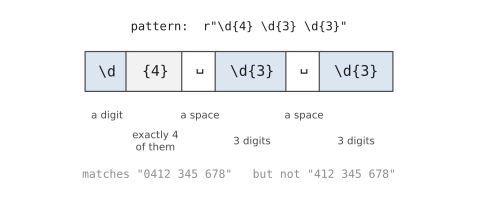
1phone = r"\d{4} \d{3} \d{3}"
2print(re.findall(phone, "Call 0412 345 678 or 0400 111 222."))
['0412 345 678', '0400 111 222']
Real people are inconsistent, of course. Some will write 0412345678 with no spaces. A ? after each space makes the space optional, and suddenly both forms match: r"\d{4} ?\d{3} ?\d{3}". That’s the rhythm of writing regular expressions. Start with the simplest version that matches your example, then loosen it, one piece at a time, as you meet real data.
Three more special characters are worth knowing, because they match a position rather than a character. ^ means “the start of the text,” $ means “the end,” and \b means “a word boundary,” the edge between a word and a space or punctuation mark. They stop patterns matching in the wrong place:
1print(re.findall(r"cat", "cat concatenate scatter"))     # 3 matches
2print(re.findall(r"\bcat\b", "cat concatenate scatter")) # just 1
Finally, what if you want to match a character that’s special, like a full stop or a dollar sign? Put a backslash in front of it. \. matches a real full stop, and \$ matches a real dollar sign. So an amount like $880.00 could be matched with r"\$\d+\.\d{2}".
#Pulling out the parts with groups
Often you don’t want the whole match, you want pieces of it. Put brackets around part of a pattern, and that part becomes a group you can pull out separately:
1match = re.search(r"(\d{4})-(\d{2})-(\d{2})", "Paid on 2026-11-05.")
2print(match.group())     # 2026-11-05
3print(match.group(1))    # 2026
4print(match.groups())    # ('2026', '11', '05')
Numbering groups works, but it gets confusing once you have several. You can give each group a name with (?P<name>...) instead, which reads oddly at first and very clearly forever after. Figure 16.2 shows the idea.
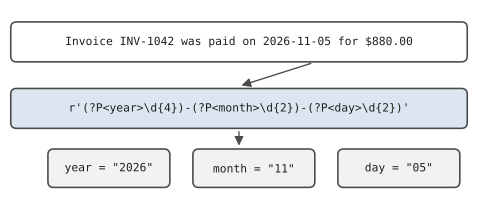
1pattern = r"(?P<year>\d{4})-(?P<month>\d{2})-(?P<day>\d{2})"
2match = re.search(pattern, "Paid on 2026-11-05.")
3print(match.group("month"))     # 11
4print(match.groupdict())
11
{'year': '2026', 'month': '11', 'day': '05'}
groupdict() hands you all the named pieces as a dictionary, which slots straight into everything you’ve learned about dictionaries.
Groups change what findall() returns, too. With one group, it returns just that group from each match. With several, it returns a tuple for each match:
1text = "INV-1042 $880.00, INV-1043 $120.50"
2print(re.findall(r"INV-(\d+) \$([\d.]+)", text))
[('1042', '880.00'), ('1043', '120.50')]
That’s a list of pairs: invoice number and amount, ready to loop over or write to a CSV file.
When you need more than the text, such as where each match was found, re.finditer() gives you a match object for each one instead of a plain string:
1for m in re.finditer(r"INV-(\d+)", text):
2    print(m.group(1), "found at position", m.start())
#Find and replace
Searching is half the story. re.sub() replaces every match with something else, and it’s wonderful for cleaning up messy text:
1messy = "Too    many     spaces   here."
2print(re.sub(r"\s+", " ", messy))
Too many spaces here.
\s+ matches any run of whitespace, and each run is replaced by a single space. You can refer back to groups in the replacement with \1, \2 and so on, which lets you rearrange things. Here’s an Australian date, day first, turned into the international YYYY-MM-DD format:
1text = "Due 05/11/2026, paid 28/10/2026."
2print(re.sub(r"(\d{2})/(\d{2})/(\d{4})", r"\3-\2-\1", text))
Due 2026-11-05, paid 2026-10-28.
For anything more complicated, you can give re.sub() a function instead of a replacement string. It’s called once for each match, receives the match object, and returns the replacement. Here’s one that hides most of each email address, a common need before sharing data:
1def hide(match):
2    name = match.group(1)
3    return name[0] + "***@" + match.group(2)
4
5
6text = "Write to sara.ahmed@example.com or lin@example.org"
7print(re.sub(r"([\w.+-]+)@([\w.-]+)", hide, text))
Write to s***@example.com or l***@example.org
There’s also re.split(), which splits text wherever a pattern matches. It’s handy when the separators vary, like re.split(r"[,;]\s*", "a, b;c ; d"), which copes with commas, semicolons, and any amount of space after them.
#Making patterns readable
Regular expressions earn their reputation when they grow. A pattern like r"(?:\+61\s?|0)4\d{2}\s?\d{3}\s?\d{3}" is correct, but nobody wants to read it. Two tools help.
The first is flags, extra options you pass to any re function. re.IGNORECASE makes a pattern ignore capital letters, so inv-1042 and INV-1042 both match. re.VERBOSE lets you spread a pattern over several lines, with spaces ignored and # comments allowed:
1MOBILE = re.compile(r"""
2    (?:\+61\s?|0)    # +61 (with optional space) or a leading 0
3    4\d{2}           # mobiles start with 4, then two more digits
4    \s?\d{3}         # optional space, three digits
5    \s?\d{3}         # optional space, three digits
6""", re.VERBOSE)
Same pattern, but now it explains itself. (Because spaces are ignored in verbose mode, you write \s for a real space.) The (?:...) is a group that doesn’t capture anything; it just bundles the two alternatives, separated by |, which means “or.”
The second tool is re.compile(), which you just saw. It turns a pattern into a reusable object with its own search(), findall() and sub() methods. It saves Python a little work when you use the same pattern many times, but the real benefit is that you can give the pattern a good name, like MOBILE, and define it once at the top of your file.
#Validating input
In Chapter 8 you checked input with if statements. Regular expressions make some of those checks much shorter. The function to use is re.fullmatch(), which only succeeds if the whole text fits the pattern, not just part of it:
1def looks_like_postcode(text):
2    return re.fullmatch(r"\d{4}", text.strip()) is not None
3
4
5print(looks_like_postcode("3168"))     # True
6print(looks_like_postcode("31680"))    # False
7print(looks_like_postcode("31a8"))     # False
A word of honest warning, though. It’s tempting to try to write the perfect pattern for something like an email address. Don’t. The real rules for email addresses are astonishingly complicated, and a pattern that tries to follow all of them becomes unreadable and still gets some cases wrong. A simple pattern that catches obvious typos, something with an @ and a dot after it, is far more useful. The only way to know an email address is real is to send it an email. The same goes for dates: a pattern can check that 2026-13-40 looks like a date, but only date.fromisoformat() from Chapter 18 can tell you there’s no thirteenth month.
And one more warning, for later: don’t use regular expressions to pull data out of web pages or other HTML. HTML is nested in ways regular expressions aren’t built for. There are proper libraries for that.
When you’re building a pattern, an online tester such as regex101.com is a great help. You paste in some sample text, type your pattern, and it highlights the matches as you go and explains every piece. Make sure you choose the Python setting.
#Project: Text Data Extractor
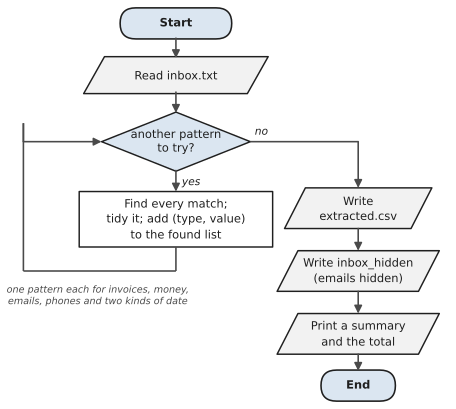
Let’s give Rafi his Monday morning back. The tool reads a messy text file, perhaps an exported email thread, and pulls out invoice numbers, amounts, phone numbers, email addresses, and dates. It tidies each one into a standard format (every phone number written the same way, every date in YYYY-MM-DD), writes the results to a CSV file, and prints a summary. It can also produce a copy of the text with every email address hidden.
Figure 16.3 shows the plan. The tool tries each regular expression in turn on the whole text, collects every match, and only then writes the results.
Here’s some practice text to work on. Save it as inbox.txt:
# inbox.txt - a messy email thread to practise on
From: Lin Chen <lin.chen@example.com>
Hi Rafi, I've paid INV-1042 ($880.00) on 2026-11-03.
Can you call me on 0412 345 678 if anything is missing?

From: Omar Haddad <OMAR@Example.org>
Re: inv-1043 - transferred $1,250.50 yesterday (04/11/2026).
My new mobile is +61 400 111 222, the old one 0433999888 is gone.

From: Priya Nair <priya.n@example.com.au>
Still checking INV-1044. Will pay $85.50 by 10/11/2026.
Office: (03) 9876 5432
And here’s the tool, text_extractor.py:
1# text_extractor.py - pull structured data out of messy text
2import csv
3import re
4import sys
5import textwrap
6from pathlib import Path
7
8HERE = Path(__file__).parent
9
10INVOICE = re.compile(r"\bINV-(\d+)\b", re.IGNORECASE)
11MONEY = re.compile(r"\$(\d{1,3}(?:,\d{3})*(?:\.\d{2})?)")
12EMAIL = re.compile(r"[\w.+-]+@[\w-]+(?:\.[\w-]+)+")
13ISO_DATE = re.compile(r"\b(\d{4})-(\d{2})-(\d{2})\b")
14AU_DATE = re.compile(r"\b(\d{1,2})/(\d{1,2})/(\d{4})\b")
15PHONE = re.compile(r"""
16    (?:\+61\s?|0)4\d{2}\s?\d{3}\s?\d{3}     # mobiles
17  | \(0[2378]\)\s?\d{4}\s?\d{4}             # landlines like (03)
18""", re.VERBOSE)
19
20
21def tidy_phone(raw):
22    """Write every phone number the same way."""
23    digits = re.sub(r"\D", "", raw)          # keep digits only
24    if digits.startswith("61"):
25        digits = "0" + digits[2:]
26    if digits.startswith("04"):
27        return f"{digits[:4]} {digits[4:7]} {digits[7:]}"
28    return f"({digits[:2]}) {digits[2:6]} {digits[6:]}"
29
30
31def find_everything(text):
32    found = []
33    for m in INVOICE.finditer(text):
34        found.append(("invoice", f"INV-{m.group(1)}"))
35    for m in MONEY.finditer(text):
36        amount = float(m.group(1).replace(",", ""))
37        found.append(("amount", f"{amount:.2f}"))
38    for m in EMAIL.finditer(text):
39        found.append(("email", m.group().lower()))
40    for m in PHONE.finditer(text):
41        found.append(("phone", tidy_phone(m.group())))
42    for m in ISO_DATE.finditer(text):
43        found.append(("date", m.group()))
44    for m in AU_DATE.finditer(text):
45        day, month, year = m.groups()
46        iso = f"{year}-{int(month):02d}-{int(day):02d}"
47        found.append(("date", iso))
48    return found
49
50
51def hide_emails(text):
52    return EMAIL.sub(lambda m: m.group()[0] + "***@hidden", text)
53
54
55def main():
56    if len(sys.argv) > 1:
57        source = Path(sys.argv[1])
58    else:
59        source = HERE / "inbox.txt"
60    text = source.read_text(encoding="utf-8")
61    found = find_everything(text)
62
63    with open(HERE / "extracted.csv", "w", newline="",
64              encoding="utf-8") as file:
65        writer = csv.writer(file)
66        writer.writerow(["type", "value"])
67        writer.writerows(found)
68
69    (HERE / "inbox_hidden.txt").write_text(hide_emails(text),
70                                           encoding="utf-8")
71
72    for kind in ("invoice", "amount", "email", "phone", "date"):
73        values = [v for k, v in found if k == kind]
74        line = f"{kind + 's':<9} {len(values)}: "
75        line += ", ".join(values)
76        print(textwrap.fill(line, width=62,
77                            subsequent_indent=" " * 13))
78    total = sum(float(v) for k, v in found if k == "amount")
79    print(f"\nTotal of all amounts: ${total:,.2f}")
80    print(f"{len(found)} items saved to extracted.csv")
81
82
83if __name__ == "__main__":
84    main()
Every pattern is compiled once, at the top, with a name that says what it’s for. MONEY handles thousands separators with (?:,\d{3})*, which means “a comma and three digits, any number of times.” INVOICE uses re.IGNORECASE, so Omar’s lowercase inv-1043 still counts. PHONE uses verbose mode and | to accept either a mobile or a landline.
The summary uses textwrap.fill(), from another small standard module, to wrap long lines neatly instead of letting them run off the edge of the screen.
tidy_phone() shows a lovely trick: re.sub(r"\D", "", raw). Capital \D means “anything that isn’t a digit,” so replacing all of them with nothing leaves only the digits. From there, it’s ordinary string slicing to put the spaces back in the same places every time. The two date patterns end up in the same format too, with int(month):02d padding a single-digit month like 4 to 04.
Run it:
invoices  3: INV-1042, INV-1043, INV-1044
amounts   3: 880.00, 1250.50, 85.50
emails    3: lin.chen@example.com, omar@example.org,
             priya.n@example.com.au
phones    4: 0412 345 678, 0400 111 222, 0433 999 888, (03)
             9876 5432
dates     3: 2026-11-03, 2026-11-04, 2026-11-10

Total of all amounts: $2,216.00
16 items saved to extracted.csv
Now do the thing that separates careful programmers from hopeful ones: check the output against the input, by eye. Everything is there. Omar’s shouty OMAR@Example.org has been lowercased, his inv-1043 was caught despite the small letters, and both date formats have come out the same way. But look at the phone numbers. The tool dutifully found 0433 999 888, the number Omar said was gone. Of course it did. A regular expression finds text with the right shape; it has no idea what the sentence around it means. That’s not a bug you can fix with a cleverer pattern. It’s a reminder that pattern matching does the tedious searching, and a human still has to read the results with some sense.
Open extracted.csv in a spreadsheet, and Rafi’s Monday morning job is done. Open inbox_hidden.txt, and you’ll see every email address replaced with something like l***@hidden, safe to share with someone who doesn’t need the customers’ details.
Some ways to take it further:
- Add a pattern for web addresses that start with
http://orhttps://, and save them in the CSV too. - Make the tool read every
.txtfile in a folder instead of a single inbox, with the file name added as a column. - Add a
--hide-phonesoption that replaces all but the last three digits of each phone number with*.
Regular expressions are one of those tools that quietly turn up everywhere once you know them: in your editor’s search box, in spreadsheet functions, in log-searching tools, and in nearly every programming language, using almost exactly the same syntax you’ve learned here. In the next chapter they’ll earn their keep straight away, because the text you pull out of PDFs and Word documents is often a jumble, and patterns are how you find the parts you need in it.
#On the Job
How it shows up at work: Text is everywhere at work, and most of it was never meant to be read by a program: emails, support tickets, log files, scanned forms, exported chat messages. Regular expressions are how you pull the useful bits out of it. Developers use them to search logs (“every line with an error code starting with 5”), validate form input, and clean data. Analysts use them to pull reference numbers, dates and amounts out of free-text columns. Many tools that aren’t Python at all, from VS Code’s search box to Google Sheets’ REGEXMATCH, accept the same patterns.
What employers expect: Comfort with the everyday pieces: character classes, quantifiers, anchors, groups, and re.search, re.findall, re.sub and re.fullmatch. Raw strings, always. Equally important is knowing the limits: a regular expression is the wrong tool for parsing HTML or fully validating email addresses, and a pattern nobody can read is a liability. Use re.VERBOSE and comments for anything longer than a line.
Interview questions you might meet:
- “Why do we write regular expressions as raw strings?” So that backslashes reach the regex engine untouched. Without the
r, Python treats\bas a backspace character, and the pattern quietly matches nothing. - “What’s the difference between
re.match,re.searchandre.fullmatch?”matchonly looks at the start of the string,searchlooks anywhere, andfullmatchrequires the whole string to fit the pattern. Usefullmatchfor validation. - “What’s the difference between
.and.?“The first is greedy and grabs as much as it can; the second is lazy and grabs as little as possible. Exercise 16.11 shows why it matters. - “Write a pattern for a date like 2026-11-05.”
r"\d{4}-\d{2}-\d{2}", and then mention, unprompted, that it would also accept2026-99-99, so you’d check the values withdatetimeafterwards. That second sentence is what interviewers are hoping to hear.
Portfolio task: Push the text extractor with one of the extensions above, and include the sample inbox.txt (it’s made up, so it’s safe to share). In the README, list each pattern the tool uses with a one-line explanation in plain English. Being able to explain a regular expression in words is the clearest sign you actually understand it.
Professional habit: Test every pattern against examples that should match and examples that shouldn’t. Paste them into regex101.com, or keep a little list in your code. A pattern that matches everything you hoped for is only half-tested.
#Exercises
Solutions are in solutions/chapter_16 in the book’s GitHub repository. Most of these can be checked quickly on regex101.com before you write any Python.
Warm-up
Exercise 16.1. Use re.findall to pull every number out of the text "Order 12 shipped 3 boxes on day 45". Then change it so the numbers come back as integers.
Exercise 16.2. For each pattern, say in words what it matches, then test it: r"\d{3}", r"^Hi", r"cat|dog", r"colou?r", r"[A-Z][a-z]+".
Exercise 16.3. Check whether a string contains the word cat as a whole word, so that "the cat sat" matches but "concatenate" doesn’t.
Exercise 16.4. Use re.split to split "apples, pears;bananas , plums" into a clean list of four fruit names.
Practice
Exercise 16.5. Pull every hashtag out of a social media post, like "Loving #Python and #regex today! #learning". Return them without the #.
Exercise 16.6. Write is_valid_postcode(text) for four-digit Australian postcodes, using re.fullmatch. 3000 is valid; 300, 30000 and 3OOO (with letter Os) aren’t.
Exercise 16.7. Given a log file’s lines, print only those that contain an error code: the word ERROR followed by a space and three digits, like ERROR 503. Print each code and how many times it appeared.
Exercise 16.8. Use a group to pull the username and the domain out of each email address in a list, printing them like sara at example.com.
Exercise 16.9. Use re.sub with backreferences to turn dates like 05/11/2026 into 2026-11-05.
Exercise 16.10. Count the words in a paragraph properly. text.split() counts "end." and "end" as different words; re.findall(r"[a-z']+", text.lower()) doesn’t. Print the five most common words.
Challenge
Exercise 16.11. Greedy versus lazy. From the string '<b>bold</b> and <b>more</b>', extract the text inside each pair of <b> tags. Try r"<b>(.*)</b>" first and see what goes wrong, then fix it.
Exercise 16.12. Write a password checker using one regular expression per rule: at least 8 characters, at least one digit, at least one capital letter, and at least one symbol from !@#$%^&*. Report which rules a password fails.
Exercise 16.13. Write a re.VERBOSE pattern, with a comment on every line, that matches Australian mobile numbers in any of these forms: 0412 345 678, 0412345678, +61 412 345 678. Use named groups and print each number in the tidy form 0412 345 678.
Exercise 16.14. Write a function that masks credit-card-like numbers in text, so that Card 4111 1111 1111 1234 was charged becomes Card **** **** **** 1234 was charged. Use re.sub with a function as the replacement.