Picture a kitchen where everything lives in one huge drawer: the spoons, the pans, the birthday candles, the potato peeler, a phone charger nobody owns. It all works, technically. You just spend five minutes digging every time you want a teaspoon.
Programs end up like that drawer if you let them. The journal from Chapter 9 was about eighty lines long, and you probably found yourself scrolling up and down to find things. Real programs are thousands of lines. So programmers split their code into several files, each with its own job, and connect the files with import.
You’ve been using import since the early chapters, to bring in time, shutil and pathlib, without much explanation. This chapter fills that gap. You’ll see what import actually does and its different forms, write modules of your own, and finally find out what the odd line if __name__ == "__main__": is for. At the end, we’ll split the expense tracker into tidy files the way real projects are laid out.
#Why Python code is split into files
Every .py file is a module. That’s genuinely all the word means: a file of Python code that other code can use. Splitting a program into modules gets you three things.
First, you can find things. If the code that saves data is in storage.py, and saving breaks, you know which file to open. That’s a lot better than “it’s somewhere in this 900-line file.”
Second, you can reuse things. The ask_number function from Chapter 7 is handy in nearly every program you’ll write. Put it in a module, and any program can borrow it with one line. The alternative is copying it into every program, and then, when you find a bug in it, fixing the same bug in seven places.
Third, you can think about one thing at a time. When you’re working out how expenses get totalled, you don’t want the menu code in the way. A separate file per job keeps the rest out of sight.
Python itself is built this way. It comes with a huge standard library, hundreds of modules covering dates, files, maths, randomness, the internet, and much more, all installed with Python and waiting to be imported. When people say Python comes with “batteries included,” this is what they mean.
#import explained clearly
When Python meets an import line, it finds the named module, runs it from top to bottom once, and then gives you access to everything it defined. Here’s the simplest form, using the standard random module:
1import random
2
3roll = random.randint(1, 6)
4print(f"You rolled a {roll}")
5
6colours = ["red", "green", "blue"]
7print(random.choice(colours))
After import random, you reach inside the module with a dot: random.randint, random.choice. Think of the module name as a surname. It tells everyone which family a function belongs to, which matters when two modules both have a function with the same name.
If you only need one or two things from a module, you can import them by name:
1from random import randint, choice
2
3print(randint(1, 6))
4print(choice(["heads", "tails"]))
Now you can use randint without the random. in front. It’s shorter, but you lose the surname, so for less familiar functions it can be harder to tell where they came from. A sensible middle ground: use plain import module by default, and from module import thing for a few well-known names you’ll use constantly, like Path from pathlib.
Sometimes module names are long, and you can give them a nickname with as:
1import datetime as dt
2
3print(dt.date.today())
You’ll see this a lot later with data libraries, where import pandas as pd is practically universal.
There’s one form you should avoid: from random import *, which imports everything in the module without a surname. It’s like tipping a stranger’s drawer into yours. You no longer know where anything came from, and names can silently overwrite each other.
#Writing your own modules
Here’s the part that surprises people: making your own module requires no special steps at all. Any .py file you write is already a module. To use it from another file, you just import it by its file name, without the .py.
Let’s try it. Create a file called helpers.py:
1# helpers.py
2def ask_number(prompt):
3    """Keep asking until the user types a valid number."""
4    while True:
5        try:
6            return float(input(prompt))
7        except ValueError:
8            print("  That's not a number. Try again.")
9
10
11def format_money(amount):
12    return f"${amount:,.2f}"
Then, in the same folder, create shop.py:
1# shop.py
2import helpers
3
4price = helpers.ask_number("Price: $")
5quantity = helpers.ask_number("Quantity: ")
6print("Total:", helpers.format_money(price * quantity))
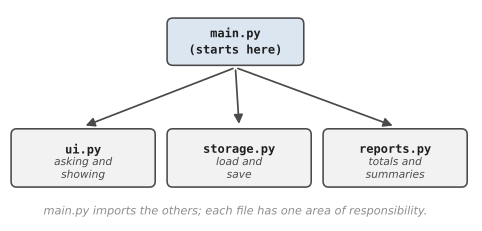
Run shop.py, and it works. Python looked for something called helpers, found helpers.py sitting next to shop.py, and gave you access to its functions. Figure 10.1 shows this relationship in a slightly bigger project, which we’ll build at the end of the chapter.
A couple of practical warnings. First, the files must be in the same folder (we’ll see other options later in the book). Second, never name your own file after a module you want to use. If you create a file called random.py and then write import random somewhere, Python finds your file first, and suddenly random.randint doesn’t exist. This trips up a surprising number of people. Jun, a first-year student, spent most of a Sunday evening on it. He’d saved his dice experiment as random.py, and from then on, every program in that folder that used import random failed with AttributeError: module 'random' has no attribute 'randint'. He reinstalled Python. He reinstalled VS Code. In the end he posted the error on his course forum, and a tutor replied within two minutes with one line: “What’s your file called?” If an import behaves bizarrely, check whether one of your files shares its name.
You might notice a folder called __pycache__ appear after you import your own module. That’s Python saving the translated bytecode we talked about in Chapter 1, so it doesn’t have to redo the work next time. It’s safe to ignore, and safe to delete. Python will just make it again.
__name__ == "__main__"
Remember that importing a module runs it, top to bottom. That causes a problem. Suppose helpers.py had a little test at the bottom, to check its functions work:
1# at the bottom of helpers.py
2print(format_money(1234.5))
That’s handy when you run helpers.py on its own. But now, every time shop.py imports helpers, that test runs too, and $1,234.50 appears in the middle of your shop program for no apparent reason.
What we need is a way for a file to know whether it’s being run directly or imported by something else. Python provides exactly that. Every module has a built-in variable called __name__. When you run a file directly, Python sets its __name__ to the special string "__main__". When a file is imported, its __name__ is set to its own module name instead, like "helpers".
So you can write:
1# at the bottom of helpers.py
2if __name__ == "__main__":
3    print(format_money(1234.5))
4    print(format_money(0.5))
Read it as: “only do this if I’m the file that was actually run.” Run helpers.py directly and you’ll see the test output. Import it from shop.py and the test stays silent. It’s like a shop with a “staff only” door: the code behind it only runs when the module is in charge.
You’ll see this line at the bottom of a huge amount of Python code. It usually guards a function called main(), which holds the program’s starting point:
1def main():
2    print("The program starts here.")
3
4
5if __name__ == "__main__":
6    main()
This pattern keeps every file importable. Even your main program can be imported by another file later, perhaps a test, without immediately starting itself up. It’s a small habit that pays off over and over.
#Real-world project structure
Once a project has more than one file, it deserves its own folder. There’s no single official layout, but small Python projects tend to look something like Figure 10.2.
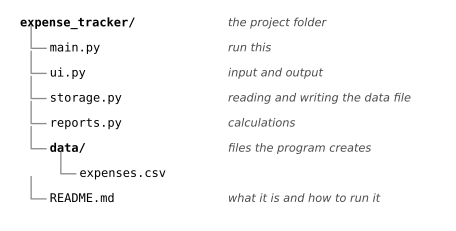
A few conventions are worth adopting. There’s one obvious file to run, often called main.py. Each other module is named after its job, in lowercase with underscores. Data the program creates lives in its own folder, separate from the code. And there’s a README.md, a plain text file explaining what the project is and how to run it, because the first thing anyone (including future you) wants to know about a folder of code is “what is this, and how do I start it?”
When a project grows bigger, you can group related modules into a package, which is just a folder of modules. You import from it with a dot, like from reports import monthly. We won’t need packages yet, but you’ll meet one in the capstone project in Chapter 24.
The main thing is to split by responsibility. Ask, for each piece of code: is this about talking to the user, about storing data, or about working something out? Code that talks to the user goes in one module. Code that reads and writes files goes in another. Calculations go in a third. When those three concerns stay separate, you can change how your program looks without touching how it saves data, and vice versa.
#Project: Small Multi-File Python Project
Time to grow up the expense tracker from Chapter 6. This version will be split into four modules, and it will finally save expenses to a file, so they’re still there tomorrow. Make a folder called expense_tracker, and create these files inside it.
First, ui.py, which handles everything to do with talking to the user:
1# ui.py - asking questions and showing results
2
3def ask_number(prompt):
4    while True:
5        try:
6            return float(input(prompt))
7        except ValueError:
8            print("  Please type a number.")
9
10
11def ask_text(prompt):
12    while True:
13        text = input(prompt).strip()
14        if text:
15            return text
16        print("  This can't be empty.")
17
18
19def show_expenses(expenses):
20    if not expenses:
21        print("  No expenses yet.")
22    for i, e in enumerate(expenses, start=1):
23        print(f"  {i:>2}. {e['item']:<18} ${e['amount']:>8.2f}"
24              f"  {e['category']}")
25
26
27def show_totals(totals, grand_total):
28    for category, amount in sorted(totals.items()):
29        print(f"  {category:<14} ${amount:>8.2f}")
30    print(f"  {'TOTAL':<14} ${grand_total:>8.2f}")
Next, storage.py, the only module that knows about files:
1# storage.py - saving and loading expenses
2from pathlib import Path
3
4DATA_FILE = Path(__file__).parent / "data" / "expenses.csv"
5
6
7def load_expenses():
8    """Read expenses from the file (none yet if it's missing)."""
9    expenses = []
10    if not DATA_FILE.exists():
11        return expenses
12    with open(DATA_FILE, encoding="utf-8") as file:
13        for line in file:
14            if not line.strip():
15                continue
16            parts = line.rstrip("\n").split(",", 2)
17            amount, category, item = parts
18            expenses.append({"amount": float(amount),
19                             "category": category, "item": item})
20    return expenses
21
22
23def save_expenses(expenses):
24    """Write all expenses safely (temp file, then swap)."""
25    DATA_FILE.parent.mkdir(exist_ok=True)
26    lines = [f"{e['amount']},{e['category']},{e['item']}\n"
27             for e in expenses]
28    temp = DATA_FILE.with_suffix(".tmp")
29    temp.write_text("".join(lines), encoding="utf-8")
30    temp.replace(DATA_FILE)
Each expense becomes one line like 5.2,food,Flat white. The split(",", 2) splits on at most two commas, so if someone buys “Pens, blue,” the comma in the item name doesn’t break anything, because the item is always the last part. In Chapter 15 you’ll meet Python’s csv module, which handles files like this even more robustly.
Then reports.py, pure calculation, with a little self-test protected by the __main__ check:
1# reports.py - working things out (no input, no files)
2
3def totals_by_category(expenses):
4    totals = {}
5    for e in expenses:
6        totals[e["category"]] = totals.get(e["category"], 0)
7        totals[e["category"]] += e["amount"]
8    return totals
9
10
11def grand_total(expenses):
12    return sum(e["amount"] for e in expenses)
13
14
15def biggest(expenses):
16    """Return the largest expense, or None if there are none."""
17    if not expenses:
18        return None
19    return max(expenses, key=lambda e: e["amount"])
20
21
22if __name__ == "__main__":
23    sample = [
24        {"item": "Tea", "amount": 4.0, "category": "food"},
25        {"item": "Bus", "amount": 3.5, "category": "transport"},
26        {"item": "Cake", "amount": 6.0, "category": "food"},
27    ]
28    print(totals_by_category(sample))
29    print(grand_total(sample))
30    print(biggest(sample)["item"])
max(expenses, key=lambda e: e["amount"]) finds the expense with the largest amount. The key tells max what to compare: not the dictionaries themselves, but the amount inside each one.
Finally, main.py ties everything together:
1# main.py - run this file
2import reports
3import storage
4import ui
5
6
7def main():
8    expenses = storage.load_expenses()
9    print(f"Expense tracker. {len(expenses)} expense(s) loaded.")
10
11    while True:
12        print("\n1. Add  2. List  3. Totals  4. Biggest  q. Quit")
13        choice = input("> ").strip().lower()
14
15        if choice == "1":
16            expenses.append({
17                "item": ui.ask_text("Item: "),
18                "amount": ui.ask_number("Amount: $"),
19                "category": ui.ask_text("Category: ").lower(),
20            })
21            storage.save_expenses(expenses)
22            print("  Saved.")
23        elif choice == "2":
24            ui.show_expenses(expenses)
25        elif choice == "3":
26            ui.show_totals(reports.totals_by_category(expenses),
27                           reports.grand_total(expenses))
28        elif choice == "4":
29            top = reports.biggest(expenses)
30            if top:
31                print(f"  {top['item']}: ${top['amount']:.2f}")
32        elif choice == "q":
33            break
34
35
36if __name__ == "__main__":
37    main()
Look at how readable main.py is. It doesn’t know how files work or how totals are calculated. It just coordinates. Each line says what happens, and the modules handle how. Run python main.py (or python3 main.py) from inside the folder, add a couple of expenses, quit, and run it again:
Expense tracker. 2 expense(s) loaded.

1. Add  2. List  3. Totals  4. Biggest  q. Quit
> 2
   1. Flat white         $    5.20  food
   2. Myki top-up        $   20.00  transport

1. Add  2. List  3. Totals  4. Biggest  q. Quit
> 3
  food           $    5.20
  transport      $   20.00
  TOTAL          $   25.20
They’re back, loaded from data/expenses.csv. Now try running reports.py on its own and watch the self-test run. Then run main.py again, and notice the self-test doesn’t appear.
Here’s where the split really pays off. Try these:
- Add a “delete” option. You’ll only need to touch
main.pyand maybeui.py.storage.pyalready knows how to save whatever list it’s given. - Add a
monthly_averagefunction toreports.py. No other file needs to know how it works. - Write a second tiny program,
quick_add.py, that importsstorageand adds one expense without the menu. Same data file, two programs.
That’s the end of Part 3. Your code is now organised into functions, protected against bad input, able to remember things in files, and split into sensible modules. These are the habits that separate scripts that work once from programs that keep working. In Part 4, we’ll learn one more way of organising code, the one that most large programs are built around: classes and objects.
#On the Job
How it shows up at work: No professional project lives in one file. On your first day, you’ll be given a folder with dozens or hundreds of modules, and much of the early learning is simply finding your way around: which file talks to the database, which one holds the calculations, where the program starts. Imports are the map. Reading the import lines at the top of a file tells you what it depends on before you’ve read a line of its logic.
What employers expect: Split code by responsibility, name modules after their jobs, and guard the starting point with if __name__ == "__main__":. Know the standard library well enough to reach for it before writing something yourself: random, math, datetime, pathlib, shutil and collections cover a surprising amount of everyday work. Be able to write a clear README.md that says what a project does and how to run it.
Interview questions you might meet:
- “What does
if __name__ == "__main__":do?” It runs the code beneath it only when the file is run directly, not when it’s imported. That keeps every module safe to import. - “What’s the difference between
import mathandfrom math import sqrt?” The first gives you the module, so you writemath.sqrt. The second brings in just that name. Both run the whole module once. - “Why might
import randomfail with an AttributeError?” There’s probably a file calledrandom.pyin your own folder. Jun’s evening is a story worth telling here; interviewers like candidates who’ve been stuck and got unstuck. - “What’s in the standard library that you’ve used?” Name three modules and one thing you did with each.
Portfolio task: Push the multi-file expense tracker, with a proper README that explains each module in one line and shows how to run main.py. A clear README on a small project impresses reviewers more than a big project with none.
Professional habit: Before writing a helper function, spend two minutes checking whether the standard library already has it. Searching “python standard library” plus what you need usually answers the question. Code you didn’t write is code you don’t have to fix.
#Exercises
Solutions are in solutions/chapter_10 in the book’s GitHub repository. Exercises that use your own modules have the module file in the same folder.
Warm-up
Exercise 10.1. Use the math module to print the square root of 144, the value of pi to four decimal places, and 7.2 rounded up to the next whole number (look for math.ceil).
Exercise 10.2. Use random to simulate rolling two dice, and print both values and their total.
Exercise 10.3. Rewrite this using from ... import ... so that it doesn’t need the module name in front of each function. Which version do you find easier to read?
1import random
2print(random.choice(["tea", "coffee", "juice"]))
3print(random.randint(1, 100))
Exercise 10.4. Use the datetime module to print today’s date, and the date 30 days from now. (from datetime import date, timedelta will help; date.today() + timedelta(days=30) does the sum.)
Practice
Exercise 10.5. Create a module called textutils.py with two functions, shout(text) and whisper(text), that return the text in capitals with ! on the end, and in lower case with ... on the end. Use them from a second file.
Exercise 10.6. Add a test block to textutils.py, guarded by if __name__ == "__main__":, that prints a couple of examples. Check that the examples appear when you run textutils.py directly, but not when you run the file that imports it.
Exercise 10.7. Write a password generator. Use random.choice with the strings in the string module (string.ascii_letters, string.digits) to make a 12-character password. Let the user choose the length.
Exercise 10.8. Simulate rolling one die 6,000 times and count how often each face comes up. Each should be roughly 1,000. Try collections.Counter, which counts things for you.
Exercise 10.9. Write a “random lunch picker” that chooses from a list of meals but never picks the same meal twice in a row over five days. (Hint: keep track of yesterday’s choice.)
Challenge
Exercise 10.10. Ask the user for their birthday as YYYY-MM-DD and print how many days old they are, and what day of the week they were born on. date.fromisoformat() turns the text into a date, and .strftime("%A") gives the day name.
Exercise 10.11. Build a tiny three-module quiz. questions.py holds a list of question-and-answer dictionaries. scoring.py has a function that checks an answer (ignoring case and spaces) and one that turns a score into a grade. quiz.py imports both, shuffles the questions with random.shuffle, asks them, and prints the result.
Exercise 10.12. Jun’s bug, on purpose. In a new, empty folder, create a file called random.py containing just print("I am not the real random!"). Next to it, create dice.py with import random and print(random.randint(1, 6)). Run dice.py, read the error, then rename the first file and run it again. Write down in one sentence what happened. (Delete the folder afterwards.)